Get Fabric or SQL Certified for Free.
Get certified for free when you join Fabric Data Days 2026 and dive into Fabric, Power BI, SQL, AI, and other essential data skills.
Join now- Power BI forums
- Get Help with Power BI
- Desktop
- Service
- Report Server
- Power Query
- Mobile Apps
- Developer
- DAX Commands and Tips
- Custom Visuals Development Discussion
- Health and Life Sciences
- Power BI Spanish forums
- Translated Spanish Desktop
- Training and Consulting
- Instructor Led Training
- Dashboard in a Day for Women, by Women
- Galleries
- Data Stories Gallery
- Themes Gallery
- Contests Gallery
- QuickViz Gallery
- Quick Measures Gallery
- Visual Calculations Gallery
- Fabric Apps Gallery
- Notebook Gallery
- Translytical Task Flow Gallery
- TMDL Gallery
- R Script Showcase
- Webinars and Video Gallery
- Ideas
- Custom Visuals Ideas (read-only)
- Issues
- Issues
- Events
- Upcoming Events
July 28 - August 9 | Final Round of the Power BI Dataviz World Championships. This is your chance. Learn more
- Power BI forums
- Forums
- Get Help with Power BI
- Desktop
- Re: DirectQuery with Gateway using SQLServer
- Subscribe to RSS Feed
- Mark Topic as New
- Mark Topic as Read
- Float this Topic for Current User
- Bookmark
- Subscribe
- Printer Friendly Page

- Mark as New
- Bookmark
- Subscribe
- Mute
- Subscribe to RSS Feed
- Permalink
- Report Inappropriate Content
DirectQuery with Gateway using SQLServer
Hi, I've problems to show data using DirectQuery, when I publish dashobard.
I installed the gateway on my server where is present an instance of SQLServer database, same instance used to design the dashboard with poweBi desktop. When I publish the dashbaord, it's doesn't work. I've other dashsbords that are working, but withoug using directquery.
Datasource on gateway is right configured, and server name and database is the same used when I designed dashboard. Looking log of gateway it show follow message:


- Mark as New
- Bookmark
- Subscribe
- Mute
- Subscribe to RSS Feed
- Permalink
- Report Inappropriate Content
change the cache settings of the browser where you display the dashboard.
- Mark as New
- Bookmark
- Subscribe
- Mute
- Subscribe to RSS Feed
- Permalink
- Report Inappropriate Content
ok I disabled cache of browser, we'll see next update
- Mark as New
- Bookmark
- Subscribe
- Mute
- Subscribe to RSS Feed
- Permalink
- Report Inappropriate Content
same problem, dataset is updated and charts still old data. I need to refresh browser manully to see charts updated
- Mark as New
- Bookmark
- Subscribe
- Mute
- Subscribe to RSS Feed
- Permalink
- Report Inappropriate Content
That is working as designed. If you want the dashboard to update you need to refresh an import dataset, push data into a streaming dataset, use external tools like Display Monkey to refresh the screen for you, or wait for the standard refresh period.
- Mark as New
- Bookmark
- Subscribe
- Mute
- Subscribe to RSS Feed
- Permalink
- Report Inappropriate Content
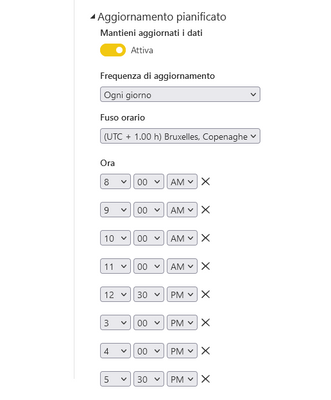
what i am trying to make you understand is that the dataset refresh is scheduled so i would expect the dashboard to refresh at the scheduled times, but that doesn't happen :

- Mark as New
- Bookmark
- Subscribe
- Mute
- Subscribe to RSS Feed
- Permalink
- Report Inappropriate Content
Hi @fala70,
Did lbendlin 's suggestions help with your scenario? if that is the case, you can consider Kudo or accept the helpful suggestion to help others who faced similar requirements to find it more quickly.
If these also not help, please share more detailed information to help us clarify your scenario to test.
How to Get Your Question Answered Quickly
Regards,
Xiaoxin Sheng
- Mark as New
- Bookmark
- Subscribe
- Mute
- Subscribe to RSS Feed
- Permalink
- Report Inappropriate Content
After you published the report you pin its pages or visuals to a new or existing dashboard
- Mark as New
- Bookmark
- Subscribe
- Mute
- Subscribe to RSS Feed
- Permalink
- Report Inappropriate Content
Well I did a test. After published report, I pinned it and I see the dashboard, but all charts are still statics. If I refresh broweser then charts are updated with new data.
- Mark as New
- Bookmark
- Subscribe
- Mute
- Subscribe to RSS Feed
- Permalink
- Report Inappropriate Content
That is a report. A dashboard is created on the Power BI service, made up of tiles which are sourced from report visuals or report pages. A dashboard is non-interactive (ish - you can hover but you cannot click. Well, you can click, but that takes you to the underlying report.)
Report = interactive, for end users to interact with
Dasboard = a page that is displayed on a hall monitor for example, updating automatically whenever the dataset changes. Not interactive.
- Mark as New
- Bookmark
- Subscribe
- Mute
- Subscribe to RSS Feed
- Permalink
- Report Inappropriate Content
Ok I need a dashboard without any interactive. I created this report with with PowerBi desktop and then I pubished it on PowerBi service, so it now should be a Dashboard ? Or what is the right method to create a Dashboard ?
- Mark as New
- Bookmark
- Subscribe
- Mute
- Subscribe to RSS Feed
- Permalink
- Report Inappropriate Content
no, that should not be necessary. Are you sure you are looking at a dashboard and not a report?
- Mark as New
- Bookmark
- Subscribe
- Mute
- Subscribe to RSS Feed
- Permalink
- Report Inappropriate Content
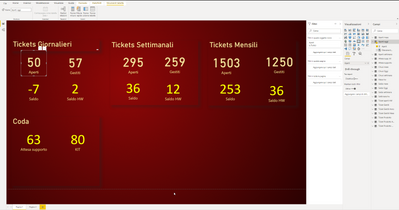
No, I am not sure. I honestly don't know the difference between report and dashboard. That is what I am doing:
- Mark as New
- Bookmark
- Subscribe
- Mute
- Subscribe to RSS Feed
- Permalink
- Report Inappropriate Content
No, that's not how it works. Dashboard contents will update whenever the underlying dataset is refreshed. That could be done with a schedule, ad-hoc API refreshes, or via a streaming dataset.
Direct Query is used for user interaction with reports, not for dashboards.
- Mark as New
- Bookmark
- Subscribe
- Mute
- Subscribe to RSS Feed
- Permalink
- Report Inappropriate Content
Well because then, on dashboard, where I am using normal import data (no direct query), I scheduled resfresh dataset, but to update charts, I need to run manually refresh browser ? charts are not update automatically.
- Mark as New
- Bookmark
- Subscribe
- Mute
- Subscribe to RSS Feed
- Permalink
- Report Inappropriate Content
First off - it is not advisable to install the gateway on a machine that is used for something else. The gateway cluster members should be independent and dedicated VMs with lots (LOTS) of cores and decent memory and disk size - IF you use the gateway for dataset mashups.
Direct Query means that the gateway "only" acts as a passthrough. In this case network performance becomes much more important on both the gateway and on the database server machine. In addition you need to make sure that your database server can actually handle the onslaught of the thousands of little queries. So better have your indexes and statistics in order etc.
Now to your question - Is the SQL server connection your only data source, or do you have other data sources in your direct query data model too?
- Mark as New
- Bookmark
- Subscribe
- Mute
- Subscribe to RSS Feed
- Permalink
- Report Inappropriate Content
My main goal is have a dashboard where data and charts are update automatically each hour. If I understood good, to have chart where are update automatically, without run refresh browser, is use directy query. No at the moment I've ony my data source with 2 dashbaord, one use directy query and other use import data.
If there are other modes to update charts automatically without refresh manually browser are welcome
Helpful resources

FabCon & SQLCon – Barcelona 2026
Join us in Barcelona for FabCon and SQLCon, the Fabric, Power BI, SQL, and AI community event. Save €200 with code FABCMTY200.

Fabric Community Sticker Challenge - Barcelona 2026
If you love stickers, then you will definitely want to check out our community sticker challenge, Barcelona edition!

Power BI Monthly Update - July 2026
Check out the July 2026 Power BI update to learn about new features.

Power BI DataViz World Championships - June 2026
A new Power BI DataViz World Championship is coming this June! Don't miss out on submitting your entry.

| User | Count |
|---|---|
| 30 | |
| 28 | |
| 22 | |
| 21 | |
| 19 |


| User | Count |
|---|---|
| 44 | |
| 32 | |
| 18 | |
| 17 | |
| 17 |


