Don't miss your chance to take the Fabric Data Engineer (DP-700) exam on us!
Learn moreWe've captured the moments from FabCon & SQLCon that everyone is talking about, and we are bringing them to the community, live and on-demand. Starts on April 14th. Register now
I'm using the DirectQuery-modus in Power BI Desktop to connect 2 AAS-models. These 2 models give me the necessary amount of information needed for a KPI-dashboard.
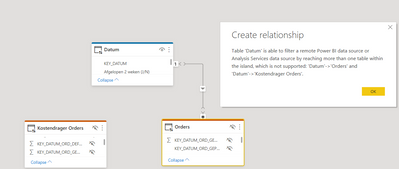
To connect these 2 models I tried to connect the fact-tables of model X to the (conformed) dimensions of model Y (for instance Dim Date). By doing this, I get the following message after relating the 2nd fact-table of model X to the Dim Date of model Y:
this is as expected - this is a current limitation.
Did anybody solved this issue?
HI @pieterf,
So you mean you want to direct link these two datasource which connect by dierctquery mode?
If that is the case, I'd like to suggest you reference another model table dimension to the current database, then you can create a bridge table from these two model dimension fields and use this table to rebuild relationships mapping on the power bi side.
Regards,
Xiaoxin Sheng
the error message indicates you have another relationship that allows for a ambiguous path in the your model.
If you have recently started exploring Fabric, we'd love to hear how it's going. Your feedback can help with product improvements.
A new Power BI DataViz World Championship is coming this June! Don't miss out on submitting your entry.
Share feedback directly with Fabric product managers, participate in targeted research studies and influence the Fabric roadmap.
| User | Count |
|---|---|
| 52 | |
| 38 | |
| 37 | |
| 19 | |
| 18 |
| User | Count |
|---|---|
| 66 | |
| 63 | |
| 34 | |
| 32 | |
| 21 |