cancel
Showing results for 
Search instead for 
Did you mean: 

We've captured the moments from FabCon & SQLCon that everyone is talking about, and we are bringing them to the community, live and on-demand. Starts on April 14th. Register now

Reply
kodemonki
New Member

DirectQuery for Oracle Datasource is Disabled

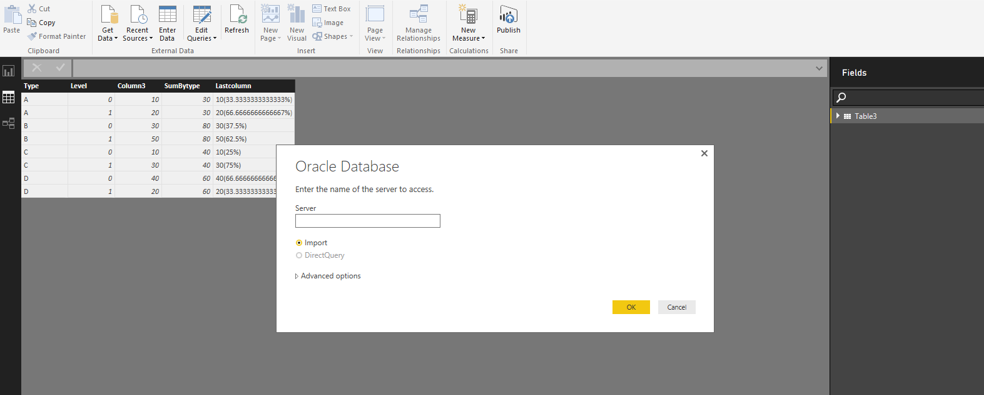
When I go to set up a new Oracle data source the DirectQuery option is disabled. How can I set up an Oracle database for DirectQuery? 

bi.JPG

2 ACCEPTED SOLUTIONS
Anonymous
Not applicable

Hi @kodemonki,

How do you connect to Oracle database in Power BI Desktop? If any connections of other data sources exist in Power BI Desktop or you connect to Oracle database via import option in current connection, when you connect to Oracle database again, the DirectQuery option is disabled as shown in the following screenshot.
Capture.PNG

Please start Power BI Desktop without any other connections and connect to Oracle as follows, this way, you are able to use the DirectQuery option.
Capture111.PNG

Thanks,
Lydia Zhang

View solution in original post

To remove a connection, go to File > Options and Settings > Data source settings. Click Global Permissions to see all of your saved connections. Select the one to remove and click Edit Permissions..., then Delete under the Credentials section. Click OK and the connection should be removed from the list.

View solution in original post

4 REPLIES 4
Anonymous
Not applicable

Hi @kodemonki,

How do you connect to Oracle database in Power BI Desktop? If any connections of other data sources exist in Power BI Desktop or you connect to Oracle database via import option in current connection, when you connect to Oracle database again, the DirectQuery option is disabled as shown in the following screenshot.
Capture.PNG

Please start Power BI Desktop without any other connections and connect to Oracle as follows, this way, you are able to use the DirectQuery option.
Capture111.PNG

Thanks,
Lydia Zhang

How do I remove/delete a connection? Whenever I restart Power BI the old connection shows. Should I just uninstall/reinstall? That seems unnecessary. 

To remove a connection, go to File > Options and Settings > Data source settings. Click Global Permissions to see all of your saved connections. Select the one to remove and click Edit Permissions..., then Delete under the Credentials section. Click OK and the connection should be removed from the list.

KGrice
Memorable Member
Memorable Member

Oracle is supported. Have you checked the limitations section in this article to make sure you aren't running into any of those?

Helpful resources

Announcements
New to Fabric survey Carousel

New to Fabric Survey

If you have recently started exploring Fabric, we'd love to hear how it's going. Your feedback can help with product improvements.

Power BI DataViz World Championships carousel

Power BI DataViz World Championships - June 2026

A new Power BI DataViz World Championship is coming this June! Don't miss out on submitting your entry.

Join our Fabric User Panel

Join our Fabric User Panel

Share feedback directly with Fabric product managers, participate in targeted research studies and influence the Fabric roadmap.

March Power BI Update Carousel

Power BI Community Update - March 2026

Check out the March 2026 Power BI update to learn about new features.