cancel
Showing results for 
Search instead for 
Did you mean: 

We've captured the moments from FabCon & SQLCon that everyone is talking about, and we are bringing them to the community, live and on-demand. Starts on April 14th. Register now

Reply
Barans
New Member

Direct Querying Issues

Hi guys,

I have an issue with Direct Querying.  I open the query page and set it as direct, I get my desireded table happily but then I can not export anything to the main Power BI page, so that I can chart it or export it to excel.


I would like to know how this works and if anyone has any solution/suggestion.

All the best.

3 REPLIES 3
v-yulgu-msft
Microsoft Employee
Microsoft Employee

Hi @Barans,


What did you mean "can not export anything to the main Power BI page, so that I can chart it or export it to excel"? You have load data into Power BI desktop successfully, right? What is your data source? Do you mean you cannot add any data into visual? Please elaborate your problem with more detailed information.


Here is a document written about how to generate a basic report with the loaded data for your reference:

Getting started with Power BI Desktop


Best regards,
Yuliana Gu

Community Support Team _ Yuliana Gu
If this post helps, then please consider Accept it as the solution to help the other members find it more quickly.

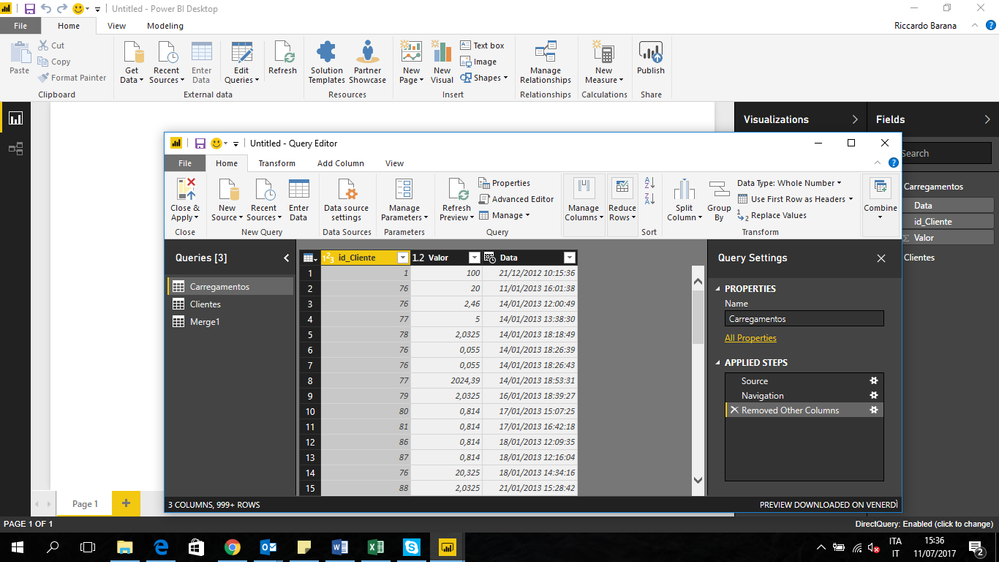
Thank you for the reply. I attahced a description that could help to find a solution for me. 

I am in direct querying and my data source is Sql Server. What I do is the following:

- I connect to the server and select two tables.
- With direct querying I select just some rows of the two table and push "close and apply".

- I open a query window (push "edit query") and merge the two table with a left join. This is done in a new query.

- I push "close and apply".
- I get an errore saying that I can not mix direct querying and importing.

My goal is the following: open two table, selct the columns I want and join the two tables. Afterwards I would like to export to the main window (the one you see on the background in my screenshot) in order to chart it.

Thank you again. I hope you can help me. I am querying directly because otherwise is really slow.


Powe BI.png

Hi @Barans,


There exists some limitations in Direct Query mode. Merge is not a supported feature in Direct Query. In your scenario, you might need to create and store your expected table structure in SQL DB first. Then, you can directly connect to that table in Power BI desktop.


Regards,
Yuliana Gu

Community Support Team _ Yuliana Gu
If this post helps, then please consider Accept it as the solution to help the other members find it more quickly.

Helpful resources

Announcements
New to Fabric survey Carousel

New to Fabric Survey

If you have recently started exploring Fabric, we'd love to hear how it's going. Your feedback can help with product improvements.

Power BI DataViz World Championships carousel

Power BI DataViz World Championships - June 2026

A new Power BI DataViz World Championship is coming this June! Don't miss out on submitting your entry.

Join our Fabric User Panel

Join our Fabric User Panel

Share feedback directly with Fabric product managers, participate in targeted research studies and influence the Fabric roadmap.

March Power BI Update Carousel

Power BI Community Update - March 2026

Check out the March 2026 Power BI update to learn about new features.