cancel
Showing results for 
Search instead for 
Did you mean: 

The Power BI Data Visualization World Championships is back! It's time to submit your entry. Live now!

Reply
sonocapace
Frequent Visitor

Direct Query SQL Server Security

I've created an on-premises gateway using my Windows credentials. I've created several Power BI reports which pull directly from SQL Server views. The views rely on SQL functions to expose only the data to which a specific logged in user is mapped in the SQL database. These views work perfectly when used as data connections in Excel, but when a user tries to refresh the reports in Power BI online they see only the data to which I myself (the report creator) am mapped. Any suggestions?

1 ACCEPTED SOLUTION
v-qiuyu-msft
Community Support
Community Support

Hi @sonocapace,


In Power BI data gateway SQL Server data source, all queries to the data source will run using these credentials entered when creating the data source. So when users access the report, those credential are passed to SQL function on SQL side to limit the specific data.


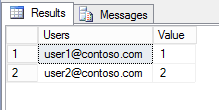
In your scenario, I would suggest you use Row Level Security feature to limit user specific data. you can connect to the SQL Server tables instead of views, which has one column contains different user's User Principal Name (UPN). For example, user1@contoso.microsoft.com.


q6.PNG


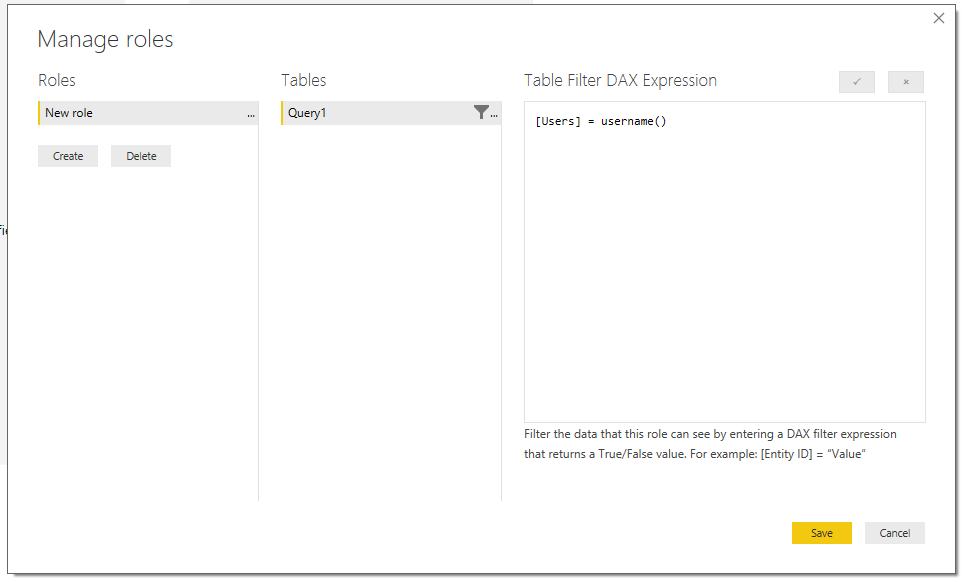
In desktop, create a role use Username() via Manage Roles like below:


q5.PNG


After publish the report to service, go to dataset security, add users under this role. For detail information, please refer to this article: Row-level security (RLS) with Power BI.


Best Regards,
Qiuyun Yu


Community Support Team _ Qiuyun Yu
If this post helps, then please consider Accept it as the solution to help the other members find it more quickly.

View solution in original post

1 REPLY 1
v-qiuyu-msft
Community Support
Community Support

Hi @sonocapace,


In Power BI data gateway SQL Server data source, all queries to the data source will run using these credentials entered when creating the data source. So when users access the report, those credential are passed to SQL function on SQL side to limit the specific data.


In your scenario, I would suggest you use Row Level Security feature to limit user specific data. you can connect to the SQL Server tables instead of views, which has one column contains different user's User Principal Name (UPN). For example, user1@contoso.microsoft.com.


q6.PNG


In desktop, create a role use Username() via Manage Roles like below:


q5.PNG


After publish the report to service, go to dataset security, add users under this role. For detail information, please refer to this article: Row-level security (RLS) with Power BI.


Best Regards,
Qiuyun Yu


Community Support Team _ Qiuyun Yu
If this post helps, then please consider Accept it as the solution to help the other members find it more quickly.

Helpful resources

Announcements
Power BI DataViz World Championships

Power BI Dataviz World Championships

The Power BI Data Visualization World Championships is back! It's time to submit your entry.

December 2025 Power BI Update Carousel

Power BI Monthly Update - December 2025

Check out the December 2025 Power BI Holiday Recap!

FabCon Atlanta 2026 carousel

FabCon Atlanta 2026

Join us at FabCon Atlanta, March 16-20, for the ultimate Fabric, Power BI, AI and SQL community-led event. Save $200 with code FABCOMM.