We've captured the moments from FabCon & SQLCon that everyone is talking about, and we are bringing them to the community, live and on-demand. Starts on April 14th. Register now
I’m currently using direct query to bring my dataset in powerbi.
I’m trying to create a measure in DAX such that the calculation is always done at a summarized view of the customer product level given a date context.
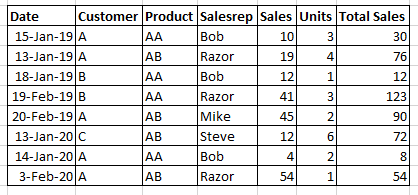
Here is an example. I have a sales table as noted below
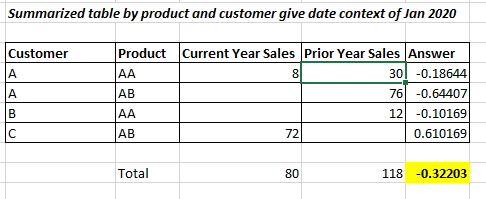
If the user selects year 2020 and month 1, it computes the answer which is the sum of the (change in sales at a customer product level / Total prior year Sales). Hence regardless of any dimension attributes or selecting sales rep, this sum is always computed at the customer product level. In the case below the answer is -0.32203.
Can some help with this? See sample dataset attached. I believe the summarize dax function is not compatible with direct query. Hence looking for some other suggestion on measures.
Excel File Sample Data (same as above sales dataset in case link does not work)
Solved! Go to Solution.
Hi,
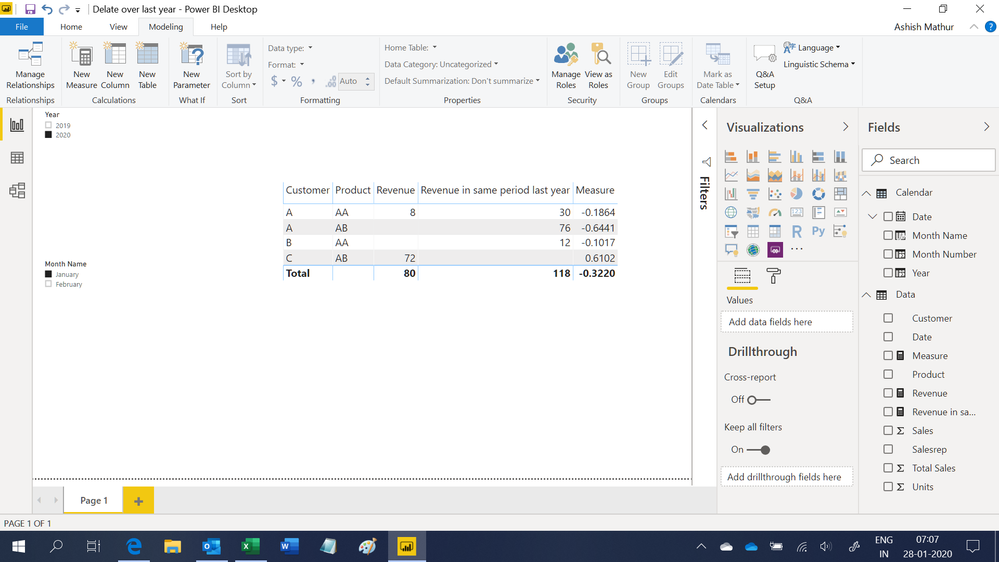
You may download my PBI file from here.
Hope this helps.
Hi,
You may download my PBI file from here.
Hope this helps.
If you have recently started exploring Fabric, we'd love to hear how it's going. Your feedback can help with product improvements.
A new Power BI DataViz World Championship is coming this June! Don't miss out on submitting your entry.
Share feedback directly with Fabric product managers, participate in targeted research studies and influence the Fabric roadmap.
| User | Count |
|---|---|
| 53 | |
| 38 | |
| 33 | |
| 17 | |
| 17 |
| User | Count |
|---|---|
| 67 | |
| 62 | |
| 38 | |
| 34 | |
| 22 |