This time we’re going bigger than ever. Fabric, Power BI, SQL, AI and more. We're covering it all. You won't want to miss it.
Learn moreDid you hear? There's a new SQL AI Developer certification (DP-800). Start preparing now and be one of the first to get certified. Register now
Hi everyone,
Due to the nature of my report, I need to use direct query.
I found out that there is limitations especially when it comes to DAX formula. I am trying to build up something using the calculate function but it won't work.
This is the formula I am trying to write:
Current Staff =
CALCULATE( COUNTROWS( 'Staff Population' ),
FILTER( VALUES( 'Staff Population'[Start Date] ), 'Staff Population'[Start Date] <= MAX( Dates[Date] ) ),
FILTER( VALUES( 'Staff Population'[End Date] ), OR( 'Staff Population'[End Date] >= MIN( Dates[Date] ), ISBLANK( 'Staff Population'[End Date] ) ) ) )
Any ideas on how I could go around this?
Thanks in advance.
Solved! Go to Solution.
Hi @corange ,
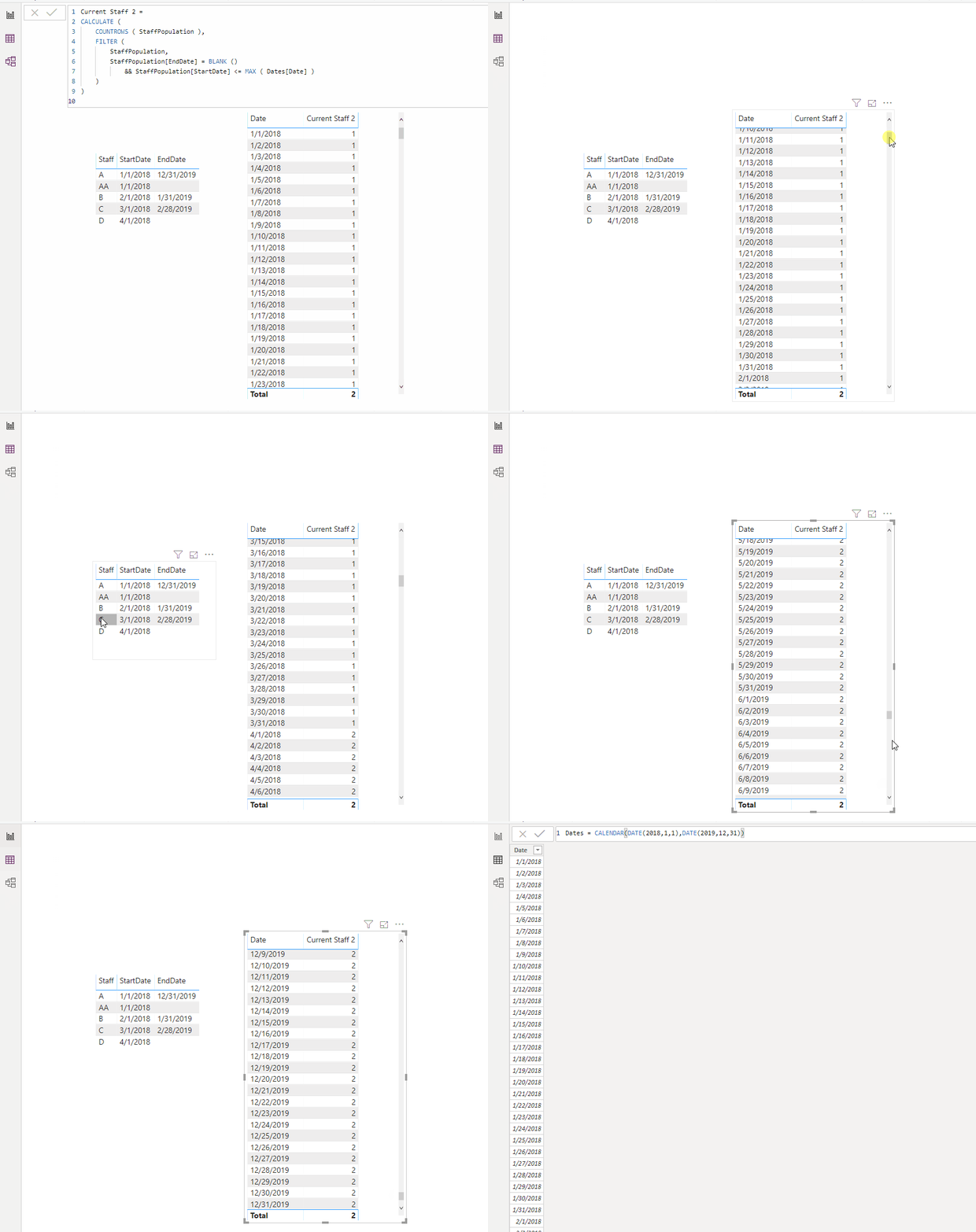
I create an example. Is this what you want?
Current Staff 2 =
CALCULATE (
COUNTROWS ( StaffPopulation ),
FILTER (
StaffPopulation,
StaffPopulation[EndDate] = BLANK ()
&& StaffPopulation[StartDate] <= MAX ( Dates[Date] )
)
)If not, please give me more details without sensitive information.
Best Regards,
Icey
If this post helps, then please consider Accept it as the solution to help the other members find it more quickly.
Hi @corange ,
I create an example. Is this what you want?
Current Staff 2 =
CALCULATE (
COUNTROWS ( StaffPopulation ),
FILTER (
StaffPopulation,
StaffPopulation[EndDate] = BLANK ()
&& StaffPopulation[StartDate] <= MAX ( Dates[Date] )
)
)If not, please give me more details without sensitive information.
Best Regards,
Icey
If this post helps, then please consider Accept it as the solution to help the other members find it more quickly.
Thank you so much for your help on this one!! It did work for me.
Check out the April 2026 Power BI update to learn about new features.
If you have recently started exploring Fabric, we'd love to hear how it's going. Your feedback can help with product improvements.
A new Power BI DataViz World Championship is coming this June! Don't miss out on submitting your entry.
| User | Count |
|---|---|
| 38 | |
| 38 | |
| 31 | |
| 22 | |
| 15 |
| User | Count |
|---|---|
| 74 | |
| 61 | |
| 31 | |
| 31 | |
| 23 |