cancel
Showing results for 
Search instead for 
Did you mean: 

The Power BI Data Visualization World Championships is back! Get ahead of the game and start preparing now! Learn more

Reply
IrsFreire
New Member

Dinamic change date in axis of a line chart

Hello all,


I'm trying to dynamically change the axis data in a Line chart with a slicer.

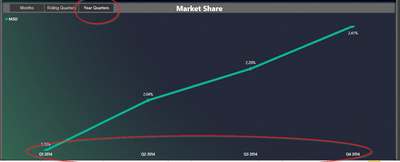
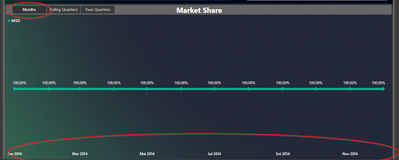
So, when I select Months, Year Quarter, or Rolling Quarter, it'll show the same data with another time dimension. Something like this

IrsFreire_1-1620633109547.png 

IrsFreire_2-1620633160806.png

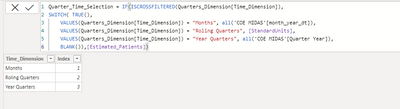
I have already created a table with the data i need

IrsFreire_3-1620633234040.png


But now what I have is this, but I'm stuck and can't make it work. The chart doesn't allow me to use this measure in Axis, and the measure is not working at all.


Any ideas?

1 ACCEPTED SOLUTION
v-yingjl
Community Support
Community Support

Hi @IrsFreire ,

You can refer this article about creating dynamic X-axis in power bi:

Dynamic dimensions in Power BI 

To achieve dynamic X-axis, you need to create a bridge table to crossjoin the dimension column and the Date column. Create a calculated table like this:

Bridge table = 
SUMMARIZE ( CROSSJOIN ( 'Table', 'Time_Dimension' ), [Date], [Time_Dimension] )

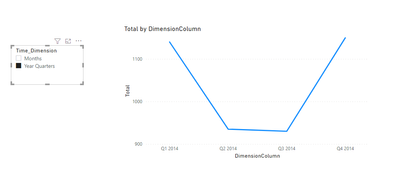
Follow the above article to create relationships between these tables and create a new calculated column based on this calculated table:

DimensionColumn = 
SWITCH (
    FIRSTNONBLANK ( 'Time_Dimension'[Time_Dimension], 1 ),
    "Months", RELATED ( 'Table'[Months] ),
    "Year Quarters", RELATED ( 'Table'[Year Quarters] )
)

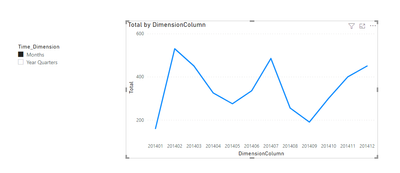
1.png2.png


Attached a sample file in the below, hopes it could help.


Best Regards,
Community Support Team _ Yingjie Li
If this post helps, then please consider Accept it as the solution to help the other members find it more quickly.


View solution in original post

3 REPLIES 3
v-yingjl
Community Support
Community Support

Hi @IrsFreire ,

You can refer this article about creating dynamic X-axis in power bi:

Dynamic dimensions in Power BI 

To achieve dynamic X-axis, you need to create a bridge table to crossjoin the dimension column and the Date column. Create a calculated table like this:

Bridge table = 
SUMMARIZE ( CROSSJOIN ( 'Table', 'Time_Dimension' ), [Date], [Time_Dimension] )

Follow the above article to create relationships between these tables and create a new calculated column based on this calculated table:

DimensionColumn = 
SWITCH (
    FIRSTNONBLANK ( 'Time_Dimension'[Time_Dimension], 1 ),
    "Months", RELATED ( 'Table'[Months] ),
    "Year Quarters", RELATED ( 'Table'[Year Quarters] )
)

1.png2.png


Attached a sample file in the below, hopes it could help.


Best Regards,
Community Support Team _ Yingjie Li
If this post helps, then please consider Accept it as the solution to help the other members find it more quickly.


Hello @v-yingjl
Thanks for the solution. Have already accepted as the solution, but now if you can, the other problem is to create the rolling quarters 😅 Month and Quarter working fine.
But I need another dimension to return the accumulate of every 3 months, ending on the lastest data. So, i´ll not be the year quarter.
If the latest data is February, I need:
1. Dec, Jan, Feb
2. Sep, Oct, Nov
3. Jun, Jul, Aug
4. So on and so forth

amitchandak
Super User
Super User

@IrsFreire ,Dynamically change chart axis in Power BI , first option is bookmark -https://radacad.com/bookmarks-and-buttons-making-power-bi-charts-even-more-interactive


Other is unpivot table
https://www.youtube.com/watch?v=6jeSIRpjv0M


With direct query
https://datamonkeysite.com/2020/10/22/change-dimension-dynamically-using-parameter-in-powerbi/

Share with Power BI Enthusiasts: Full Power BI Video (20 Hours) YouTube
Microsoft Fabric Series 60+ Videos YouTube
Microsoft Fabric Hindi End to End YouTube

Helpful resources

Announcements
Power BI DataViz World Championships

Power BI Dataviz World Championships

The Power BI Data Visualization World Championships is back! Get ahead of the game and start preparing now!

November Power BI Update Carousel

Power BI Monthly Update - November 2025

Check out the November 2025 Power BI update to learn about new features.

FabCon Atlanta 2026 carousel

FabCon Atlanta 2026

Join us at FabCon Atlanta, March 16-20, for the ultimate Fabric, Power BI, AI and SQL community-led event. Save $200 with code FABCOMM.