This time we’re going bigger than ever. Fabric, Power BI, SQL, AI and more. We're covering it all. You won't want to miss it.
Learn moreLevel up your Power BI skills this month - build one visual each week and tell better stories with data! Get started
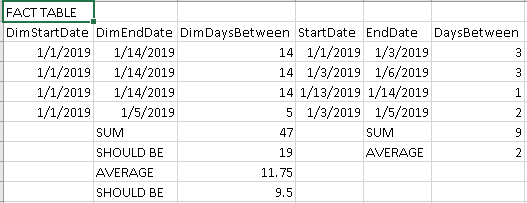
We have dates at the dimension level as well as the fact. Above the Dim dates should only calculate the unique start/end. Is there a way to do this with calculate or other function ? I thought about storing the dates in both dimension and fact then calculating DimDaysBetween then hding the dates in the dimension. It would be ideal to have all the dates in the fact table to avoid multiple calendars.
Solved! Go to Solution.
Read up on related vs relatedtable.
https://business-insights.net/2017/09/02/the-magic-of-related-relatedtable-functions-in-dax/
Since I want to go from the fact to the dimension, I need to use RELATEDTABLE
Next step is to aggregage SLA over the context.
Read up on related vs relatedtable.
https://business-insights.net/2017/09/02/the-magic-of-related-relatedtable-functions-in-dax/
Since I want to go from the fact to the dimension, I need to use RELATEDTABLE
Next step is to aggregage SLA over the context.
Hi
I have done something similar in another context, but maybe you can use it here.
avg = AVERAGEX( SUMMARIZE(FactTable, FactTable[DimStartDate], FactTable[DimEndDate], FactTable[DimDaysBetween]), FactTable[DimDaysBetween]) sum= SUMX( SUMMARIZE(FactTable, FactTable[DimStartDate], FactTable[DimEndDate], FactTable[DimDaysBetween]), FactTable[DimDaysBetween])
If it works then please mark it as the solution.
Check out the April 2026 Power BI update to learn about new features.
Sign up to receive a private message when registration opens and key events begin.
If you have recently started exploring Fabric, we'd love to hear how it's going. Your feedback can help with product improvements.
| User | Count |
|---|---|
| 36 | |
| 29 | |
| 29 | |
| 21 | |
| 18 |
| User | Count |
|---|---|
| 71 | |
| 43 | |
| 33 | |
| 24 | |
| 23 |