Join us in Barcelona for FabCon and SQLCon, September 28 - October 1, 2026.
This is best Fabric, Power BI, SQL and AI community event. How do we know? The last event sold out! Save €200 with code FABCMTY200.
Register now- Power BI forums
- Get Help with Power BI
- Desktop
- Service
- Report Server
- Power Query
- Mobile Apps
- Developer
- DAX Commands and Tips
- Custom Visuals Development Discussion
- Health and Life Sciences
- Power BI Spanish forums
- Translated Spanish Desktop
- Training and Consulting
- Instructor Led Training
- Dashboard in a Day for Women, by Women
- Galleries
- Data Stories Gallery
- Themes Gallery
- Contests Gallery
- QuickViz Gallery
- Quick Measures Gallery
- Visual Calculations Gallery
- Fabric Apps Gallery
- Notebook Gallery
- Translytical Task Flow Gallery
- TMDL Gallery
- R Script Showcase
- Webinars and Video Gallery
- Ideas
- Custom Visuals Ideas (read-only)
- Issues
- Issues
- Events
- Upcoming Events
July 28 - August 9 | Final Round of the Power BI Dataviz World Championships. This is your chance. Learn more
- Power BI forums
- Forums
- Get Help with Power BI
- Desktop
- Re: Dimension Relationship Problem
- Subscribe to RSS Feed
- Mark Topic as New
- Mark Topic as Read
- Float this Topic for Current User
- Bookmark
- Subscribe
- Printer Friendly Page

- Mark as New
- Bookmark
- Subscribe
- Mute
- Subscribe to RSS Feed
- Permalink
- Report Inappropriate Content
Dimension Relationship Problem
I have a model like below.
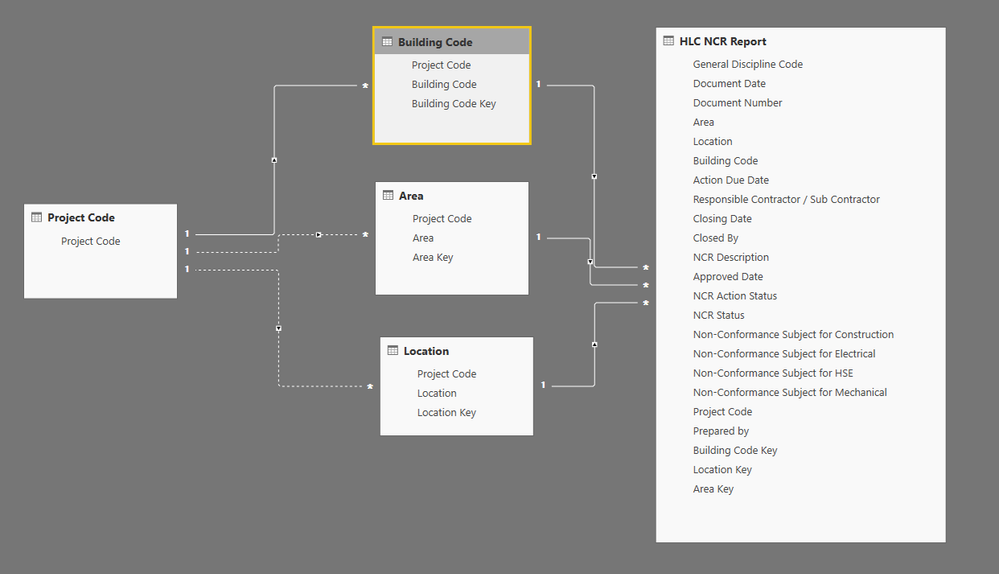
Dimensions:
- Project Code
- Building Code
- Area
- Location
Fact:
- HLC NCR Report
Building Code, Area and Location has no relation between them. They only have a common column which is Project Code.
I need a model that, Project Code filter all other dimensions (Building Code, Location and Area). Because first I need to see the dimensions related to that Project Code.
And after that, Building Code, Location and Area filters the fact table (HLC NCR Report). I also want to see the dimension that has no record on the fact table. Even its value shows zero. Thats why I can’t use both sided relation (Even I have Project Code field on fact).
How can I activate the relationship between Project Code and others. How can I build the model?
Solved! Go to Solution.


- Mark as New
- Bookmark
- Subscribe
- Mute
- Subscribe to RSS Feed
- Permalink
- Report Inappropriate Content
@Anonymous,
You may apply virtual relationship in DAX measure.
https://www.sqlbi.com/articles/physical-and-virtual-relationships-in-dax/
If this post helps, then please consider Accept it as the solution to help the other members find it more quickly.
- Mark as New
- Bookmark
- Subscribe
- Mute
- Subscribe to RSS Feed
- Permalink
- Report Inappropriate Content
@Anonymous,
You may apply virtual relationship in DAX measure.
https://www.sqlbi.com/articles/physical-and-virtual-relationships-in-dax/
If this post helps, then please consider Accept it as the solution to help the other members find it more quickly.


- Mark as New
- Bookmark
- Subscribe
- Mute
- Subscribe to RSS Feed
- Permalink
- Report Inappropriate Content
Hello @Anonymous,
as far as I see, you can link the project code dimension directly to the fact table, you do not need to traverse any of the three other dimensions. The relationship between 'Project Code' and and Area, Location, Building is already present in the fact table.
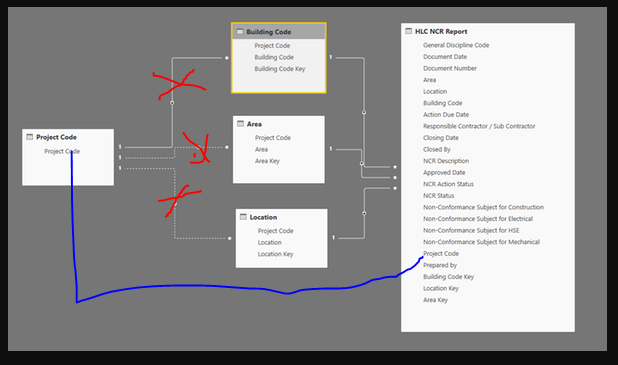
Also, are you sure that Building, Location and Area do not have a one to many relationship going from Building > Location > Area? Can a building really belong to multiple locations? Can a location really belong to multiple areas?
Did I answer your question correctly? Mark my answer as a solution!
Proud to be a Datanaut!
- Mark as New
- Bookmark
- Subscribe
- Mute
- Subscribe to RSS Feed
- Permalink
- Report Inappropriate Content
Hello @LivioLanzo;
Many thanks for your reply.
If I do what you suggested, I can not filter building, Area and Location related to that project code. For doing this, I have to build both sided relationship between Fact and (Location, area and building) as below. (Please correct me if I am wrong)

But I don't want this, because I want to see all Locations even if it has no value on the fact table.
And yes, I asked many times unfotunately building, location and area has no link. They named the data like this. But it has no common column except Project Code.
- Mark as New
- Bookmark
- Subscribe
- Mute
- Subscribe to RSS Feed
- Permalink
- Report Inappropriate Content
Hello @Anonymous!
if you get rid of the bi-directional filter (highly suggested) then the 'Project Code' dimension will filter the fact table but then the fact table does not filter the other three dimensions (giving you the effect that you want).
Also notice that there are columns in the fact table that you do not need anymore and can be removed to make your model lighter, for instance 'Area', 'Location', 'Building Code' are all attributes of the three dimensions so they can go and probably there're a few more like this
Did I answer your question correctly? Mark my answer as a solution!
Proud to be a Datanaut!
- Mark as New
- Bookmark
- Subscribe
- Mute
- Subscribe to RSS Feed
- Permalink
- Report Inappropriate Content
Thanks @LivioLanzo;
Yes I understand, I will clear the columns.
I don't want both sided becuse they want to see the zero values also. For example, All the Locations, that project A has. If I build a both sided relation to the fact, fact also filter the Location table. So I can not see the Location which havent got a value on the fact.
But they want to know all Locations, for asking why there is no transaction to this Location.
In this case, I tried many relationship scenarios, but I couldn't solve.
- Mark as New
- Bookmark
- Subscribe
- Mute
- Subscribe to RSS Feed
- Permalink
- Report Inappropriate Content
Hi @Anonymous,
try with the bi directional filter removed and also on your matrix you can enable 'Show items with no data'

Did I answer your question correctly? Mark my answer as a solution!
Proud to be a Datanaut!
- Mark as New
- Bookmark
- Subscribe
- Mute
- Subscribe to RSS Feed
- Permalink
- Report Inappropriate Content
Thats ok @LivioLanzo. But when I remove bidirectional Project Code can not filter Building, Location, Area Tables. How can we handle this?
- Mark as New
- Bookmark
- Subscribe
- Mute
- Subscribe to RSS Feed
- Permalink
- Report Inappropriate Content
@Anonymous
use CROSSFILTER: https://docs.microsoft.com/en-us/dax/crossfilter-function
Did I answer your question correctly? Mark my answer as a solution!
Proud to be a Datanaut!
Helpful resources

FabCon & SQLCon – Barcelona 2026
Join us in Barcelona for FabCon and SQLCon, the Fabric, Power BI, SQL, and AI community event. Save €200 with code FABCMTY200.

Power BI DataViz World Championships - June 2026
A new Power BI DataViz World Championship is coming this June! Don't miss out on submitting your entry.

| User | Count |
|---|---|
| 27 | |
| 22 | |
| 20 | |
| 18 | |
| 14 |


| User | Count |
|---|---|
| 25 | |
| 20 | |
| 20 | |
| 20 | |
| 20 |


