Hi, for the sake of this question I have a set of old products which are being migrated to new products. Each product has a set of attributes which I want to compare so that I know how many differences there are for each migration mapping.
Here is some data. The mapping table looks like this:
| Mapping ID | Category | Old Product ID | New Product ID |
| 1 | A | 1 | 11 |
| 2 | A | 2 | 11 |
| 3 | A | 3 | 12 |
| 4 | B | 1 | 21 |
| 5 | C | 2 | 22 |
| 6 | C | 3 | 23 |
The Product table looks like this:
| Product ID | Product Name | Attribute 1 | Attribute 2 | Attribute 3 |
| 1 | Name1 | S | 123 | TRUE |
| 2 | Name2 | M | 456 | FALSE |
| 3 | Name3 | L | 789 | TRUE |
| 11 | Name11 | XS | 234 | FALSE |
| 12 | Name12 | M | 345 | TRUE |
| 13 | Name13 | L | 456 | FALSE |
| 21 | Name21 | S | 678 | TRUE |
| 22 | Name22 | L | 456 | FALSE |
| 23 | Name23 | XL | 890 | TRUE |
I want to know the number of differences across all Attribute columns for the chosen 'Old' and 'New' products. Also, the number of Attribute columns may change.
So far I have separated the attribute fields into a separate table in Power BI so that the model looks like:
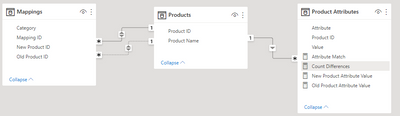
In my report I want to select a mapping from product X to product Y and show:
- A list of attributes and their values for both products
- Whether the attribute is the same for both products
- A count of how many differences there are between products
So the report looks something like below, except that the count of differences is not correct.
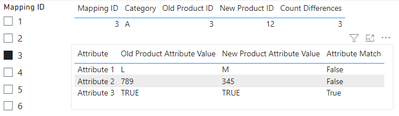
I have 4 measures:
- Old Product Attribute Value = SELECTEDVALUE('Product Attributes'[Value])
- New Product Attribute Value = CALCULATE(SELECTEDVALUE('Product Attributes'[Value]),USERELATIONSHIP(Mappings[New Product ID],Products[Product ID]))
- Attribute Match = IF([New Product Attribute Value] = [Old Product Attribute Value], TRUE())
- Count Differences = COUNTROWS(FILTER('Product Attributes',[Attribute Match] <> TRUE()))
Firstly, is it the best approach to seperate the attributes into another table or is there a better way to count differences across columns without unpivoting the product table?
Secondly, if splitting is a resonable approach then why is the 'Count Differences' measure not producing the value I expect to see?
Thanks in advance!


