Join us at FabCon Atlanta from March 16 - 20, 2026, for the ultimate Fabric, Power BI, AI and SQL community-led event. Save $200 with code FABCOMM.
Register now!The Power BI Data Visualization World Championships is back! Get ahead of the game and start preparing now! Learn more
Hello,
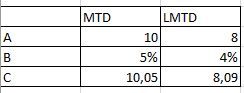
how can i get different row data type in a Matrix.
For example Measure MTD, row A = integer, B percentage and C = numeric with 2 decimals.
Thanks for your help
Solved! Go to Solution.
HI, @carloscabreraq
After my test, you could try this way as below:
Use FORMAT Function with IF/ SWITCH in your formula of measure.
For example:
Measure =
VAR _A =
CALCULATE ( SUM ( 'Table'[Qty] ), FILTER ( 'Table', 'Table'[Type] = "MTD" ) )
RETURN
IF (
SELECTEDVALUE ( 'Table'[ID] ) = "A",
FORMAT ( _A, "0" ),
IF (
SELECTEDVALUE ( 'Table'[ID] ) = "B",
FORMAT ( _A, "0.0%" ),
IF ( SELECTEDVALUE ( 'Table'[ID] ) = "C", FORMAT ( _A, "0.00" ) )
)
)
Measure 2 = VAR _A =
CALCULATE ( SUM ( 'Table'[Qty] ), FILTER ( 'Table', 'Table'[Type] = "LMTD" ) )
RETURN
IF (
SELECTEDVALUE ( 'Table'[ID] ) = "A",
FORMAT ( _A, "0" ),
IF (
SELECTEDVALUE ( 'Table'[ID] ) = "B",
FORMAT ( _A, "0%" ),
IF ( SELECTEDVALUE ( 'Table'[ID] ) = "C", FORMAT ( _A, "0.00" ) )
)
)
By the way, for B percentage, FORMAT ( _A, "0.0%" ) and FORMAT ( _A, "0%" ) is used for decimals.
Result:
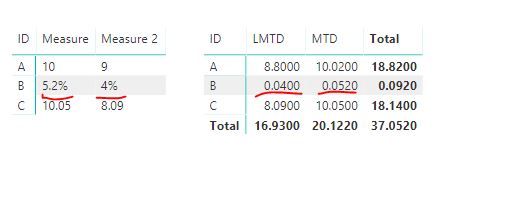
and here is the document for you refer to
https://docs.microsoft.com/en-us/dax/custom-numeric-formats-for-the-format-function
Best Regards,
Lin
HI, @carloscabreraq
After my test, you could try this way as below:
Use FORMAT Function with IF/ SWITCH in your formula of measure.
For example:
Measure =
VAR _A =
CALCULATE ( SUM ( 'Table'[Qty] ), FILTER ( 'Table', 'Table'[Type] = "MTD" ) )
RETURN
IF (
SELECTEDVALUE ( 'Table'[ID] ) = "A",
FORMAT ( _A, "0" ),
IF (
SELECTEDVALUE ( 'Table'[ID] ) = "B",
FORMAT ( _A, "0.0%" ),
IF ( SELECTEDVALUE ( 'Table'[ID] ) = "C", FORMAT ( _A, "0.00" ) )
)
)
Measure 2 = VAR _A =
CALCULATE ( SUM ( 'Table'[Qty] ), FILTER ( 'Table', 'Table'[Type] = "LMTD" ) )
RETURN
IF (
SELECTEDVALUE ( 'Table'[ID] ) = "A",
FORMAT ( _A, "0" ),
IF (
SELECTEDVALUE ( 'Table'[ID] ) = "B",
FORMAT ( _A, "0%" ),
IF ( SELECTEDVALUE ( 'Table'[ID] ) = "C", FORMAT ( _A, "0.00" ) )
)
)
By the way, for B percentage, FORMAT ( _A, "0.0%" ) and FORMAT ( _A, "0%" ) is used for decimals.
Result:
and here is the document for you refer to
https://docs.microsoft.com/en-us/dax/custom-numeric-formats-for-the-format-function
Best Regards,
Lin
@carloscabreraq you have to use format function get respective format for each row.
Subscribe to the @PowerBIHowTo YT channel for an upcoming video on List and Record functions in Power Query!!
Learn Power BI and Fabric - subscribe to our YT channel - Click here: @PowerBIHowTo
If my solution proved useful, I'd be delighted to receive Kudos. When you put effort into asking a question, it's equally thoughtful to acknowledge and give Kudos to the individual who helped you solve the problem. It's a small gesture that shows appreciation and encouragement! ❤
Did I answer your question? Mark my post as a solution. Proud to be a Super User! Appreciate your Kudos 🙂
Feel free to email me with any of your BI needs.
The Power BI Data Visualization World Championships is back! Get ahead of the game and start preparing now!
| User | Count |
|---|---|
| 38 | |
| 36 | |
| 33 | |
| 32 | |
| 29 |
| User | Count |
|---|---|
| 129 | |
| 88 | |
| 79 | |
| 68 | |
| 63 |