Learn from the best! Meet the four finalists headed to the FINALS of the Power BI Dataviz World Championships! Register now
Hi
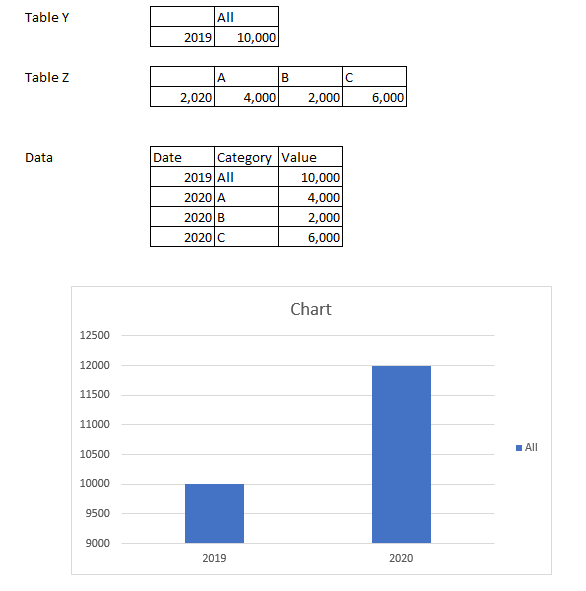
I have data at different category granularity and I am wondering how I should wrangle with it to produce a simple ar chart that shows total 2019 and total 2020. The 2019 data is a total of the subcategories. The data has been aggregated to one table named DATA.
Any suggestions via dax or model design? Sample data and chart below.
Any assistance greatly appreciated.
John
Solved! Go to Solution.
@johnmelbourne , In power Query.
Add new column Table Y
Category = "All"
And unpivot the table z
https://radacad.com/pivot-and-unpivot-with-power-bi
After that append two tables
https://radacad.com/append-vs-merge-in-power-bi-and-power-query
@johnmelbourne , In power Query.
Add new column Table Y
Category = "All"
And unpivot the table z
https://radacad.com/pivot-and-unpivot-with-power-bi
After that append two tables
https://radacad.com/append-vs-merge-in-power-bi-and-power-query
A new Power BI DataViz World Championship is coming this June! Don't miss out on submitting your entry.
Share feedback directly with Fabric product managers, participate in targeted research studies and influence the Fabric roadmap.
| User | Count |
|---|---|
| 51 | |
| 33 | |
| 32 | |
| 19 | |
| 18 |
| User | Count |
|---|---|
| 66 | |
| 66 | |
| 43 | |
| 27 | |
| 24 |