FabCon is coming to Atlanta
Join us at FabCon Atlanta from March 16 - 20, 2026, for the ultimate Fabric, Power BI, AI and SQL community-led event. Save $200 with code FABCOMM.
Register now!- Power BI forums
- Get Help with Power BI
- Desktop
- Service
- Report Server
- Power Query
- Mobile Apps
- Developer
- DAX Commands and Tips
- Custom Visuals Development Discussion
- Health and Life Sciences
- Power BI Spanish forums
- Translated Spanish Desktop
- Training and Consulting
- Instructor Led Training
- Dashboard in a Day for Women, by Women
- Galleries
- Data Stories Gallery
- Themes Gallery
- Contests Gallery
- QuickViz Gallery
- Quick Measures Gallery
- Visual Calculations Gallery
- Notebook Gallery
- Translytical Task Flow Gallery
- TMDL Gallery
- R Script Showcase
- Webinars and Video Gallery
- Ideas
- Custom Visuals Ideas (read-only)
- Issues
- Issues
- Events
- Upcoming Events
Get Fabric Certified for FREE during Fabric Data Days. Don't miss your chance! Request now
- Power BI forums
- Forums
- Get Help with Power BI
- Desktop
- Different Conditional Formatting for Values and To...
- Subscribe to RSS Feed
- Mark Topic as New
- Mark Topic as Read
- Float this Topic for Current User
- Bookmark
- Subscribe
- Printer Friendly Page

- Mark as New
- Bookmark
- Subscribe
- Mute
- Subscribe to RSS Feed
- Permalink
- Report Inappropriate Content
Different Conditional Formatting for Values and Totals on the Same Visual
Hello guys,
I have a matrix table with the row and column subtotal done in Power BI. I want to set a conditional background formatting for my values and total. The issue is that the taget of my values are different from the target of my totals. So, how do I achieve this?
This is a random example of my matrix:
| Category | China | Japan | Total |
| Product xx | 98.5% | 98.4% | 98.4% |
| Product yy | 97.3% | 98.2% | 97.9% |
| Total | 95.4% | 97.5% | 96.5% |
What I want to achieve is the following:
1. If China value is => 98.8%, green else red
2. If Japan value is => 98.6%, green else red
3. If the total (column total) of China => 98.4%. green else red (Please, note that the total is generated in PBI)
4. If the total (column total) of Japan => 98.4%. green else red (Please, note that the total is generated in PBI)
5. If the total (row total) of Product xx => 98.4%. green else red (Please, note that the total is generated in PBI)
5. If the total (row total) of Product yy => 98.4%. green else red (Please, note that the total is generated in PBI)
Please, how do I go about this? Is it possible to apply 2 different conditional formattings to the same visual (one for values and the second for totals)?
Solved! Go to Solution.


- Mark as New
- Bookmark
- Subscribe
- Mute
- Subscribe to RSS Feed
- Permalink
- Report Inappropriate Content
Would you be able to share the pbix file, if the data is not sensitive? Or else, the following video illustrates the concept, though the scenario is different


- Mark as New
- Bookmark
- Subscribe
- Mute
- Subscribe to RSS Feed
- Permalink
- Report Inappropriate Content
You can only apply one set of background conditional formatting rules, you can't apply two separate background conditional formatting rules, one for values and one for totals?
- Mark as New
- Bookmark
- Subscribe
- Mute
- Subscribe to RSS Feed
- Permalink
- Report Inappropriate Content
Hey @Padycosmos .
The critical thing I'm finding hard to do at this point is how to apply these two measures (for values and the total) on the same visual. They overwrite one another (i.e. when I apply for value only, it works but when I go back to apply for totals only, the formats of values get removed). I don't if this is because of my limited knowledge in Power BI or that's just the way it is?
- Mark as New
- Bookmark
- Subscribe
- Mute
- Subscribe to RSS Feed
- Permalink
- Report Inappropriate Content
Would you be able to share the pbix file, if the data is not sensitive? Or else, the following video illustrates the concept, though the scenario is different
- Mark as New
- Bookmark
- Subscribe
- Mute
- Subscribe to RSS Feed
- Permalink
- Report Inappropriate Content
Hello @Padycosmos ,
Thanks for your response. However, the video only showed how to apply one format to either the values only, totals only or values and total. In my case one format is probably not applicable to both values and totals, as they have diferrent targets.
- Mark as New
- Bookmark
- Subscribe
- Mute
- Subscribe to RSS Feed
- Permalink
- Report Inappropriate Content
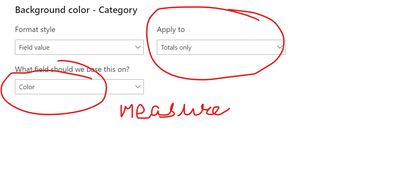
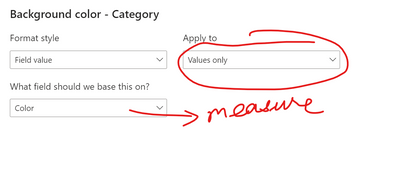
Please create 2 measures, apply one measure to values only and the other measure to Totals only.
A sample measure is shown below:
- Mark as New
- Bookmark
- Subscribe
- Mute
- Subscribe to RSS Feed
- Permalink
- Report Inappropriate Content
Please create 2 measures , one for values and one for totals and use them in conditional formatting.
Tha following video will be of help:
Helpful resources

Power BI Monthly Update - November 2025
Check out the November 2025 Power BI update to learn about new features.

Fabric Data Days
Advance your Data & AI career with 50 days of live learning, contests, hands-on challenges, study groups & certifications and more!

FabCon Atlanta 2026
Join us at FabCon Atlanta, March 16-20, for the ultimate Fabric, Power BI, AI and SQL community-led event. Save $200 with code FABCOMM.


