Join us at FabCon Atlanta from March 16 - 20, 2026, for the ultimate Fabric, Power BI, AI and SQL community-led event. Save $200 with code FABCOMM.
Register now!Learn from the best! Meet the four finalists headed to the FINALS of the Power BI Dataviz World Championships! Register now
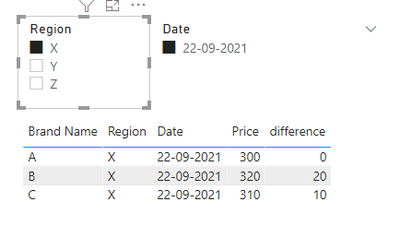
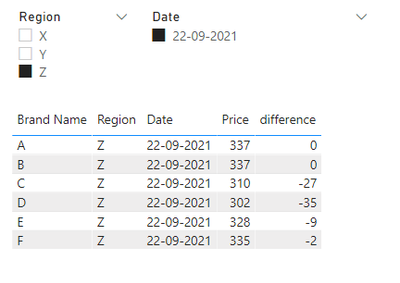
working on a project where I want to create measure/DAX of price difference between brands.Using the following data I want to create the price diffrence between Brand A with All other brands for regions.
Sample data:
Brand Name | Region | Date | Price |
A | X | 22-09-2021 | 300 |
B | X | 22-09-2021 | 320 |
C | X | 22-09-2021 | 310 |
A | Y | 22-09-2021 | 330 |
B | Y | 22-09-2021 | 316 |
C | Y | 22-09-2021 | 321 |
A | Z | 22-09-2021 | 337 |
B | Z | 22-09-2021 | 337 |
C | Z | 22-09-2021 | 310 |
D | Z | 22-09-2021 | 302 |
E | Z | 22-09-2021 | 328 |
F | Z | 22-09-2021 | 335 |
Hi @BhoomiT
try this
difference =
var _PriceA = CALCULATE(MIN('Table'[Price]),FILTER(ALLSELECTED('Table'),'Table'[Brand Name]="A"))
var _currPrice = MIN('Table'[Price])
return _currPrice-_PriceA
result
if you need more help, please @ me.
Best Regards,
Community Support Team _Tang
If this post helps, please consider Accept it as the solution to help the other members find it more quickly.
@BhoomiT , A new column for price of A and then you can take a diff
A price = maxx(filter(Table, [region] =earlier( [region] ) && [Brand Name] ="A") , [Price])
diff = [Price] -[A price]
a measure, if needed
A price = maxx(filter(allselected(Table), [region] =max( [region] ) && [Brand Name] ="A") , [Price])
Thank You Amit,
This is working perfact up to region level filters but, when I tried to calculate it at branch and terittory level ( level down the region) then there is minor deviation in the calculation.
request you to please guide me how can I calculate a measure so that it works for region, branch, terittory filters as well as time filters.
Share feedback directly with Fabric product managers, participate in targeted research studies and influence the Fabric roadmap.
Check out the February 2026 Power BI update to learn about new features.
| User | Count |
|---|---|
| 60 | |
| 59 | |
| 41 | |
| 18 | |
| 15 |
| User | Count |
|---|---|
| 106 | |
| 106 | |
| 40 | |
| 29 | |
| 28 |