This time we’re going bigger than ever. Fabric, Power BI, SQL, AI and more. We're covering it all. You won't want to miss it.
Learn moreLevel up your Power BI skills this month - build one visual each week and tell better stories with data! Get started
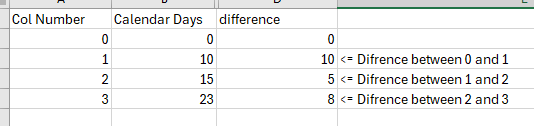
hello, I am looking to calculate the difference between the preview row in a matrix table.
I can do this in Excel, but not sure where to start with DAX.
Solved! Go to Solution.
Thank you @VahidDM for your prompt reply.
Hi @NewbieJono ,
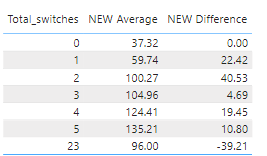
Depending on the information you have provided, you can add a new measure:
NEW Difference =
VAR _Totalswtiches =
SELECTEDVALUE ( 'Table'[Total_switches] )
VAR _MOVEAVERAGE =
MAXX (
FILTER ( ALL ( 'Table' ), [Total_switches] < _Totalswtiches ),
[NEW Average]
)
RETURN
IF ( _Totalswtiches = 0, 0, SUM ( 'Table'[NEW Average] ) - _MOVEAVERAGE )
Final output:
How to Get Your Question Answered Quickly - Microsoft Fabric Community
If it does not help, please provide more details with your desired out put and pbix file without privacy information.
Best Regards,
Ada Wang
If this post helps, then please consider Accept it as the solution to help the other members find it more quickly.
Thank you @VahidDM for your prompt reply.
Hi @NewbieJono ,
Depending on the information you have provided, you can add a new measure:
NEW Difference =
VAR _Totalswtiches =
SELECTEDVALUE ( 'Table'[Total_switches] )
VAR _MOVEAVERAGE =
MAXX (
FILTER ( ALL ( 'Table' ), [Total_switches] < _Totalswtiches ),
[NEW Average]
)
RETURN
IF ( _Totalswtiches = 0, 0, SUM ( 'Table'[NEW Average] ) - _MOVEAVERAGE )
Final output:
How to Get Your Question Answered Quickly - Microsoft Fabric Community
If it does not help, please provide more details with your desired out put and pbix file without privacy information.
Best Regards,
Ada Wang
If this post helps, then please consider Accept it as the solution to help the other members find it more quickly.
Hi @NewbieJono
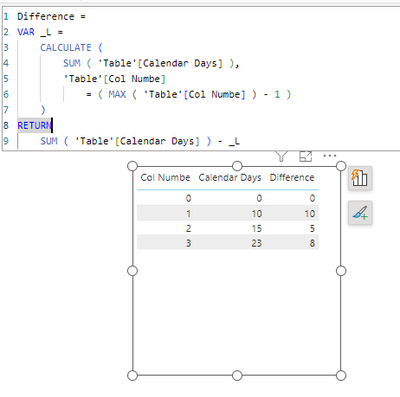
Create a measure using this DAX Expression:
Difference =
VAR _L =
CALCULATE (
SUM ( 'Table'[Calendar Days] ),
'Table'[Col Numbe]
= ( MAX ( 'Table'[Col Numbe] ) - 1 )
)
RETURN
SUM ( 'Table'[Calendar Days] ) - _L
Output:
If this post helps, please consider accepting it as the solution to help the other members find it more quickly.
Appreciate your Kudos!!
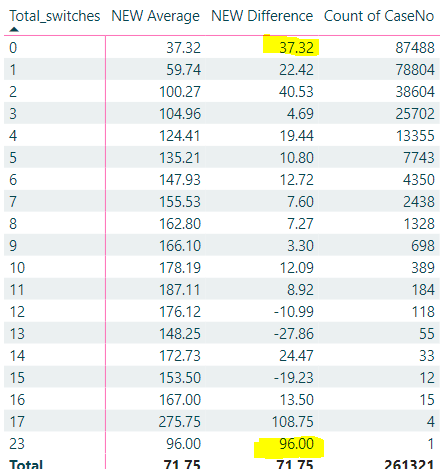
Thank you, is there any method to stop day zero and the last zero showing incorrect. day zero difference should be 0. last day not calculating correct
Check out the April 2026 Power BI update to learn about new features.
Sign up to receive a private message when registration opens and key events begin.
If you have recently started exploring Fabric, we'd love to hear how it's going. Your feedback can help with product improvements.
| User | Count |
|---|---|
| 36 | |
| 33 | |
| 31 | |
| 24 | |
| 18 |
| User | Count |
|---|---|
| 66 | |
| 50 | |
| 33 | |
| 24 | |
| 24 |