Join us at FabCon Atlanta from March 16 - 20, 2026, for the ultimate Fabric, Power BI, AI and SQL community-led event. Save $200 with code FABCOMM.
Register now!The Power BI Data Visualization World Championships is back! Get ahead of the game and start preparing now! Learn more
Hello,
I am not familiar enough with DAX to pull this off.
I have a table:
Date Product Item % Usage of item
| 1/1/2020 | Product 1 | Water | 60 |
| 1/1/2020 | Product 1 | Salt | 40 |
| 1/1/2020 | Product 2 | Water | 30 |
| 1/1/2020 | Product 2 | Salt | 70 |
| 1/2/2020 | Product 1 | Water | 20 |
| 1/2/2020 | Product 1 | Salt | 80 |
| 1/2/2020 | Product 2 | Water | 45 |
| 1/2/2020 | Product 2 | Salt | 55 |
I am adding a column and I need to work out the diffrence between each item used from the previous Date (Water, Salt) . but filted out for each product on the second date entry (1/2/2020) like so:
| Difference from previous run |
| -40 |
| 40 |
| -15 |
| -15 |
So getting the 20 from 1/2/2020, Product 1, Water and then deducting. 60 from 1/1/2020, Product 1 Water. to make -40 and so on
What Forumla would I use in DAX to pull this off when I add Custom Column in the Query Editor?
Appreciate your help in advance
Solved! Go to Solution.
hi @DH102
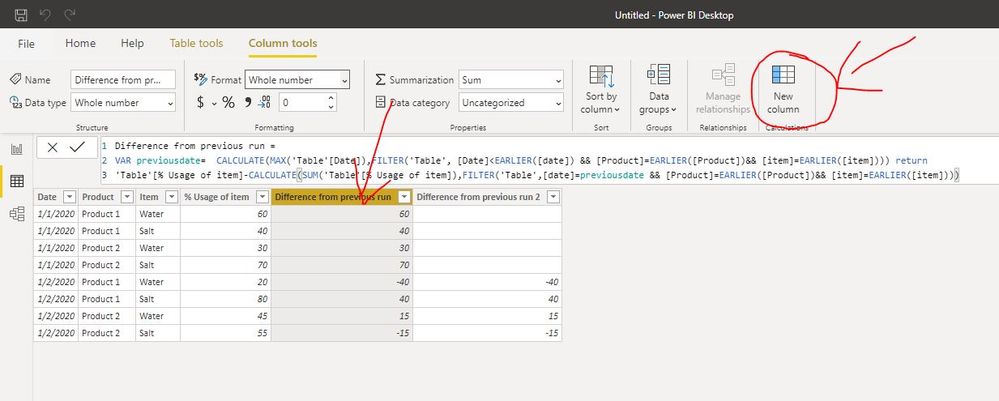
You need to knowledge that DAX is used to create a new Calculate Column/Table/Measure.
https://docs.microsoft.com/en-us/power-bi/transform-model/desktop-tutorial-create-calculated-columns
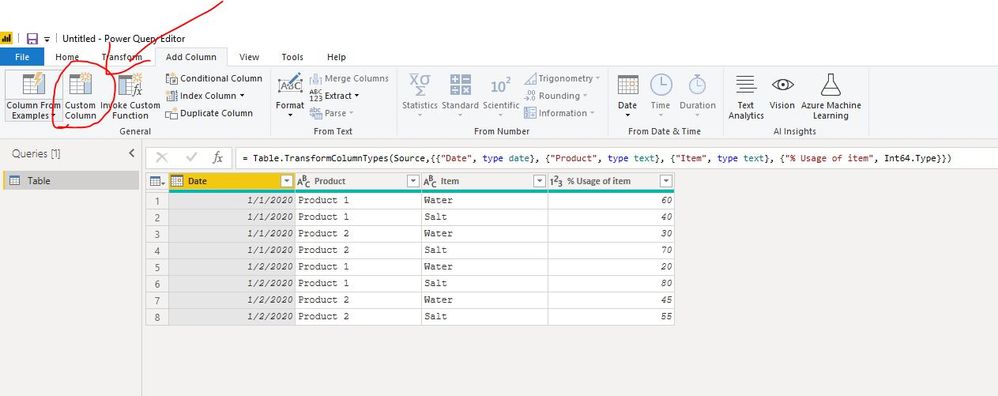
M code is used in power query to create a custom column
https://community.powerbi.com/t5/Desktop/Dax-or-M-Language/td-p/136827
Then you could use this dax formula to create a new column
Difference from previous run =
VAR previousdate= CALCULATE(MAX('Table'[Date]),FILTER('Table', [Date]<EARLIER([date]) && [Product]=EARLIER([Product])&& [item]=EARLIER([item]))) return
'Table'[% Usage of item]-CALCULATE(SUM('Table'[% Usage of item]),FILTER('Table',[date]=previousdate && [Product]=EARLIER([Product])&& [item]=EARLIER([item])))
or
Difference from previous run 2 =
VAR previousdate= CALCULATE(MAX('Table'[Date]),FILTER('Table', [Date]<EARLIER([date]) && [Product]=EARLIER([Product])&& [item]=EARLIER([item]))) return
IF(ISBLANK(previousdate),BLANK(),'Table'[% Usage of item]-CALCULATE(SUM('Table'[% Usage of item]),FILTER('Table',[date]=previousdate && [Product]=EARLIER([Product])&& [item]=EARLIER([item]))))
Regards,
Lin
hi @DH102
You need to knowledge that DAX is used to create a new Calculate Column/Table/Measure.
https://docs.microsoft.com/en-us/power-bi/transform-model/desktop-tutorial-create-calculated-columns
M code is used in power query to create a custom column
https://community.powerbi.com/t5/Desktop/Dax-or-M-Language/td-p/136827
Then you could use this dax formula to create a new column
Difference from previous run =
VAR previousdate= CALCULATE(MAX('Table'[Date]),FILTER('Table', [Date]<EARLIER([date]) && [Product]=EARLIER([Product])&& [item]=EARLIER([item]))) return
'Table'[% Usage of item]-CALCULATE(SUM('Table'[% Usage of item]),FILTER('Table',[date]=previousdate && [Product]=EARLIER([Product])&& [item]=EARLIER([item])))
or
Difference from previous run 2 =
VAR previousdate= CALCULATE(MAX('Table'[Date]),FILTER('Table', [Date]<EARLIER([date]) && [Product]=EARLIER([Product])&& [item]=EARLIER([item]))) return
IF(ISBLANK(previousdate),BLANK(),'Table'[% Usage of item]-CALCULATE(SUM('Table'[% Usage of item]),FILTER('Table',[date]=previousdate && [Product]=EARLIER([Product])&& [item]=EARLIER([item]))))
Regards,
Lin
@DH102 , both as new columns
last Date = maxx(filter(table, [date]<earlier([date]) && [Product]=earlier([Product])&& [item]=earlier([item])),[date])
[% Usage of item] - maxx(filter(table, [date] =earlier([last Date]) && [Product]=earlier([Product])&& [item]=earlier([item])),[% Usage of item])
The Power BI Data Visualization World Championships is back! Get ahead of the game and start preparing now!
| User | Count |
|---|---|
| 39 | |
| 37 | |
| 33 | |
| 32 | |
| 29 |
| User | Count |
|---|---|
| 132 | |
| 88 | |
| 82 | |
| 68 | |
| 64 |