
Don't miss your chance to take the Fabric Data Engineer (DP-600) exam for FREE! Find out how by watching the DP-600 session on-demand now through April 28th.
Learn moreJoin the FabCon + SQLCon recap series. Up next: Power BI, Real-Time Intelligence, IQ and AI, and Data Factory take center stage. All sessions are available on-demand after the live show. Register now
I have two text columns (column A in data table A and column B in data table B -both data tables have id columns).
I want to create a table\matrix in the desktop page that contains an id column, column A, column B and then another column which indicates if A is the same as B.
I would like to avoid doing a query where I merge column A and B based on the id column, but will if there are no other viable options
Thank you!
Solved! Go to Solution.
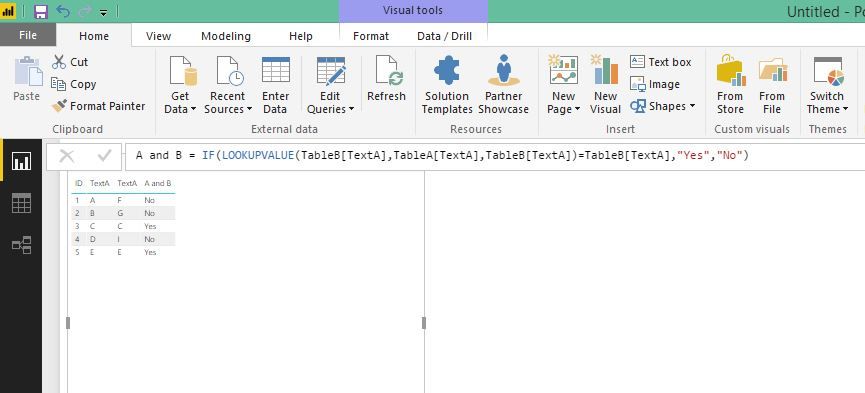
Since you want a calculated column, use below.
A and B = IF(LOOKUPVALUE(TableB[TextA],TableA[TextA],TableB[TextA])=TableB[TextA],"Yes","No")
You can relate table A and B first. Then write a IF function to return "yes" if column A1 = column B1 I don't think you need to merge.
Thank you!
When trying to implement the following statement:
IF( EXACT( 'Table A'[A1]), 'Table B'[B1])), "yes", "no")
I get the error: A single value for column 'A1' in table 'Table A' cannot be determined. (for both tables)
It is my understanding that I need to add something in the statement so that column A1 and B1 are only compared when the id column in both tables are equal. Is this correct and how would I go about doing this?
Since you want a calculated column, use below.
A and B = IF(LOOKUPVALUE(TableB[TextA],TableA[TextA],TableB[TextA])=TableB[TextA],"Yes","No")
Hi
I get errors when using the same DAX
may I know how to edit?
Check out the April 2026 Power BI update to learn about new features.
If you have recently started exploring Fabric, we'd love to hear how it's going. Your feedback can help with product improvements.
A new Power BI DataViz World Championship is coming this June! Don't miss out on submitting your entry.
| User | Count |
|---|---|
| 41 | |
| 37 | |
| 34 | |
| 21 | |
| 16 |
| User | Count |
|---|---|
| 65 | |
| 62 | |
| 31 | |
| 26 | |
| 25 |