Get certified for free when you join Fabric Data Days 2026 and dive into Fabric, Power BI, SQL, AI, and other essential data skills.
Join nowData Days is here! Join us now for 60+ days of learning, challenges, and connection. Learn more
Hi,
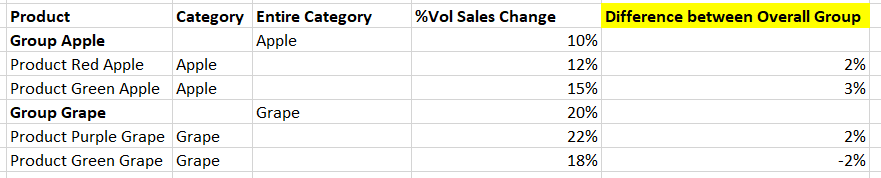
I am trying to make a dax measure that finds the difference between a product and its overall category (group), filtering by entire category and specific product. Below, is sample data, with the yellow column showing what I would like. I have made the following measures but they are not working. Any suggestions are welcome!
Entire Category % Vol Sales =
CALCULATE(
SUM('Table'[Volume Sales % Change vs YA]),
ALL('Table'[Entire Category])
)
Brand % Vol Sales =
CALCULATE(
SUM('Table'[Volume Sales % Change vs YA]),
ALL('Table'[Product])
)
Brand % Vol Sales minus Entire Category % Vol Sales =
[Brand % Vol Sales] - [Entire Category % Vol Sales]
Thanks!
Michaela
Solved! Go to Solution.
Hi @MichaelaMul
You can try thw following measure
% Difference =
VAR _volbyentirecate =
CALCULATE (
SUM ( 'Table'[% Vol Sales Change] ),
ALLSELECTED ( 'Table' ),
'Table'[Entire Category] = MAX ( 'Table'[Category] ),
'Table'[Manager] IN VALUES ( 'Table'[Manager] ),
'Table'[Time] IN VALUES ( 'Table'[Time] )
)
VAR _volbyproduct =
CALCULATE (
SUM ( 'Table'[% Vol Sales Change] ),
ALLSELECTED ( 'Table' ),
'Table'[Category] <> BLANK (),
'Table'[Product] IN VALUES ( 'Table'[Product] ),
'Table'[Manager] IN VALUES ( 'Table'[Manager] ),
'Table'[Time] IN VALUES ( 'Table'[Time] )
)
RETURN
IF (
MAX ( 'Table'[Category] ) <> BLANK (),
_volbyproduct - _volbyentirecate,
0
)
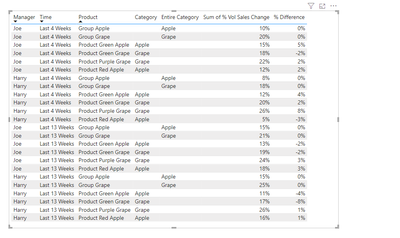
Output
Best Regards!
Yolo Zhu
If this post helps, then please consider Accept it as the solution to help the other members find it more quickly.
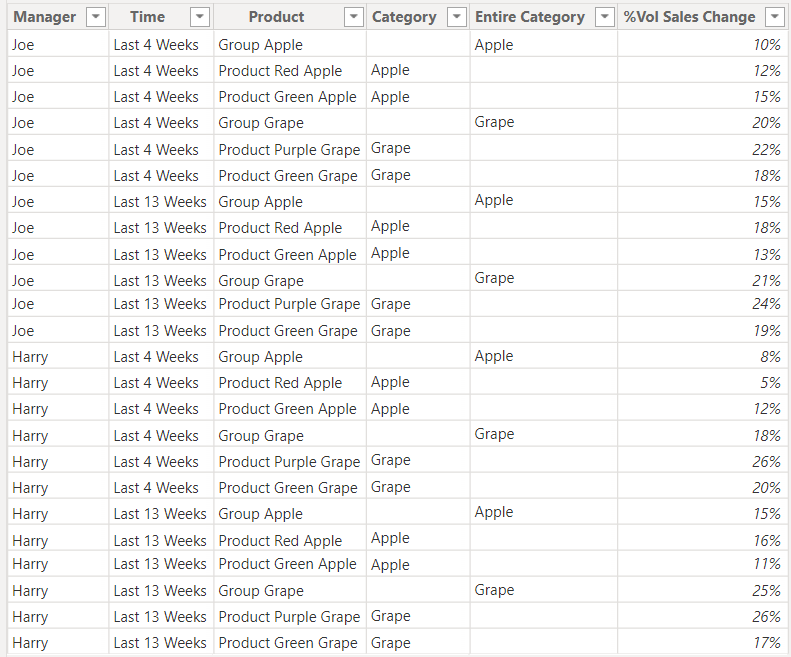
here's the sample data -
Hi @MichaelaMul
You can try thw following measure
% Difference =
VAR _volbyentirecate =
CALCULATE (
SUM ( 'Table'[% Vol Sales Change] ),
ALLSELECTED ( 'Table' ),
'Table'[Entire Category] = MAX ( 'Table'[Category] ),
'Table'[Manager] IN VALUES ( 'Table'[Manager] ),
'Table'[Time] IN VALUES ( 'Table'[Time] )
)
VAR _volbyproduct =
CALCULATE (
SUM ( 'Table'[% Vol Sales Change] ),
ALLSELECTED ( 'Table' ),
'Table'[Category] <> BLANK (),
'Table'[Product] IN VALUES ( 'Table'[Product] ),
'Table'[Manager] IN VALUES ( 'Table'[Manager] ),
'Table'[Time] IN VALUES ( 'Table'[Time] )
)
RETURN
IF (
MAX ( 'Table'[Category] ) <> BLANK (),
_volbyproduct - _volbyentirecate,
0
)
Output
Best Regards!
Yolo Zhu
If this post helps, then please consider Accept it as the solution to help the other members find it more quickly.
HI @MichaelaMul ,
Create two new columns in power query.
First column is Entire %
If [Entire Category <> null then [%Vol Sales Change] else null
Then fill down this new column.
Second Column Difference Between Product Group
If [Entire Category <> null then null else [Entire %] - [%Vol Sales Change]
Thanks
Hi @MichaelaMul ,
Could you please copy and paste data rather than image.
Thanks.
Don't miss out on Data Days, June 15 through August 7. Learn Fabric, Power BI, SQL, AI and more.
Check out the May 2026 Power BI update to learn about new features.
| User | Count |
|---|---|
| 22 | |
| 21 | |
| 20 | |
| 17 | |
| 13 |
| User | Count |
|---|---|
| 58 | |
| 50 | |
| 37 | |
| 29 | |
| 24 |