Don't miss your chance to take the Fabric Data Engineer (DP-600) exam for FREE! Find out how by watching the DP-600 session on-demand now through April 28th.
Learn moreJoin the FabCon + SQLCon recap series. Up next: Power BI, Real-Time Intelligence, IQ and AI, and Data Factory take center stage. All sessions are available on-demand after the live show. Register now
Hello DAX experts 🙂
I'am trying to figure out the formula that calculate an average time spent (in months) in company by previous and active employees (splitted by time periods - months/years). So I got 'start date' column and 'end date' column (for active emloyees remains empty). I did try DATEIFF function but every time it gaves me wrong numbers. Can somebody help me?
| Employee | Start date | End date |
| A | 2/7/2011 | |
| B | 2/14/2011 | 1/4/2016 |
| C | 6/1/2011 | |
| D | 6/1/2011 | 7/7/2014 |
Solved! Go to Solution.
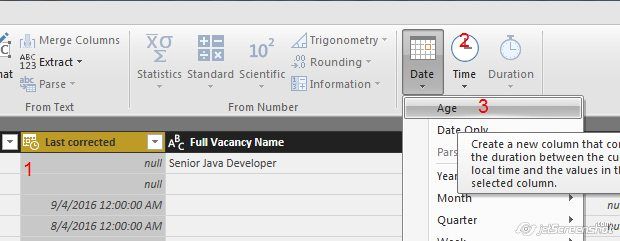
Typically, I like to add an "Age" column in the query, rather than creating a calculated column with DAX, in the data model. For example, to do an "Age in Days" column...
Or, if you do want to use a calculated column with a DAX formula, this works for me:
Age in Months = DATEDIFF([Start Date], [End Date], MONTH)
Hi @kb,
Have you resolved your issue? You'd better list your expected result according to the sample data. It's difficult to reproduce how to calculate the average time time according to your description.
Best Regards,
Angelia
Hi there,
Here is the image how to do it:
Typically, I like to add an "Age" column in the query, rather than creating a calculated column with DAX, in the data model. For example, to do an "Age in Days" column...
Or, if you do want to use a calculated column with a DAX formula, this works for me:
Age in Months = DATEDIFF([Start Date], [End Date], MONTH)
Check out the April 2026 Power BI update to learn about new features.
If you have recently started exploring Fabric, we'd love to hear how it's going. Your feedback can help with product improvements.
A new Power BI DataViz World Championship is coming this June! Don't miss out on submitting your entry.
| User | Count |
|---|---|
| 45 | |
| 38 | |
| 34 | |
| 21 | |
| 17 |
| User | Count |
|---|---|
| 65 | |
| 63 | |
| 31 | |
| 26 | |
| 25 |