cancel
Showing results for 
Search instead for 
Did you mean: 

The Power BI Data Visualization World Championships is back! Get ahead of the game and start preparing now! Learn more

Reply
lpalacios
Frequent Visitor

Difference Between two selected year

Hello Everbody:


I hope you are well. 


I have some experience in PowerBi ( not that advance) and I don´t figure out how to solve this issue.


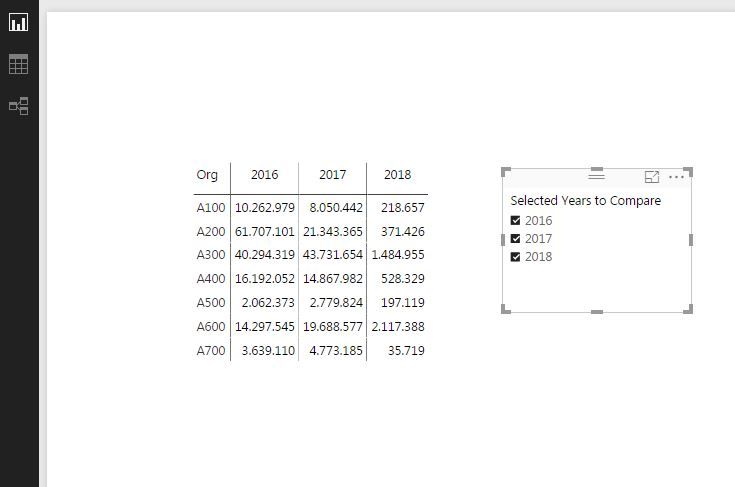
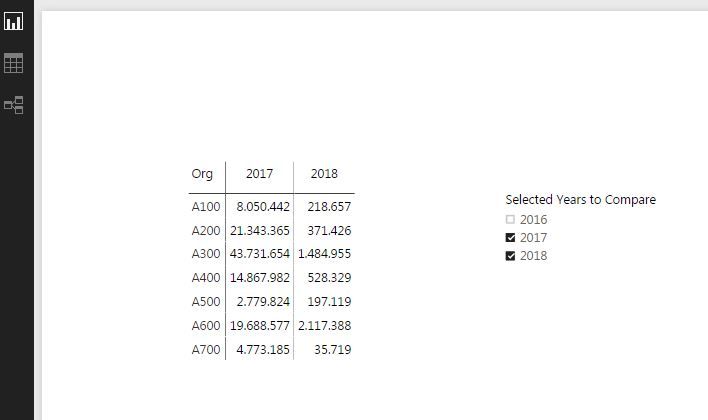
I have a table of Purchase by year and organization taken from SAP (picture 1), then I would like to create one column (or measure) that shows the difference between the amounts in usd for 2 selected years. For example: if i selected 2017 and 2018 (picture 2).


It will always works to make the difference of 2 columns.


do you have any idea on how I can solve it out?


kind regards


Captura.JPG


Captura2.JPG


1 ACCEPTED SOLUTION
Anonymous
Not applicable

Hi,


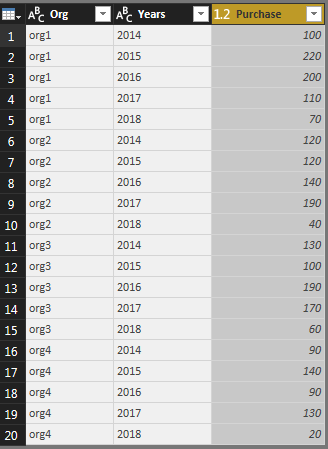
Firstly unpivod your puchase data for multiple year column into single column, lik

 Unpivot your data in edit queryUnpivot your data in edit query

Then create Three different columns as

Oldest Year Purchase = CALCULATE(sum(Sheet1[Purchase]), Filter(Sheet1,Sheet1[Years]=Min(Sheet1[Years])))

Newest Year Purchase = CALCULATE(sum(Sheet1[Purchase]), Filter(Sheet1,Sheet1[Years]=Max(Sheet1[Years])))

Purchase Difference = [Newest Year Purchase]-[Oldest Year Purchase]


Then apply a slicer to select two table. The Purchase Difference field will always provide you the difference of two selected years.

Use slicer to select two yearsUse slicer to select two years

Please let me know if you face any challange.

View solution in original post

3 REPLIES 3
Anonymous
Not applicable

Hi,


Firstly unpivod your puchase data for multiple year column into single column, lik

 Unpivot your data in edit queryUnpivot your data in edit query

Then create Three different columns as

Oldest Year Purchase = CALCULATE(sum(Sheet1[Purchase]), Filter(Sheet1,Sheet1[Years]=Min(Sheet1[Years])))

Newest Year Purchase = CALCULATE(sum(Sheet1[Purchase]), Filter(Sheet1,Sheet1[Years]=Max(Sheet1[Years])))

Purchase Difference = [Newest Year Purchase]-[Oldest Year Purchase]


Then apply a slicer to select two table. The Purchase Difference field will always provide you the difference of two selected years.

Use slicer to select two yearsUse slicer to select two years

Please let me know if you face any challange.

v-ljerr-msft
Microsoft Employee
Microsoft Employee

Hi @lpalacios,

I have a table of Purchase by year and organization taken from SAP (picture 1), then I would like to create one column (or measure) that shows the difference between the amounts in usd for 2 selected years. For example: if i selected 2017 and 2018 (picture 2).

If I understand you correctly, you should be able to use the formula below to create a new measure to calculate the difference between the two selected year.

Diff of Selected Years =
CALCULATE (
    [Total Purchase],
    FILTER ( 'Date', 'Date'[Year] = MAX ( 'Date'[Year] ) )
)
    - CALCULATE (
        [Total Purchase],
        FILTER ( 'Date', 'Date'[Year] = MIN ( 'Date'[Year] ) )
    )

As there isn't an easy way to add the new created measure into the exiting Matrix visual currently, you may need to show the measure with [Org] column on a new Matrix visual. Smiley Happy


Regards

thanks!! but it does not work Man Sad


Helpful resources

Announcements
Power BI DataViz World Championships

Power BI Dataviz World Championships

The Power BI Data Visualization World Championships is back! Get ahead of the game and start preparing now!

December 2025 Power BI Update Carousel

Power BI Monthly Update - December 2025

Check out the December 2025 Power BI Holiday Recap!

FabCon Atlanta 2026 carousel

FabCon Atlanta 2026

Join us at FabCon Atlanta, March 16-20, for the ultimate Fabric, Power BI, AI and SQL community-led event. Save $200 with code FABCOMM.