Join us at FabCon Atlanta from March 16 - 20, 2026, for the ultimate Fabric, Power BI, AI and SQL community-led event. Save $200 with code FABCOMM.
Register now!The Power BI Data Visualization World Championships is back! Get ahead of the game and start preparing now! Learn more
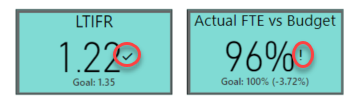
I'm about to release a new dashboard for my organization and I know this question is coming. What is the difference between the '!' and the Checkmark in the KPI Visual? Thank you for your help.
Solved! Go to Solution.
The check mark means the KPI is better than the goal (higher if high is good, lower if low is good). The exclamation means the KPS is worse than the goal (lower if high is good, higher if low is good).
Your first KPI low is good and 1.22 is < 1.35 so it gets √
The second KPI high is good and 96% < 100% so it gets !
The check mark means the KPI is better than the goal (higher if high is good, lower if low is good). The exclamation means the KPS is worse than the goal (lower if high is good, higher if low is good).
Your first KPI low is good and 1.22 is < 1.35 so it gets √
The second KPI high is good and 96% < 100% so it gets !
Thank you jdbuchanan. That is correct.
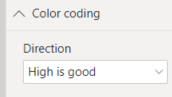
It comes down to the color coding section of editing your kpi card.
My next challenge is having a goal that is a range of values. For the 96% example above, it's actually within the range, as we're looking for 100+-5%.
If you adjust the goal a bit and use the absolute of the calc it should work.
Measure = 1 - ABS ( 1 - [Actual FTE vs Budget] )
Goal = .95
Higher is better
In your example Measure would return .96 which is higer than .95 so it would be good.
If the [Actual FTE vs Budget] was say 103%
1-1.03 = -.03
ABS (-.03) = .03
1-.03 = .97
.97 > .95 so that would also be good.
The Power BI Data Visualization World Championships is back! Get ahead of the game and start preparing now!
| User | Count |
|---|---|
| 37 | |
| 37 | |
| 33 | |
| 32 | |
| 29 |
| User | Count |
|---|---|
| 130 | |
| 88 | |
| 82 | |
| 68 | |
| 64 |