cancel
Showing results for 
Search instead for 
Did you mean: 

The Power BI Data Visualization World Championships is back! It's time to submit your entry. Live now!

Reply
jpcbr
Regular Visitor

Detecting duplicates by validating two column

Hello 🙂


Im new at power bi, so im sorry for the noob question 😛


So i have a table more or less like this


CompanyStage
microsoftMAL
asusMQL
toshibaSAL
lgMAL
asusMQL
nokiaMAL


As you can see i have the company "asus"  its duplicated, but i just want to count it once.
So i need to create a new column that verifies if the company its duplicated and if it haves the same stage and give me a result like this:


CompanyStageStage verified
microsoftMALMAL
asusMQLMQL
toshibaSALSAL
lgMALMAL
asusMQL 
nokiaMALMAL


Thanks  🙂

1 ACCEPTED SOLUTION
v-caliao-msft
Microsoft Employee
Microsoft Employee

@jpcbr,


Please refer to the steps below to achieve your requirement.

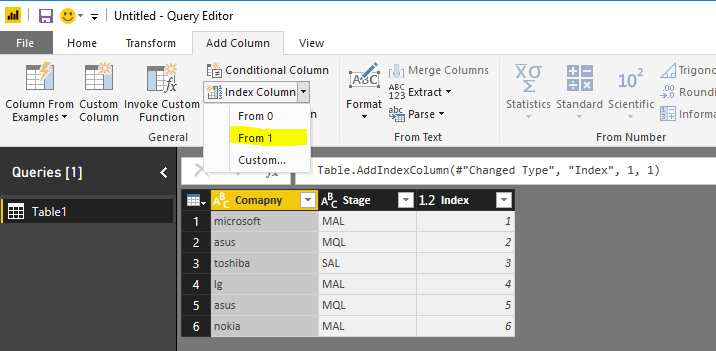
  1. Add a index column.(Edit Query)
    Capture.PNG
  2. Create a column to combine company and stage column.
    CompanyStage = Table1[Comapny]&Table1[Stage]
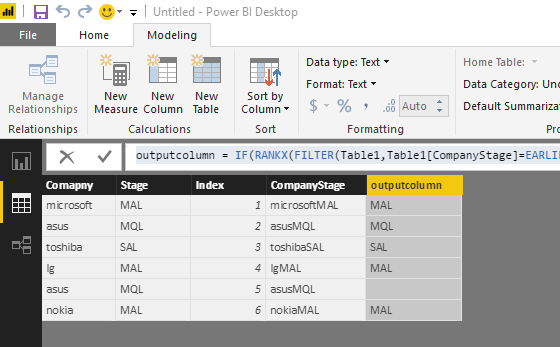
  3. Create your expected column.
    outputcolumn = IF(RANKX(FILTER(Table1,Table1[CompanyStage]=EARLIER(Table1[CompanyStage])),Table1[Index],,ASC)>1,BLANK(),Table1[Stage])
    Capture1.PNG

Regards,

Charlie Liao

View solution in original post

3 REPLIES 3
v-caliao-msft
Microsoft Employee
Microsoft Employee

@jpcbr,


Please refer to the steps below to achieve your requirement.

  1. Add a index column.(Edit Query)
    Capture.PNG
  2. Create a column to combine company and stage column.
    CompanyStage = Table1[Comapny]&Table1[Stage]
  3. Create your expected column.
    outputcolumn = IF(RANKX(FILTER(Table1,Table1[CompanyStage]=EARLIER(Table1[CompanyStage])),Table1[Index],,ASC)>1,BLANK(),Table1[Stage])
    Capture1.PNG

Regards,

Charlie Liao

Thats very well thought!!! Thanks a lot 😄

Anonymous
Not applicable

That is going to be challenging as presented, because there is no way to differentiate the two rows of asus,mql.


If you don't need the dupes, I would just remove them (via Edit Queries).  If you do... what if you had a column that just counted the # of duplicates?  That's easy... 🙂

Helpful resources

Announcements
Power BI DataViz World Championships

Power BI Dataviz World Championships

The Power BI Data Visualization World Championships is back! It's time to submit your entry.

January Power BI Update Carousel

Power BI Monthly Update - January 2026

Check out the January 2026 Power BI update to learn about new features.

FabCon Atlanta 2026 carousel

FabCon Atlanta 2026

Join us at FabCon Atlanta, March 16-20, for the ultimate Fabric, Power BI, AI and SQL community-led event. Save $200 with code FABCOMM.