FabCon is coming to Atlanta
Join us at FabCon Atlanta from March 16 - 20, 2026, for the ultimate Fabric, Power BI, AI and SQL community-led event. Save $200 with code FABCOMM.
Register now!- Power BI forums
- Get Help with Power BI
- Desktop
- Service
- Report Server
- Power Query
- Mobile Apps
- Developer
- DAX Commands and Tips
- Custom Visuals Development Discussion
- Health and Life Sciences
- Power BI Spanish forums
- Translated Spanish Desktop
- Training and Consulting
- Instructor Led Training
- Dashboard in a Day for Women, by Women
- Galleries
- Data Stories Gallery
- Themes Gallery
- Contests Gallery
- QuickViz Gallery
- Quick Measures Gallery
- Visual Calculations Gallery
- Notebook Gallery
- Translytical Task Flow Gallery
- TMDL Gallery
- R Script Showcase
- Webinars and Video Gallery
- Ideas
- Custom Visuals Ideas (read-only)
- Issues
- Issues
- Events
- Upcoming Events
The Power BI Data Visualization World Championships is back! Get ahead of the game and start preparing now! Learn more
- Power BI forums
- Forums
- Get Help with Power BI
- Desktop
- Re: Detect number in a text string
- Subscribe to RSS Feed
- Mark Topic as New
- Mark Topic as Read
- Float this Topic for Current User
- Bookmark
- Subscribe
- Printer Friendly Page

- Mark as New
- Bookmark
- Subscribe
- Mute
- Subscribe to RSS Feed
- Permalink
- Report Inappropriate Content
Detect number in a text string
I want a true/false statement in Power Query to detect numbers in a text string.
45a- TRUE
ab- FALSE
34- TRUE
aa46- TRUE
Solved! Go to Solution.


- Mark as New
- Bookmark
- Subscribe
- Mute
- Subscribe to RSS Feed
- Permalink
- Report Inappropriate Content
Hi @Anonymous ,
Text.contails could not work on more then one values, similar error refer:
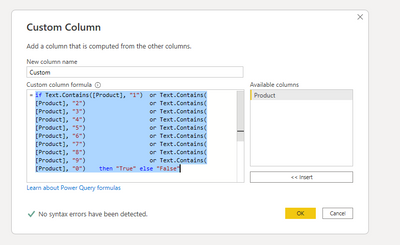
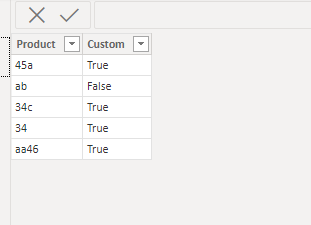
And change yours to the below:
if Text.Contains([Product], "1") or Text.Contains([Product], "2") or Text.Contains([Product], "3") or Text.Contains([Product], "4") or Text.Contains([Product], "5") or Text.Contains([Product], "6") or Text.Contains([Product], "7") or Text.Contains([Product], "8") or Text.Contains([Product], "9") or Text.Contains([Product], "0") then "True" else "False"
Did I answer your question? Mark my post as a solution!
Best Regards
Lucien

- Mark as New
- Bookmark
- Subscribe
- Mute
- Subscribe to RSS Feed
- Permalink
- Report Inappropriate Content
Actually there is another solution if you want to make it dynamic you can use this kind of code
Let's say the name of this field is [Sample1]
45a- TRUE
ab- FALSE
34- TRUE
aa46- TRUE
Power Query code:
if List.AnyTrue(List.Transform({0..9},(NumberColumn) => Text.Contains([Sample1],Number.ToText(NumberColumn)))) = true then "TRUE" else "FALSE"
Please put thumbs up if I help you better
- Mark as New
- Bookmark
- Subscribe
- Mute
- Subscribe to RSS Feed
- Permalink
- Report Inappropriate Content
Hi @Anonymous ,
Text.contails could not work on more then one values, similar error refer:
And change yours to the below:
if Text.Contains([Product], "1") or Text.Contains([Product], "2") or Text.Contains([Product], "3") or Text.Contains([Product], "4") or Text.Contains([Product], "5") or Text.Contains([Product], "6") or Text.Contains([Product], "7") or Text.Contains([Product], "8") or Text.Contains([Product], "9") or Text.Contains([Product], "0") then "True" else "False"
Did I answer your question? Mark my post as a solution!
Best Regards
Lucien

- Mark as New
- Bookmark
- Subscribe
- Mute
- Subscribe to RSS Feed
- Permalink
- Report Inappropriate Content
Using the "Contains" option in the conditional column interface seems to work for me:
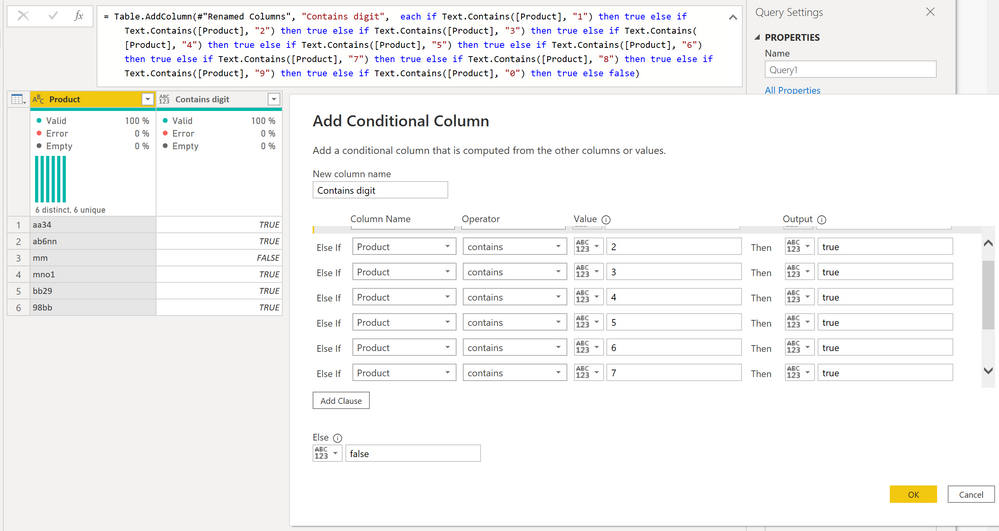
Attached is the file
Did I answer your question? Mark my post as a solution!
In doing so, you are also helping me. Thank you!
Proud to be a Super User!
Paul on Linkedin.
- Mark as New
- Bookmark
- Subscribe
- Mute
- Subscribe to RSS Feed
- Permalink
- Report Inappropriate Content
Hi @PaulDBrown ,
Thank you for your reply, based on what you have provided, each time you use Contains, you also judge only one element and then use a combination of multiple judgments to get the final result.
Best Regards
Lucien
- Mark as New
- Bookmark
- Subscribe
- Mute
- Subscribe to RSS Feed
- Permalink
- Report Inappropriate Content
See if this helps:
https://eriksvensen.wordpress.com/2018/03/06/extraction-of-number-or-text-from-a-column-with-both-te...
Did I answer your question? Mark my post as a solution!
In doing so, you are also helping me. Thank you!
Proud to be a Super User!
Paul on Linkedin.
- Mark as New
- Bookmark
- Subscribe
- Mute
- Subscribe to RSS Feed
- Permalink
- Report Inappropriate Content
Thanks for the reply but I don't want to extract a number from the string. I want a function to only detects IF there is a number in the text string and give me a true/false value
- Mark as New
- Bookmark
- Subscribe
- Mute
- Subscribe to RSS Feed
- Permalink
- Report Inappropriate Content
Well... that link got me to this:
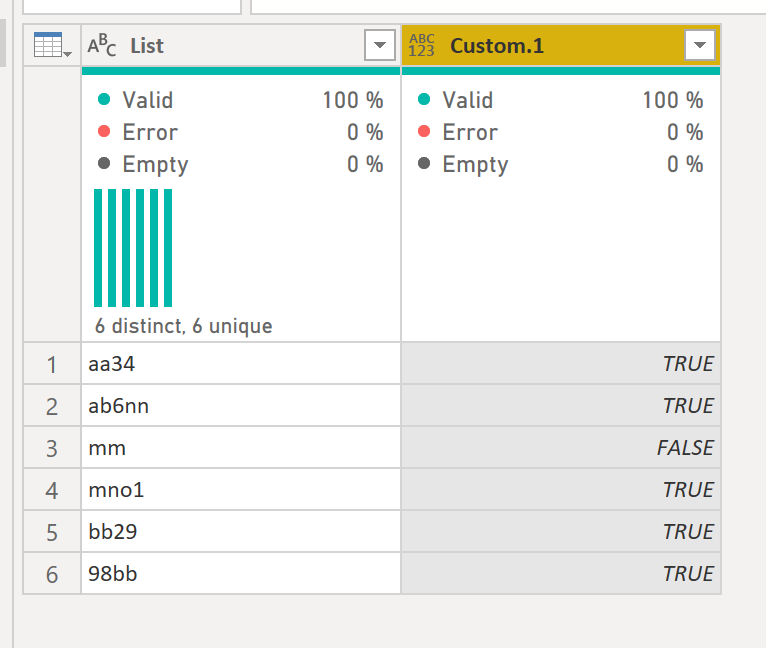
Using
let
    Source = Table.FromRows(Json.Document(Binary.Decompress(Binary.FromText("i45WSkw0NlGK1QEykszy8sCs3FwIlZdvCGYkJRlZghmWFklJSrGxAA==", BinaryEncoding.Base64), Compression.Deflate)), let _t = ((type nullable text) meta [Serialized.Text = true]) in type table [List = _t]),
    #"Changed Type" = Table.TransformColumnTypes(Source,{{"List", type text}}),
    #"Added Custom" = Table.AddColumn(#"Changed Type", "Custom", each Text.Select([List], {"0".."9"})),
    #"Changed Type1" = Table.TransformColumnTypes(#"Added Custom",{{"Custom", Int64.Type}}),
    #"Added Conditional Column" = Table.AddColumn(#"Changed Type1", "Custom.1", each if [Custom] = null then false else true),
    #"Removed Columns" = Table.RemoveColumns(#"Added Conditional Column",{"Custom"})
in
    #"Removed Columns"
Does that help?
Did I answer your question? Mark my post as a solution!
In doing so, you are also helping me. Thank you!
Proud to be a Super User!
Paul on Linkedin.
- Mark as New
- Bookmark
- Subscribe
- Mute
- Subscribe to RSS Feed
- Permalink
- Report Inappropriate Content
I'm sorry but the code is just too complex for me to understand. I find it easier to add a condition with true conditions being every number from 1-9, see below:
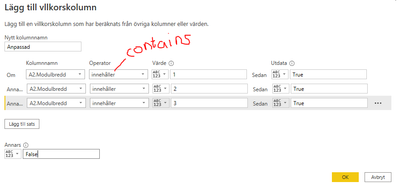
However a single line code would be easier to manage. Somtehing like this:
text.Contains([Product], type number)- Mark as New
- Bookmark
- Subscribe
- Mute
- Subscribe to RSS Feed
- Permalink
- Report Inappropriate Content
Your conditional column approach does deliver a single line of code (and is way simpler than my suggestion! )
= Table.AddColumn(#"Renamed Columns", "Number?", each if Text.Contains([Product], "1") then true else if Text.Contains([Product], "2") then true else if Text.Contains([Product], "3") then true else if Text.Contains([Product], "4") then true else if Text.Contains([Product], "5") then true else if Text.Contains([Product], "6") then true else if Text.Contains([Product], "7") then true else if Text.Contains([Product], "8") then true else if Text.Contains([Product], "9") then true else if Text.Contains([Product], "0") then true else false)
Did I answer your question? Mark my post as a solution!
In doing so, you are also helping me. Thank you!
Proud to be a Super User!
Paul on Linkedin.
- Mark as New
- Bookmark
- Subscribe
- Mute
- Subscribe to RSS Feed
- Permalink
- Report Inappropriate Content
However, I can't get the code to work properly, I keep getting an error
- Mark as New
- Bookmark
- Subscribe
- Mute
- Subscribe to RSS Feed
- Permalink
- Report Inappropriate Content
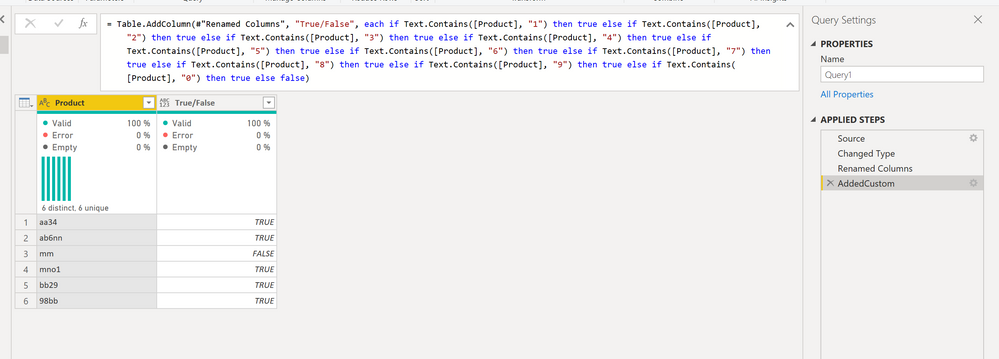
It shouldn't return an error. Is the Product column set as type Text?
Did I answer your question? Mark my post as a solution!
In doing so, you are also helping me. Thank you!
Proud to be a Super User!
Paul on Linkedin.
- Mark as New
- Bookmark
- Subscribe
- Mute
- Subscribe to RSS Feed
- Permalink
- Report Inappropriate Content
Yes it's set as Text. I get an Expression. Error. Not possible to convert the type Type to type Text.
Information:
Value=[Type]
Type=[Type]
Helpful resources

Power BI Dataviz World Championships
The Power BI Data Visualization World Championships is back! Get ahead of the game and start preparing now!

Power BI Monthly Update - December 2025
Check out the December 2025 Power BI Holiday Recap!

FabCon Atlanta 2026
Join us at FabCon Atlanta, March 16-20, for the ultimate Fabric, Power BI, AI and SQL community-led event. Save $200 with code FABCOMM.

| User | Count |
|---|---|
| 38 | |
| 36 | |
| 33 | |
| 32 | |
| 29 |


| User | Count |
|---|---|
| 129 | |
| 88 | |
| 79 | |
| 68 | |
| 63 |


