This time we’re going bigger than ever. Fabric, Power BI, SQL, AI and more. We're covering it all. You won't want to miss it.
Learn moreLevel up your Power BI skills this month - build one visual each week and tell better stories with data! Get started
Hello PBI Gurus
I was looking for some inspiration on the simplest or best way to achive my visualisation
So Im a new member of the team and want to bring some structure with a work look ahead. I have a date table linked to my source table.
My Key Delivery Date is Due Date which is when is the task due. Tasks are spread over months /years. But Im just looking for whats happening in the next 4x weeks.
As you can see below - This week has 2x Tasks due etc
All help appreciated.
Thanks in advance.
Jimmy
Im hoping for some further assistance.
I have a date table which looks like so
Date = ADDCOLUMNS (
FILTER (
CALENDARAUTO (),
AND ( YEAR ( [Date] ) >= 2020, YEAR ( [Date] ) <= YEAR(TODAY()))
),
"Calendar Year", "CY " & YEAR ( [Date] ),
"Month Name", FORMAT ( [Date], "mmmm" ),
"Month Shortname", FORMAT ( [Date], "mmm" ),
"Month Number", MONTH ( [Date] ),
"Weekday", FORMAT ( [Date], "dddd" ),
"Weekday number", WEEKDAY ( [Date] )
)
Above is marked as a Date Table.
So after creation I added a new column to this date Table called Week Start Date
I then added another new column to the date table using below:
Week Rank = RANKX('Date','Date'[Week Start date],,ASC,Dense)
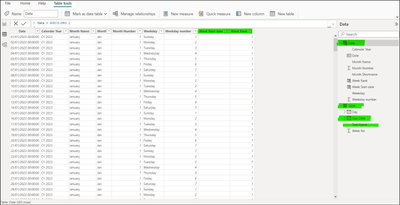
I get the following in my Date Table and I think this is the 1st issue? See Fig 2
The Ranks shows as all Digit Ones and Week Start is empty - See Fig 2
Just some further inforamtion: My Excel Data source (Fig 1) is super simple and its Columns 1& 2 which is what I wanted to create my look ahead for. Columns 3 & 4 were sanity checkers in excel and will not be used in my calculation:
I will come to the measures afyter clarifying above. Sorry to ask such lame questions.
Its very much apprecited.
Jimmy
Fig 1
Data Source
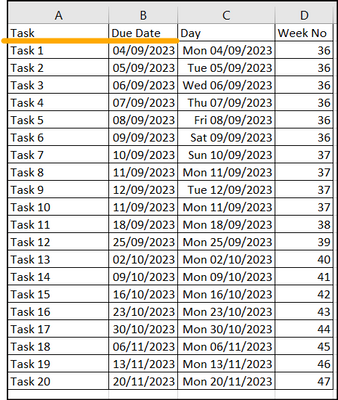
Fig 2
Date Table
thanks @amitchandak Im going to have a fiddle with this over the weekdn and report back. A big than thanks for the reply.
Jimmy
@Anonymous , Have week rank in date table then use concatenateX
Have these new columns in Date Table, Week Rank is Important in Date/Week Table
Week Rank = RANKX('Date','Date'[Week Start date],,ASC,Dense)
OR
Week Rank = RANKX('Date','Date'[Year Week],,ASC,Dense) //YYYYWW format
These measures can help
This Week = CALCULATE(concatenateX(Table, 'Table'[Task Name], ", "), FILTER(ALL('Date'),'Date'[Week Rank]=max('Date'[Week Rank])))
Next Week = CALCULATE(concatenateX(Table, 'Table'[Task Name], ", "), FILTER(ALL('Date'),'Date'[Week Rank]=max('Date'[Week Rank])+1))
Next Week +2= CALCULATE(concatenateX(Table, 'Table'[Task Name], ", "), FILTER(ALL('Date'),'Date'[Week Rank]=max('Date'[Week Rank])+2))
Next Week +3= CALCULATE(concatenateX(Table, 'Table'[Task Name], ", "), FILTER(ALL('Date'),'Date'[Week Rank]=max('Date'[Week Rank])+3))
Check out the April 2026 Power BI update to learn about new features.
Sign up to receive a private message when registration opens and key events begin.
If you have recently started exploring Fabric, we'd love to hear how it's going. Your feedback can help with product improvements.
| User | Count |
|---|---|
| 36 | |
| 29 | |
| 29 | |
| 21 | |
| 18 |
| User | Count |
|---|---|
| 68 | |
| 45 | |
| 33 | |
| 24 | |
| 23 |