cancel
Showing results for 
Search instead for 
Did you mean: 

Get Fabric certified for FREE! Don't miss your chance! Learn more

Reply
andreazambon
Helper V
Helper V

Delta value between 2 weeks

Hi there. 

I'm trying to calculate the delta% between th last week agree with my filter anche le last-1 week.


I try with this:


Delta%PerditaLast = 
VAR PercMaxWeek= if(MAX(DateTable[week]) > DateTable[ThisWeek],calculate('SAPProdEvent-2'[%Perdita_RIL], FILTER(DateTable,DateTable[week]=DateTable[ThisWeek])),calculate('SAPProdEvent-2'[%Perdita_RIL], FILTER(DateTable,DateTable[week]=MAX(DateTable[week]))))
VAR PercLast1Week = if(MAX(DateTable[week]) > DateTable[ThisWeek],calculate('SAPProdEvent-2'[%Perdita_RIL], FILTER(DateTable,DateTable[week]=DateTable[ThisWeek])),calculate('SAPProdEvent-2'[%Perdita_RIL], FILTER(DateTable,DateTable[week]=(MAX(DateTable[week])-1))))
//VAR Delta = PercMaxWeek-PercMinWeek
RETURN 
    PercMaxWeek-PercLast1Week


But probably the code 


MAX(DateTable[week])-1)


is not correct. 


Also it gives me an error: cannot compare a text type and a number type. 

Actually, I just copy the formula that I use to calcolate the %Delta with another percentage measure, but in that case i calculate the MAX and the MIN week of my filter. 


Some suggestion? 

Thanks.

5 REPLIES 5
lbendlin
Super User
Super User

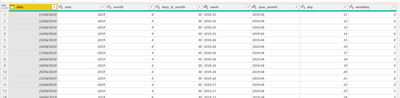
Please show a couple of rows of your "DateTable" table.

andreazambon_0-1681195929562.png


var thisweek = max(DateTable[Week])
var prevweek = calculate(max(DateTable[Week]),all(DateTable),DateTable[Week])<thisweek)

Thanks for your reply, I think that I can use this to my case. 

Instead of this solution, what if I want to show the difference between a week and the previous one?


For example, in WK15 I want to show the difference between WK 15 and WK14, in WK 14 the difference between WK 14 and WK 13.. 

you would use the same approach. Remember that "MAX"  is dependent on the current filter context, and it has a different meaning in different parts of your visual. That way you can write a single measure that can  compare a value with its "previous"  incarnation.  (Note that the new windowing functions can also be used if you are looking for alternatives)

Helpful resources

Announcements
Join our Fabric User Panel

Join our Fabric User Panel

Share feedback directly with Fabric product managers, participate in targeted research studies and influence the Fabric roadmap.

FabCon Atlanta 2026 carousel

FabCon Atlanta 2026

Join us at FabCon Atlanta, March 16-20, for the ultimate Fabric, Power BI, AI and SQL community-led event. Save $200 with code FABCOMM.