Join us at FabCon Atlanta from March 16 - 20, 2026, for the ultimate Fabric, Power BI, AI and SQL community-led event. Save $200 with code FABCOMM.
Register now!Vote for your favorite vizzies from the Power BI Dataviz World Championship submissions. Vote now!
Hi,
I have a following sample table:
| Page Name | Customer ID |
| Page A | Customer 1 |
| Page A | Customer 2 |
| Page B | Customer 1 |
| Page B | Customer 2 |
| Page B | Customer 3 |
| Page B | Customer 4 |
| Page C | Customer 1 |
| Page D | Customer 1 |
| Page D | Customer 2 |
From the above table, I have created a funnel which shows the unique number of customers per page
| Page Name | No. Unique Customers |
| Page A | 2 |
| Page B | 4 |
| Page C | 1 |
| Page D | 2 |
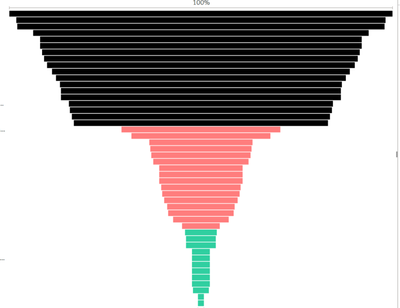
The funnel is sorted automatically as shown below (with many more page names that I have in my source data):
My question is how can I calculate or depict the number of dropped customers as they travel from most visited page (page B) to least visited page (page C) in Power BI:
| Page Name | No. Dropped Customers |
| Page B | |
| Page A | 2 (4 in Page B - 2 in Page A) |
| Page D | 0 (2 in Page A - 2 in Page D) |
| Page C | 1 (2 in Page D - 1 in Page C) |
In other words, how can I visulaise the delta funnel?
Many thanks
Solved! Go to Solution.
Hi, @hamadani
As a workaround, you can try the following steps to visulaise the delta funnel.
1. add a summarize table:
calculated table:
Table 2 = SUMMARIZE('Table','Table'[Page Name],"No.Unique Customers",DISTINCTCOUNT('Table'[Customer ID]))
calculatd column:
Rank = RANKX(ALLSELECTED('Table 2'),'Table 2'[No.Unique Customers],,DESC,Dense) Rankvalue =
RANKX (
'Table 2',
'Table 2'[Rank]
+ RANKX ( 'Table 2', 'Table 2'[Page Name],, ASC, DENSE )
/ CALCULATE ( COUNTROWS ( 'Table 2' ), ALLSELECTED () ),
,
ASC,
DENSE
)No.Dropped Customers =
VAR a = 'Table 2'[No.Unique Customers]
VAR b =
CALCULATE (
MAX ( 'Table 2'[No.Unique Customers] ),
FILTER (
'Table 2',
'Table 2'[Rankvalue]
= EARLIER ( 'Table 2'[Rankvalue] ) - 1
)
)
RETURN
IF ( ISBLANK ( b ), BLANK (), b - a )
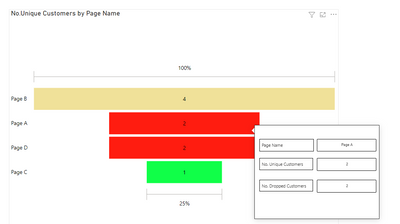
2. consider using custom tooltip page to show the Dropped Customers.
Result:
Best Regards,
Community Support Team _ Eason
Hi, @hamadani
As a workaround, you can try the following steps to visulaise the delta funnel.
1. add a summarize table:
calculated table:
Table 2 = SUMMARIZE('Table','Table'[Page Name],"No.Unique Customers",DISTINCTCOUNT('Table'[Customer ID]))
calculatd column:
Rank = RANKX(ALLSELECTED('Table 2'),'Table 2'[No.Unique Customers],,DESC,Dense) Rankvalue =
RANKX (
'Table 2',
'Table 2'[Rank]
+ RANKX ( 'Table 2', 'Table 2'[Page Name],, ASC, DENSE )
/ CALCULATE ( COUNTROWS ( 'Table 2' ), ALLSELECTED () ),
,
ASC,
DENSE
)No.Dropped Customers =
VAR a = 'Table 2'[No.Unique Customers]
VAR b =
CALCULATE (
MAX ( 'Table 2'[No.Unique Customers] ),
FILTER (
'Table 2',
'Table 2'[Rankvalue]
= EARLIER ( 'Table 2'[Rankvalue] ) - 1
)
)
RETURN
IF ( ISBLANK ( b ), BLANK (), b - a )
2. consider using custom tooltip page to show the Dropped Customers.
Result:
Best Regards,
Community Support Team _ Eason
Vote for your favorite vizzies from the Power BI World Championship submissions!
If you love stickers, then you will definitely want to check out our Community Sticker Challenge!
Check out the January 2026 Power BI update to learn about new features.
| User | Count |
|---|---|
| 64 | |
| 56 | |
| 43 | |
| 20 | |
| 17 |
| User | Count |
|---|---|
| 123 | |
| 108 | |
| 44 | |
| 32 | |
| 24 |