cancel
Showing results for 
Search instead for 
Did you mean: 

Learn from the best! Meet the four finalists headed to the FINALS of the Power BI Dataviz World Championships! Register now

Reply
Anonymous
Not applicable

Delta Between Two Dates Aggregation

In Power BI I have two tables.

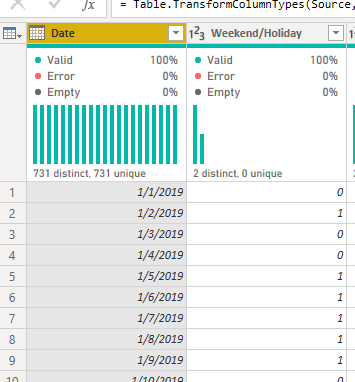
Holidays:

andrewseaman_0-1593721927264.png

Table_1 (My Main Table):

andrewseaman_2-1593721997013.png


In Table_1 I created a measure.  This measure calculates the difference between two dates and excludes weekends and holidays.


image.png

Delta = CALCULATE(SUM(Holidays[Weekend/Holiday]), FILTER(Holidays, Holidays[Date] >= FIRSTDATE('Table_1'[Opened]) && Holidays[Date] < LASTDATE('Table_1'[Closed])))
 
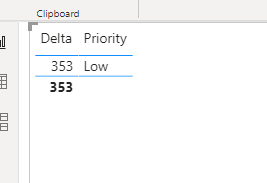
The issue is, this measure works when each row is individually displayed like above.  However when I remove the dates and aggregate, I get a delta of 353.  Not sure where this comes from, but I would like the average or median delta calculation.  Any ideas?
 

image.png


1 ACCEPTED SOLUTION
v-deddai1-msft
Community Support
Community Support

Hi @Anonymous ,


Would you please try the measure below:


measure =
AVERAGEX (
    SUMMARIZE ( 'Table_1', 'Table_1'[Opened], 'Table_1'[Closed], "_delta", [Delta] ),
    [_delta]
)

measure2 =
MEDIANX (
    SUMMARIZE ( 'Table_1', 'Table_1'[Opened], 'Table_1'[Closed], "_delta", [Delta] ),
    [_delta]
)


If this post helps, then please consider Accept it as the solution to help the other members find it more quickly.


Best Regards,

Dedmon Dai

View solution in original post

1 REPLY 1
v-deddai1-msft
Community Support
Community Support

Hi @Anonymous ,


Would you please try the measure below:


measure =
AVERAGEX (
    SUMMARIZE ( 'Table_1', 'Table_1'[Opened], 'Table_1'[Closed], "_delta", [Delta] ),
    [_delta]
)

measure2 =
MEDIANX (
    SUMMARIZE ( 'Table_1', 'Table_1'[Opened], 'Table_1'[Closed], "_delta", [Delta] ),
    [_delta]
)


If this post helps, then please consider Accept it as the solution to help the other members find it more quickly.


Best Regards,

Dedmon Dai

Helpful resources

Announcements
Power BI DataViz World Championships carousel

Power BI DataViz World Championships - June 2026

A new Power BI DataViz World Championship is coming this June! Don't miss out on submitting your entry.

Join our Fabric User Panel

Join our Fabric User Panel

Share feedback directly with Fabric product managers, participate in targeted research studies and influence the Fabric roadmap.

March Power BI Update Carousel

Power BI Community Update - March 2026

Check out the March 2026 Power BI update to learn about new features.