cancel
Showing results for 
Search instead for 
Did you mean: 

The Power BI Data Visualization World Championships is back! Get ahead of the game and start preparing now! Learn more

Reply
rshifflet
Frequent Visitor

Delimitate Column into Single Column

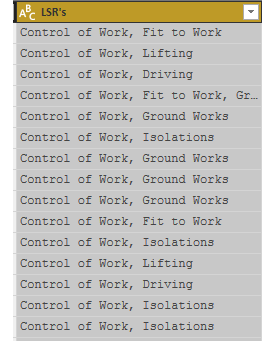
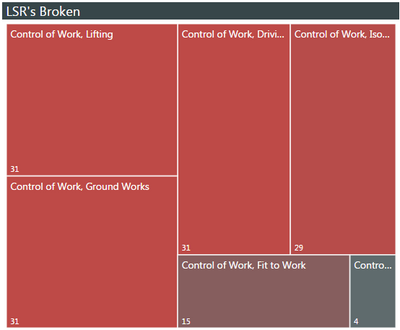
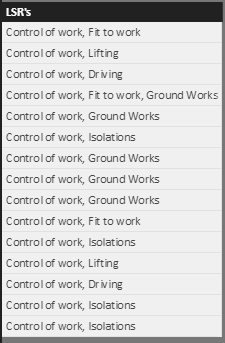
This may be a very simple thing, so please excuse my ignorance. I will try and articulate this the best that I can. When I go to edit my quiries, I have several columns with values that are comma delimited. However, when I apply these columns to a chart, or graph, it treats each combined text as a unique value. 


 1 (2).PNG1.PNG

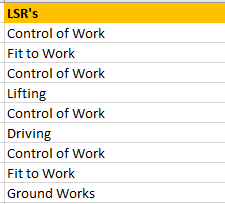
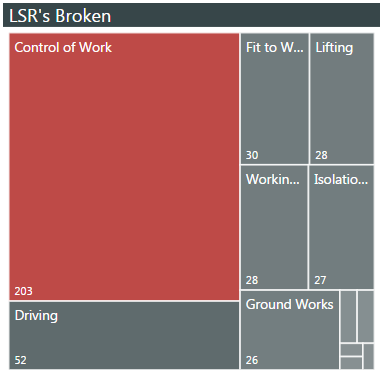
I believe that I need the be able to have the data line up like below, in order to get the chart's to break apart by the unique values. 

2.PNG4.PNG

I know that I can split each column by the coma delimeter into multiple columns, however that could be up to 30 columns. When I try and add each column into the values to plot, I can get a graph but I can't get it to slice all the other surounding graphs. 


Is there a simple way to break the values apart at the coma and have them stack in the same column rather than splitting into multiple colums? That way all I have to do is "Fill Down" by the unique identifier and everyting slices just fine. I hope I'm making sence. 


Aaron 

1 ACCEPTED SOLUTION
Anonymous
Not applicable

Hi,


According  to your description, you want to spilt the “LSR’s “ column by “,” and merge them to one column, right?


If as I said, you can follow below steps:


Source table:

Capture4.PNG
 

1. Open the edit query and duplicate the base table:


Capture5.PNG
 

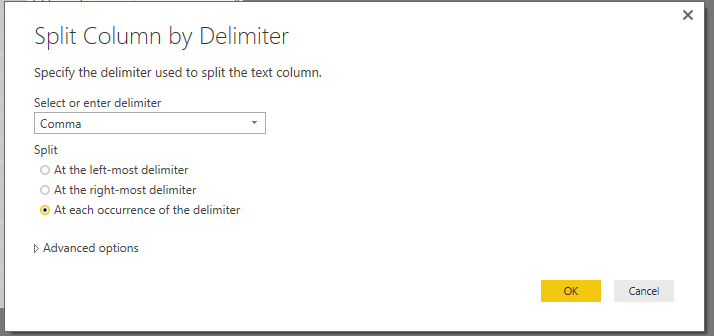
2. Right-Click on LSR’s and choose the “spilt column” -> “By Delimiter”:


 Capture6.PNG


Capture7.PNG 


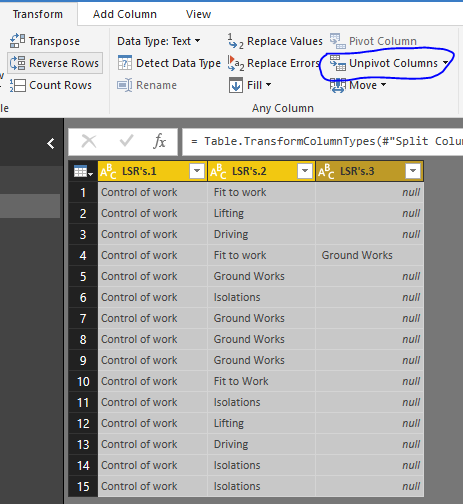
3.All select the columns and choose the “Unpivot Columns”:
 

Capture8.PNGCapture9.PNG 


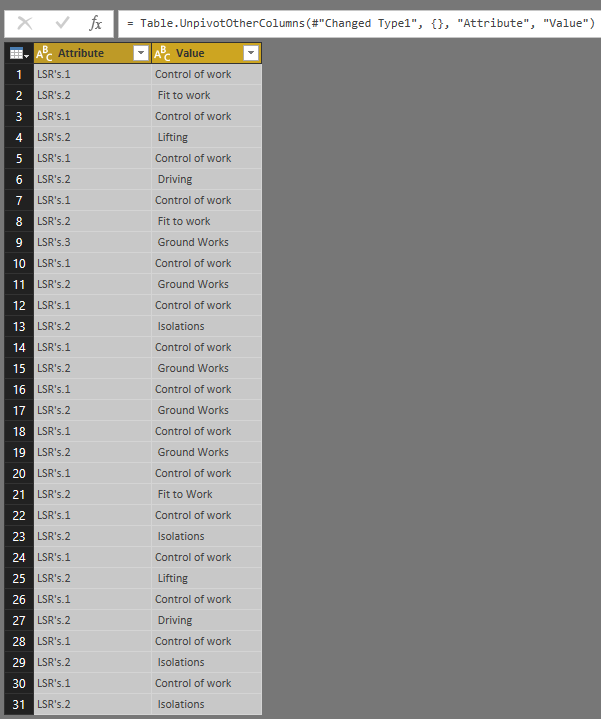
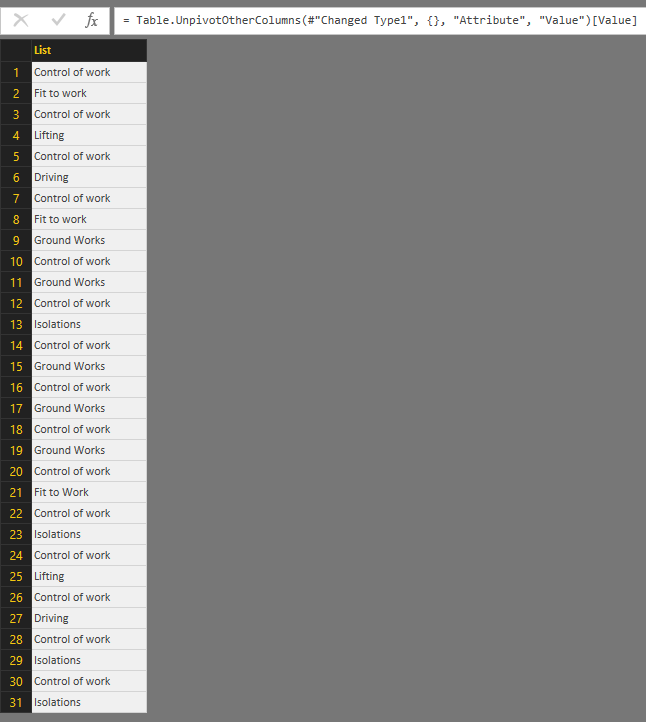
4.Modify the formula of "Unpivot Columns":


Table.UnpivotOtherColumns(#"Changed Type1", {}, "Attribute", "Value")[Value]


Capture10.PNG
 

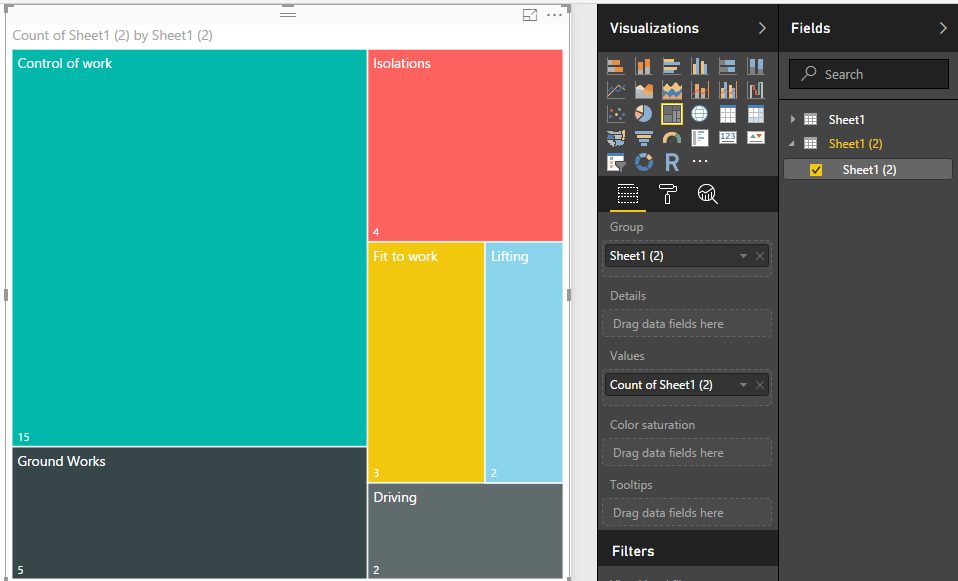
5. Close and apply the change, then create a visual.


Capture11.PNG
 

Regards,
Xiaoxin Sheng

View solution in original post

3 REPLIES 3
Anonymous
Not applicable

Hi,


According  to your description, you want to spilt the “LSR’s “ column by “,” and merge them to one column, right?


If as I said, you can follow below steps:


Source table:

Capture4.PNG
 

1. Open the edit query and duplicate the base table:


Capture5.PNG
 

2. Right-Click on LSR’s and choose the “spilt column” -> “By Delimiter”:


 Capture6.PNG


Capture7.PNG 


3.All select the columns and choose the “Unpivot Columns”:
 

Capture8.PNGCapture9.PNG 


4.Modify the formula of "Unpivot Columns":


Table.UnpivotOtherColumns(#"Changed Type1", {}, "Attribute", "Value")[Value]


Capture10.PNG
 

5. Close and apply the change, then create a visual.


Capture11.PNG
 

Regards,
Xiaoxin Sheng

Xiaoxin_Sheng,


Thank you so much for your solution. It is exactly what I was looking for. 


Greg_Deckler
Community Champion
Community Champion

Split into two columns on comma. Make a hierarchy, Column1 at the top, Column2 below it and use that in your visual. This will activate drill down capabilities. Alternatively, you can use two treemaps, one for Column1 and one for Column2. Clicking on the Column1 treemap will automagically filter the other treemap.


Follow on LinkedIn
@ me in replies or I'll lose your thread!!!
Instead of a Kudo, please vote for this idea
Become an expert!: Enterprise DNA
External Tools: MSHGQM
YouTube Channel!: Microsoft Hates Greg
Latest book!:
DAX For Humans

DAX is easy, CALCULATE makes DAX hard...

Helpful resources

Announcements
Power BI DataViz World Championships

Power BI Dataviz World Championships

The Power BI Data Visualization World Championships is back! Get ahead of the game and start preparing now!

November Power BI Update Carousel

Power BI Monthly Update - November 2025

Check out the November 2025 Power BI update to learn about new features.

FabCon Atlanta 2026 carousel

FabCon Atlanta 2026

Join us at FabCon Atlanta, March 16-20, for the ultimate Fabric, Power BI, AI and SQL community-led event. Save $200 with code FABCOMM.