Get Fabric or SQL Certified for Free.
Get certified for free when you join Fabric Data Days 2026 and dive into Fabric, Power BI, SQL, AI, and other essential data skills.
Join now- Power BI forums
- Get Help with Power BI
- Desktop
- Service
- Report Server
- Power Query
- Mobile Apps
- Developer
- DAX Commands and Tips
- Custom Visuals Development Discussion
- Health and Life Sciences
- Power BI Spanish forums
- Translated Spanish Desktop
- Training and Consulting
- Instructor Led Training
- Dashboard in a Day for Women, by Women
- Galleries
- Data Stories Gallery
- Themes Gallery
- Contests Gallery
- QuickViz Gallery
- Quick Measures Gallery
- Visual Calculations Gallery
- Notebook Gallery
- Translytical Task Flow Gallery
- TMDL Gallery
- R Script Showcase
- Webinars and Video Gallery
- Ideas
- Custom Visuals Ideas (read-only)
- Issues
- Issues
- Events
- Upcoming Events
July 7 - July 17 | Round 2 of the Power BI Dataviz World Championships. Don't miss your chance! Learn more
- Power BI forums
- Forums
- Get Help with Power BI
- Desktop
- Re: Defect Rate Formula
- Subscribe to RSS Feed
- Mark Topic as New
- Mark Topic as Read
- Float this Topic for Current User
- Bookmark
- Subscribe
- Printer Friendly Page

- Mark as New
- Bookmark
- Subscribe
- Mute
- Subscribe to RSS Feed
- Permalink
- Report Inappropriate Content
Defect Rate Formula
I am VERY new to PowerBI and have been struggling with calculating a defect rate for weeks. Please help!
I have a table that has R (regular) and W (warranty) orders. I want to divide the InvoiceQty of the W orders by the InvoiceQty of the R orders to get the defect rate. I have tried many approaches and variations. Here is my current formula in the Query Editor:
DefectRate = DIVIDE(CALCULATE(SUMX([InvoiceQty], [OrderType] = "W"),CALCULATE(SUMX([InvoiceQty],[OrderType]="R"))
The current error it gives me is a Token RightParen Expected Error. I have no idea what this means.
Solved! Go to Solution.


- Mark as New
- Bookmark
- Subscribe
- Mute
- Subscribe to RSS Feed
- Permalink
- Report Inappropriate Content
@Anonymous
Hi, are using DAX in Query Editor (This use Power Query Language).
To obtain this you can create a New Measure.
DEFECTRATE =
DIVIDE (
    CALCULATE (
        SUM ( [InvoiceQty] ),
        FILTER ( YOURTABLE, YOURTABLE[OrderType] = "W" )
    ),
    CALCULATE (
        SUM ( [InvoiceQty] ),
        FILTER ( YOURTABLE, YOURTABLE[OrderType] = "R" )
    )
)
Regards
Victor
Lima - Peru
Lima - Peru
- Mark as New
- Bookmark
- Subscribe
- Mute
- Subscribe to RSS Feed
- Permalink
- Report Inappropriate Content
@Anonymous
Hi, are using DAX in Query Editor (This use Power Query Language).
To obtain this you can create a New Measure.
DEFECTRATE =
DIVIDE (
    CALCULATE (
        SUM ( [InvoiceQty] ),
        FILTER ( YOURTABLE, YOURTABLE[OrderType] = "W" )
    ),
    CALCULATE (
        SUM ( [InvoiceQty] ),
        FILTER ( YOURTABLE, YOURTABLE[OrderType] = "R" )
    )
)
Regards
Victor
Lima - Peru
Lima - Peru
- Mark as New
- Bookmark
- Subscribe
- Mute
- Subscribe to RSS Feed
- Permalink
- Report Inappropriate Content
So I am taking this formula a few steps further and I am stuck. Below I have added in DefectReason that is not AB Damage, I also need to add in that the DefectReason is not Concealed Damage or Goodwill. I tried with a comma but it does not like it. How can I add more?
UnfilterDefectRate = DIVIDE(
CALCULATE(
SUM ( vSalesMaster[WarrDetail.InvoiceQty] ),
FILTER (vSalesMaster,vSalesMaster[OrderType] = "W" &&
vSalesMaster[WarrDetail.DefectReason] <> "AB Damage" )
),
CALCULATE(
SUM ( [InvoiceQty] ),
FILTER (VSalesMaster,vSalesMaster[OrderType] = "R")
)
)
- Mark as New
- Bookmark
- Subscribe
- Mute
- Subscribe to RSS Feed
- Permalink
- Report Inappropriate Content
Thank you so much for the quick response. I have made the adjustments and am getting a Token RightParen expected error.
= Table.AddColumn(vSalesMaster_View, "DefectRate1", each DIVIDE(
CALCULATE(
SUM ( [InvoiceQty] ),
FILTER (vSalesMaster,vSalesMaster[OrderType] = "W")
),
CALCULATE(
SUM ( [InvoiceQty] ),
FILTER (VSalesMaster,vSalesMaster[OrderType] = "R")
)
)

- Mark as New
- Bookmark
- Subscribe
- Mute
- Subscribe to RSS Feed
- Permalink
- Report Inappropriate Content
@Anonymous the token right partentheses error means that your left parentheses and right parenthesis do not match up. So you seem to have more ( then ) in your formula. Your formula seems to have 8 * ( and 7 * ). But I think you had figured this one out already.
As for your results of your formula: I am not sure that SUM is the right calculator. I think you should be using COUNT.
If I read your message correctly, your table has a row for each order na each order is either a "W" Waranty or a "R" Regular order.
Since you are summing the invoice quantity, I am wondering if your source data is correct. To me it seems like the waranty lines might contain incorrect InvoiceQTY data for your purpose.
- Mark as New
- Bookmark
- Subscribe
- Mute
- Subscribe to RSS Feed
- Permalink
- Report Inappropriate Content
@Anonymous
Don't do this in Query Editor.
Close that Window and to Main Screen.
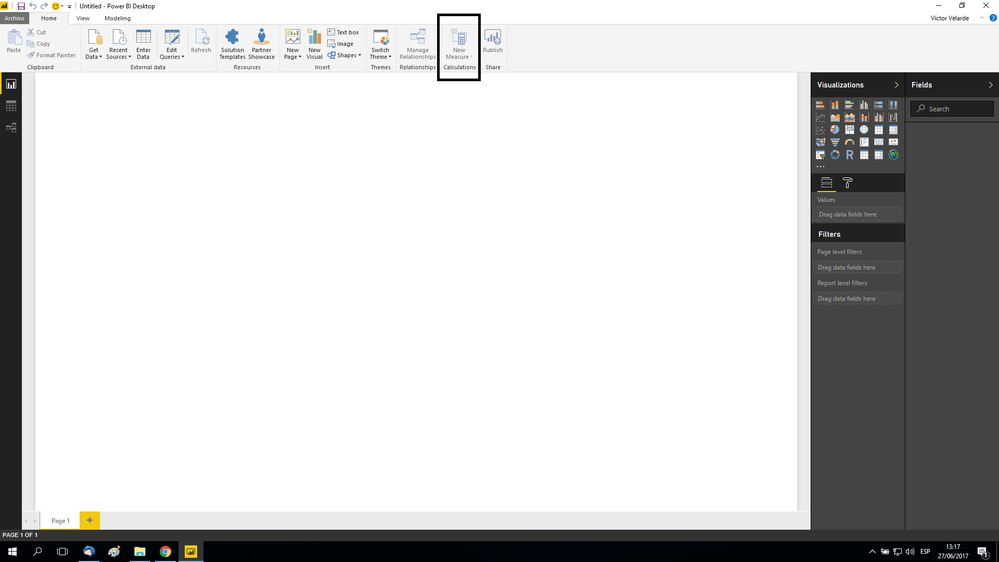
Let me know if need more help
Victor
Lima - Peru
- Mark as New
- Bookmark
- Subscribe
- Mute
- Subscribe to RSS Feed
- Permalink
- Report Inappropriate Content
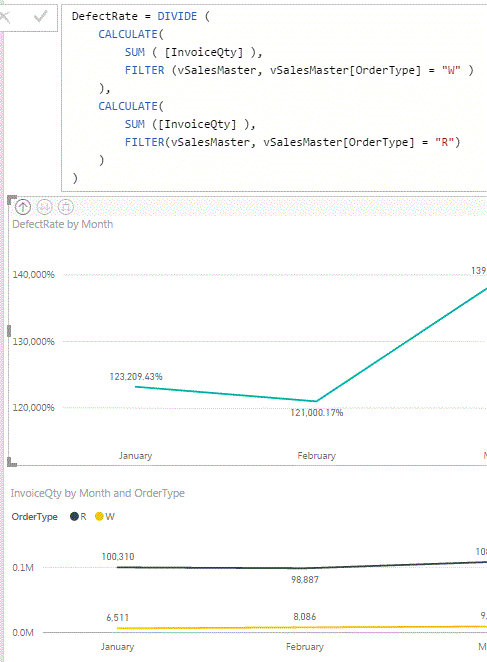
Thank you again. I am now getting numbers but they seem off. The defect rate is between 120,000% and 150,000%.
For Example: January should be 6,511/100,310 = 6.49% but the chart shows 123,209%


- Mark as New
- Bookmark
- Subscribe
- Mute
- Subscribe to RSS Feed
- Permalink
- Report Inappropriate Content
Hi @Anonymous,
Please share your sample data for further analysis. If possible, please upload your pbix file.
Regards,
Yuliana Gu
If this post helps, then please consider Accept it as the solution to help the other members find it more quickly.
- Mark as New
- Bookmark
- Subscribe
- Mute
- Subscribe to RSS Feed
- Permalink
- Report Inappropriate Content
@Anonymous
Hi, is very difficult find a reason not viewing the data.
Try to create a measure to only sum the R and other to only sum the W and show in a visuals with the months, Maybe this give you a clue to solve it.
Lima - Peru
- Mark as New
- Bookmark
- Subscribe
- Mute
- Subscribe to RSS Feed
- Permalink
- Report Inappropriate Content
Thank you all very much for the responses. I reloaded my two tables in a new file and merged them together. The formula works great now. I appreciate the assistance.
Helpful resources

FabCon & SQLCon – Barcelona 2026
Join us in Barcelona for FabCon and SQLCon, the Fabric, Power BI, SQL, and AI community event. Save €200 with code FABCMTY200.

Data Days 2026
Join Data Days 2026: 60 days of free live/on-demand sessions, challenges, study groups, and certification opportunities.

Power BI DataViz World Championships - June 2026
A new Power BI DataViz World Championship is coming this June! Don't miss out on submitting your entry.

| User | Count |
|---|---|
| 29 | |
| 26 | |
| 25 | |
| 25 | |
| 18 |


| User | Count |
|---|---|
| 54 | |
| 49 | |
| 43 | |
| 36 | |
| 32 |


