cancel
Showing results for 
Search instead for 
Did you mean: 

The Power BI Data Visualization World Championships is back! Get ahead of the game and start preparing now! Learn more

Reply
bella769
Frequent Visitor

Default slicer date

Hi 

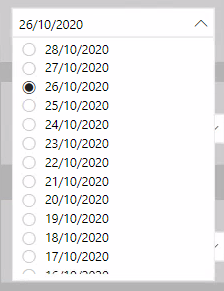
I have a date slicer which looks like this 

bella769_0-1603878493788.png

and my dashboard is refreshed daily with the date/time shown

bella769_1-1603878540783.png 

does anyone know how to get the slicer to automatically select the date the refresh took place.  At the moment it is a manual process where the slicer has to be updated everyday.  I've tried istoday, relative date, but this then only gives the option of one date and I want the other dates to still be an option.  I've also datediff/generateseries to bring a date range with today as the max date, but this still requires manual selection of the date after refresh. 


Is this actually possible or am I wasting my time?

3 REPLIES 3
Anonymous
Not applicable

Hi @bella769 

Could you tell me if your problem has been solved? If it is, kindly Accept it as the solution. More people will benefit from it. Or you are still confused about it, please provide me with more details about your table and your problem or share me with your pbix file from your Onedrive for Business.


Best Regards,

Rico Zhou

Anonymous
Not applicable

Hello @bella769

Currently we would not be able to add a measure in the slicer so that today's date is automatically filtered, however, we could create a measure in your visual to achieve your goal.

I build a sample table:
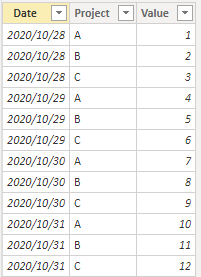
1.png

Create a dimdata table.

Date = CALENDAR(MIN('Table'[Date]),MAX('Table'[Date]))

Theb construct a measure, drag it to the filter field, and set it to display items when it is not blank.

Measure = 
VAR _SEL = SELECTEDVALUE('Date'[Date])
VAR _Date = IF(ISFILTERED('Date'[Date]),_SEL,TODAY())
VAR _Result = IF(MAX('Table'[Date])=_Date,1,BLANK())
RETURN
_Result

The result is as shown below, it will display the values currently by default, and you can use slicer to display values on different dates.
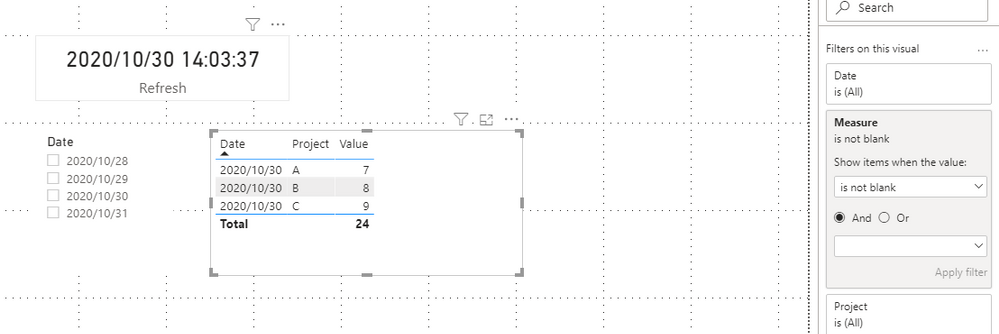
2.png

You can download the pbix file from this link: Default targeting date

Best regards

Rico Zhou

If this post helps,then consider Accepting it as the solution to help other members find it faster.

amitchandak
Super User
Super User

@bella769 , Try is Today with a difference.

Create a column with today and all dates

Is Today = if('Date'[Date]=TODAY(),"Today",[Date]&"")

It is a text column, Sort it on your date column. You can select and save on today and other dates are also avaible


refer: https://www.youtube.com/watch?v=hfn05preQYA&list=PLPaNVDMhUXGaaqV92SBD5X2hk3TMNlHhb&index=35


Share with Power BI Enthusiasts: Full Power BI Video (20 Hours) YouTube
Microsoft Fabric Series 60+ Videos YouTube
Microsoft Fabric Hindi End to End YouTube

Helpful resources

Announcements
Power BI DataViz World Championships

Power BI Dataviz World Championships

The Power BI Data Visualization World Championships is back! Get ahead of the game and start preparing now!

December 2025 Power BI Update Carousel

Power BI Monthly Update - December 2025

Check out the December 2025 Power BI Holiday Recap!

FabCon Atlanta 2026 carousel

FabCon Atlanta 2026

Join us at FabCon Atlanta, March 16-20, for the ultimate Fabric, Power BI, AI and SQL community-led event. Save $200 with code FABCOMM.
