cancel
Showing results for 
Search instead for 
Did you mean: 

The Power BI Data Visualization World Championships is back! Get ahead of the game and start preparing now! Learn more

Reply
EnochS
Advocate II
Advocate II

Default Summarization

Hello,


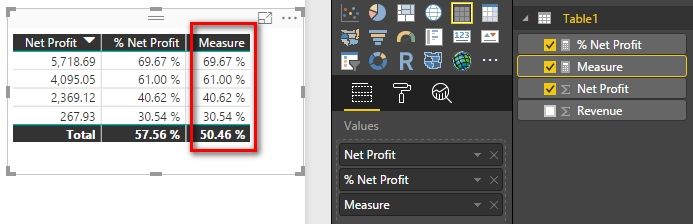
I'm trying to change the column total to be an average, instead of summarized, for some percentages. As you can see below, the average is not correct:


 2.JPG


I have my data housed in a SQL Database and most of the calculations are done in the ETL process so my data is mostly ready to go for Power BI. The calculations that I use in Power BI are for data that are in multiple tables so I have used "Measures":


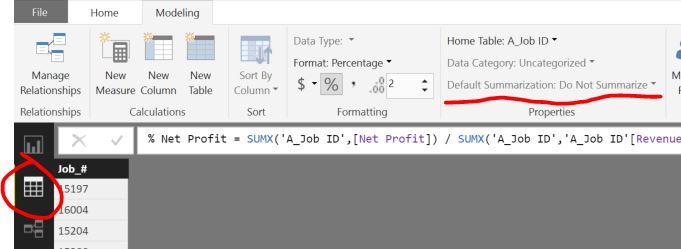
3.JPG


For some reason I can't change the "Default Summarization" Settings. It's greyed out. I'm assuming you cannot change that for measures..


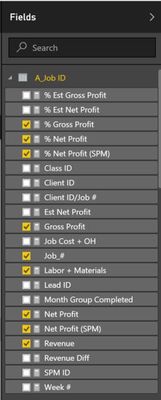
1.JPG


 What are my options to change this since summarized %'s are not correct. I would like them to be averages. It seems that I could potentially create a custom column (like the picture above ("Job_#), but if there is a simpler way then that would be best. Please let me know if you know what can be done.


Thank you,

1 ACCEPTED SOLUTION
v-haibl-msft
Microsoft Employee
Microsoft Employee

@EnochS


If you already have a measure for % Net Profit, please try to create another measure with following DAX expression.

Measure = 
AVERAGEX ( A_Job ID, [% Net Profit] )

Default Summarization_1.jpg


Best Regards,

Herbert

View solution in original post

2 REPLIES 2
v-haibl-msft
Microsoft Employee
Microsoft Employee

@EnochS


If you already have a measure for % Net Profit, please try to create another measure with following DAX expression.

Measure = 
AVERAGEX ( A_Job ID, [% Net Profit] )

Default Summarization_1.jpg


Best Regards,

Herbert

Thank you!


That looks like it is the answer that I was looking for. I realized that I actually made a mistake regarding the needed calculation. An average of the % net profit, vs the total % net profit are two different numbers and will give us two different numbers because it's basically just telling us our success rate, vs the total success that we've had. The original numbers and calculation was correct. 


The measure you provided though can come in handy so that we can see what the average % net profit we do actually get on a regular basis and let's us see if wee need to improve in our operations or company overhead.


Thank you for taking the time to solve this.

Helpful resources

Announcements
Power BI DataViz World Championships

Power BI Dataviz World Championships

The Power BI Data Visualization World Championships is back! Get ahead of the game and start preparing now!

December 2025 Power BI Update Carousel

Power BI Monthly Update - December 2025

Check out the December 2025 Power BI Holiday Recap!

FabCon Atlanta 2026 carousel

FabCon Atlanta 2026

Join us at FabCon Atlanta, March 16-20, for the ultimate Fabric, Power BI, AI and SQL community-led event. Save $200 with code FABCOMM.