Join us at FabCon Atlanta from March 16 - 20, 2026, for the ultimate Fabric, Power BI, AI and SQL community-led event. Save $200 with code FABCOMM.
Register now!Learn from the best! Meet the four finalists headed to the FINALS of the Power BI Dataviz World Championships! Register now
Solved! Go to Solution.
Hi @Anonymous ,
I created a simple table as below:
Then create a measure as below:
Current Month Data =
IF(ISFILTERED('Table (2)'[Month])||ISFILTERED('Table (2)'[Year]),SELECTEDVALUE('Table (2)'[Sales]),IF(MAX('Table (2)'[Month])=MONTH(TODAY())&&MAX('Table (2)'[Year])=YEAR(TODAY()),MAX('Table (2)'[Sales]),BLANK()))
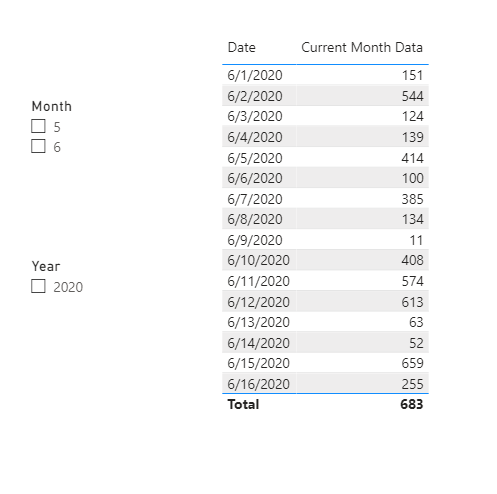
And you will see: (When you open the .pbix file,it will show):
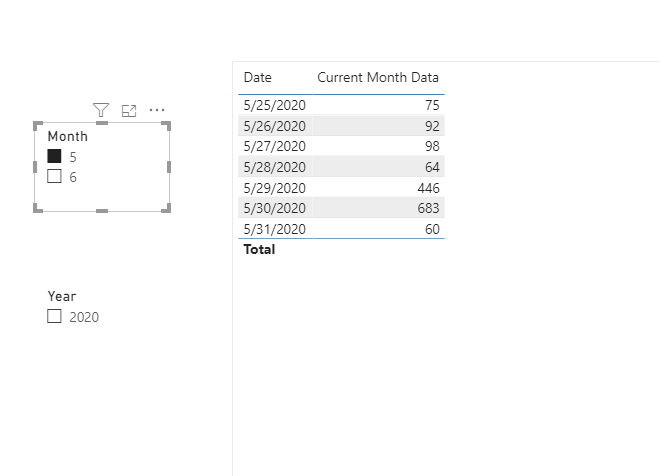
When you select May,it will show:
For the related .pbix file,pls click here.
@Anonymous ,The information you have provided is not making the problem clear to me. Can you please explain with an example.
See if this can help
https://docs.microsoft.com/en-us/power-bi/visuals/desktop-slicer-filter-date-range
Appreciate your Kudos.
I have created a report whenever we have opened that report the data should be displayed current monthly data or current yearly data.
After that by selecting year or months we can select the as we want.
Hi @Anonymous ,
I created a simple table as below:
Then create a measure as below:
Current Month Data =
IF(ISFILTERED('Table (2)'[Month])||ISFILTERED('Table (2)'[Year]),SELECTEDVALUE('Table (2)'[Sales]),IF(MAX('Table (2)'[Month])=MONTH(TODAY())&&MAX('Table (2)'[Year])=YEAR(TODAY()),MAX('Table (2)'[Sales]),BLANK()))
And you will see: (When you open the .pbix file,it will show):
When you select May,it will show:
For the related .pbix file,pls click here.
Share feedback directly with Fabric product managers, participate in targeted research studies and influence the Fabric roadmap.
Check out the February 2026 Power BI update to learn about new features.
| User | Count |
|---|---|
| 53 | |
| 47 | |
| 30 | |
| 15 | |
| 14 |
| User | Count |
|---|---|
| 88 | |
| 73 | |
| 38 | |
| 26 | |
| 25 |