We've captured the moments from FabCon & SQLCon that everyone is talking about, and we are bringing them to the community, live and on-demand. Starts on April 14th. Register now
Hi Buddies,
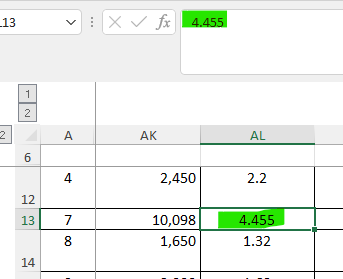
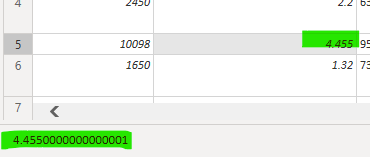
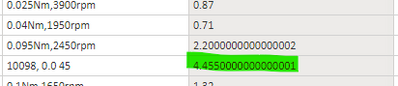
It's weird that 4.455 would become 4.45500000000000001, anyone facing such issue as well?
How can it change back to 4.455???
(In my case the data type will keep as any, it won't change to decimal, as the column consist of other data type)
Source: Excel
PowerQuery
Power BI
Hi @simonchung ,
Has your problem been solved, if so, please consider Accept a correct reply as the solution or share your own solution to help others find it.
Best Regards
Lucien
Really really thanks for your kindly reply, this issue has not been solved.
I'm busy to doing other task, so I have no time to manage this issue right now. I'm really sorry for this, maybe I'll get back to this issue few weeks later
Hi @simonchung ,
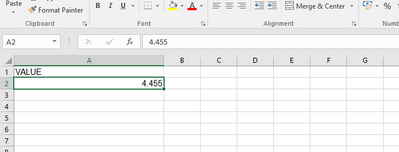
I created a test file and tested it and this did not happen, you can try to import my test file and see if it is normal, also are you convenient to provide the excel where you have the problem, remember to delete the confidential data for me to test and check.
After import:
Best Regards
Lucien
@simonchung , In DAX, in the column tool, restrict the number of the decimal place. There can difference in decimal number accuracy in tools at the high number of decimal places.
It doesn't works.
Actually, I wanna treat that field as a text
If you have recently started exploring Fabric, we'd love to hear how it's going. Your feedback can help with product improvements.
A new Power BI DataViz World Championship is coming this June! Don't miss out on submitting your entry.
Share feedback directly with Fabric product managers, participate in targeted research studies and influence the Fabric roadmap.
| User | Count |
|---|---|
| 53 | |
| 38 | |
| 33 | |
| 17 | |
| 17 |
| User | Count |
|---|---|
| 67 | |
| 62 | |
| 38 | |
| 34 | |
| 22 |