Don't miss your chance to take the Fabric Data Engineer (DP-700) exam on us!
Learn moreWe've captured the moments from FabCon & SQLCon that everyone is talking about, and we are bringing them to the community, live and on-demand. Starts on April 14th. Register now
Hi all,
General query -
Overall issue of in detail debugging data source loading (i.e. not just looking at the load pop up box as this dissapears too quickly to view last datsource to complete etc.).
Specific requirement -
I am looking to adhoc log load times of my PowerBI docs. I have built two stored procedures (one to trigger at the start of a data load and one at the end), these update a table in a database to log load times and progress status etc.
TLDR: I would like a specific data source to load first and another to load last.
Any assitance with this matter would be appreciated, any ideas?
Thank you
William
hi, @WilliamDaisy89
I have a little confused about your description.
And according to my knowledge, all the queries will run at the same time.
And if you try to use SQL Server Profiler with power bi.
Best Regards,
Lin
@v-lili6-msft Thank you for your feedback, within PowerBI are you able to view which dataset finished loading last?
hi, @WilliamDaisy89
I'm afraid it is difficult to achieve in Power bi,
It usually depends on size of data source, steps for queries, the network status , etc.
As a workaround, you may try this way:
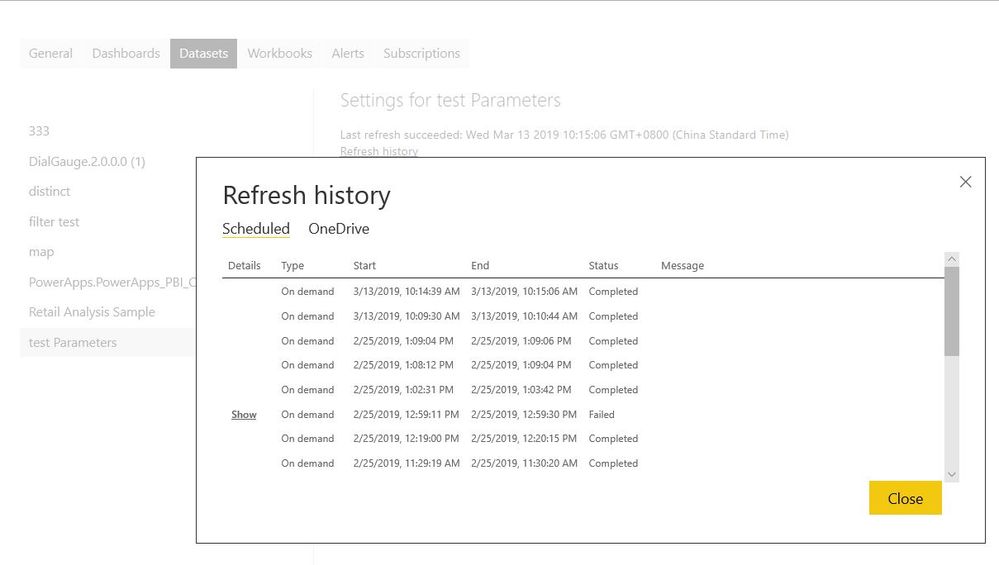
Set different dataset then refresh it in power bi service.
And when datasets have refreshed complete, you could see refresh history in dateset.
It includes start datetime and end datetime, you could use them as a reference
Best Regards,
Lin
If you have recently started exploring Fabric, we'd love to hear how it's going. Your feedback can help with product improvements.
A new Power BI DataViz World Championship is coming this June! Don't miss out on submitting your entry.
Share feedback directly with Fabric product managers, participate in targeted research studies and influence the Fabric roadmap.
| User | Count |
|---|---|
| 55 | |
| 40 | |
| 35 | |
| 19 | |
| 18 |
| User | Count |
|---|---|
| 71 | |
| 70 | |
| 38 | |
| 35 | |
| 23 |