Join us at FabCon Atlanta from March 16 - 20, 2026, for the ultimate Fabric, Power BI, AI and SQL community-led event. Save $200 with code FABCOMM.
Register now!Get Fabric Certified for FREE during Fabric Data Days. Don't miss your chance! Request now
Hi :),
yeah I know the question is normally "How can I create a Tooltip" but in this case my customer like to deaktivate the default Tooltip which shows the Name from the Column/Row Header again.
Is this even possible?
For a better understandig I created a short gif 🙂
Thanks @all,
best regards,
Kathrin
Solved! Go to Solution.
Hi @KBO
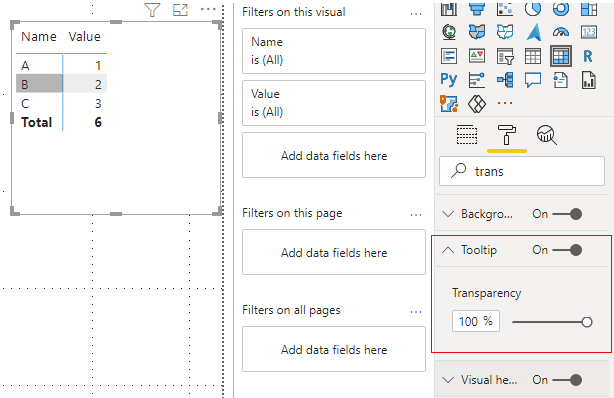
You can try to turn on Tooltip function in Format. Then set Transparency to 100%, this can solve your problem.
Best Regards,
Rico Zhou
If this post helps, then please consider Accept it as the solution to help the other members find it more quickly.
Hi @KBO
You can try to turn on Tooltip function in Format. Then set Transparency to 100%, this can solve your problem.
Best Regards,
Rico Zhou
If this post helps, then please consider Accept it as the solution to help the other members find it more quickly.
Thank you! That works like a charm!
Greates Tip of the day! Thanks @Anonymous your the best 🙂
Not currently possible. Maybe raise an idea.
Check out the November 2025 Power BI update to learn about new features.
Advance your Data & AI career with 50 days of live learning, contests, hands-on challenges, study groups & certifications and more!