cancel
Showing results for 
Search instead for 
Did you mean: 

The Power BI Data Visualization World Championships is back! Get ahead of the game and start preparing now! Learn more

Reply
Farmertree
Frequent Visitor

Days between two dates and a date slicer

I would like to count a total number of available days between a variable range of two dates defined by a slicer. I have a table with employees ID, start date and end date. Missing end dates indicate employees are still employed.


Table .jpg


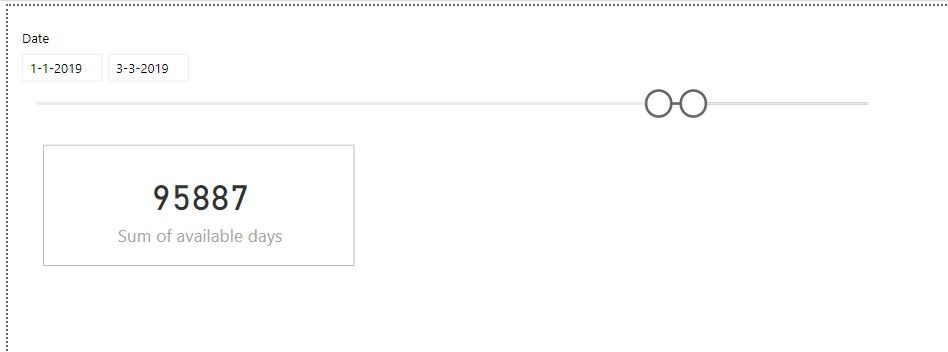
In my report I would like to have a card visual that shows the sum of days that employees are available between a date range defined by a slicer. Something like this:


Visual.jpg


Is it possible to create such a measure?


Thank you for your help!

2 ACCEPTED SOLUTIONS
Anonymous
Not applicable

Hi @Farmertree ,

Yes, it is possible. You can add variables to extract min and max date from selected calendar date and compare with start/end date to get datediff. After these, package them with a sumx function to summary datediff result.

Meausre =
VAR selected =
    ALLSELECTED ( Calendar[Date] )
VAR _max =
    MAXX ( selected, [Date] )
VAR _min =
    MINX ( selected, [Date] )
RETURN
    SUMX (
        ADDCOLUMNS (
            ALLSELECTED ( Table ),
            "Diff", DATEDIFF ( MAX ( [Start date], _min ), MIN ( [End date], _max ), DAY )
        ),
        [Diff]
    )

Regards,

Xiaoxin Sheng

View solution in original post

@Anonymous Thanks! This helps a lot. The only problem is that this formula returns a negative DATEDIFF value for End dates < _min. Do you know how i could apply a filter within this formula that only selects rows in which Enddate >= _min?

View solution in original post

3 REPLIES 3
Anonymous
Not applicable

Hi @Farmertree ,

Yes, it is possible. You can add variables to extract min and max date from selected calendar date and compare with start/end date to get datediff. After these, package them with a sumx function to summary datediff result.

Meausre =
VAR selected =
    ALLSELECTED ( Calendar[Date] )
VAR _max =
    MAXX ( selected, [Date] )
VAR _min =
    MINX ( selected, [Date] )
RETURN
    SUMX (
        ADDCOLUMNS (
            ALLSELECTED ( Table ),
            "Diff", DATEDIFF ( MAX ( [Start date], _min ), MIN ( [End date], _max ), DAY )
        ),
        [Diff]
    )

Regards,

Xiaoxin Sheng

@Anonymous Thanks! This helps a lot. The only problem is that this formula returns a negative DATEDIFF value for End dates < _min. Do you know how i could apply a filter within this formula that only selects rows in which Enddate >= _min?

Anonymous
Not applicable

HI @Farmertree ,

You can do compare between date and _min to get the bigger one and use in datediff function:

Measure =
VAR selected =
    ALLSELECTED ( Calendar[Date] )
VAR _max =
    MAXX ( selected, [Date] )
VAR _min =
    MINX ( selected, [Date] )
RETURN
    SUMX (
        ADDCOLUMNS (
            ALLSELECTED ( Table ),
            "Diff", DATEDIFF (
                MAX ( [Start date], _min ),
                MIN ( MAX ( [End date], _min ), _max ),
                DAY
            )
        ),
        [Diff]
    )

Regards,

Xiaoxin Sheng

Helpful resources

Announcements
Power BI DataViz World Championships

Power BI Dataviz World Championships

The Power BI Data Visualization World Championships is back! Get ahead of the game and start preparing now!

December 2025 Power BI Update Carousel

Power BI Monthly Update - December 2025

Check out the December 2025 Power BI Holiday Recap!

FabCon Atlanta 2026 carousel

FabCon Atlanta 2026

Join us at FabCon Atlanta, March 16-20, for the ultimate Fabric, Power BI, AI and SQL community-led event. Save $200 with code FABCOMM.