Join us at FabCon Atlanta from March 16 - 20, 2026, for the ultimate Fabric, Power BI, AI and SQL community-led event. Save $200 with code FABCOMM.
Register now!Learn from the best! Meet the four finalists headed to the FINALS of the Power BI Dataviz World Championships! Register now
Hi all,
Using Power BI Desktop July, 2021.
I have a Calendar and Sales Tables
The tables are 1:M on Date Field.
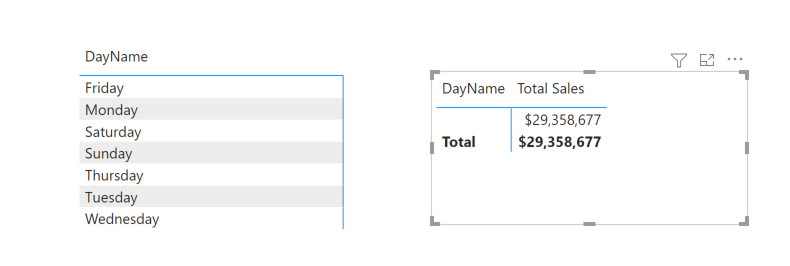
I put the DayName on Rows in Matrix Visual
I then added Total Sales to Values
As soon as I add Total Sales to Values, the DayName disappears from the Matrix
I tried to make the column wider for the DayName - no help.
If I remove Total Sales from Values, the DayName displays on the Matrix again.
Any ideas?
Thanks,
-w
Solved! Go to Solution.
The OrderDate column on your Sales table is formatted as text. Change that to type Date and it will work.
Pat
To learn more about Power BI, follow me on Twitter or subscribe on YouTube.
Thanks Pat,
The Order Date in the Sales Table was the culprit - thanks!
-w
Thanks Jihwan,
I uploaded to OneDrive : https://tinyurl.com/jm4deeea
If it does not take you directly to the pbix its in //public/power_bi/aw2.pbix
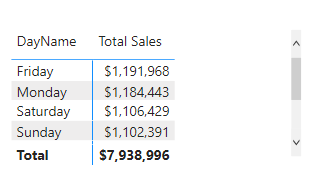
The 2 Matrices are on Page 9.
Thanks,
-w
-w
The OrderDate column on your Sales table is formatted as text. Change that to type Date and it will work.
Pat
To learn more about Power BI, follow me on Twitter or subscribe on YouTube.
Hi,
I am not sure how your data model looks like, but in my opinion, it seems like there is an invalid relationship between fact table and date table.
If it is OK with you, please share your sample pbix file, then I can try to look into it to come up with a relevant solution.
Thanks.
Share feedback directly with Fabric product managers, participate in targeted research studies and influence the Fabric roadmap.
Check out the February 2026 Power BI update to learn about new features.
| User | Count |
|---|---|
| 53 | |
| 48 | |
| 35 | |
| 14 | |
| 14 |
| User | Count |
|---|---|
| 93 | |
| 79 | |
| 37 | |
| 27 | |
| 25 |