FabCon is coming to Atlanta
Join us at FabCon Atlanta from March 16 - 20, 2026, for the ultimate Fabric, Power BI, AI and SQL community-led event. Save $200 with code FABCOMM.
Register now!- Power BI forums
- Get Help with Power BI
- Desktop
- Service
- Report Server
- Power Query
- Mobile Apps
- Developer
- DAX Commands and Tips
- Custom Visuals Development Discussion
- Health and Life Sciences
- Power BI Spanish forums
- Translated Spanish Desktop
- Training and Consulting
- Instructor Led Training
- Dashboard in a Day for Women, by Women
- Galleries
- Data Stories Gallery
- Themes Gallery
- Contests Gallery
- QuickViz Gallery
- Quick Measures Gallery
- Visual Calculations Gallery
- Notebook Gallery
- Translytical Task Flow Gallery
- TMDL Gallery
- R Script Showcase
- Webinars and Video Gallery
- Ideas
- Custom Visuals Ideas (read-only)
- Issues
- Issues
- Events
- Upcoming Events
The Power BI Data Visualization World Championships is back! Get ahead of the game and start preparing now! Learn more
- Power BI forums
- Forums
- Get Help with Power BI
- Desktop
- Re: Day number of year
- Subscribe to RSS Feed
- Mark Topic as New
- Mark Topic as Read
- Float this Topic for Current User
- Bookmark
- Subscribe
- Printer Friendly Page

- Mark as New
- Bookmark
- Subscribe
- Mute
- Subscribe to RSS Feed
- Permalink
- Report Inappropriate Content
Day number of year
Hello Forum,
I am looking for the simplest way of creating a measure that just returns day number of the year, ie 2017-04-03 would return 93.
Note: Not trying to create a calculated column.
thx,
Peter


- Mark as New
- Bookmark
- Subscribe
- Mute
- Subscribe to RSS Feed
- Permalink
- Report Inappropriate Content
Perhaps something like this:
Measure = (YEARFRAC("Jan 1 2017",TODAY())*360)+1
Follow on LinkedIn
@ me in replies or I'll lose your thread!!!
Instead of a Kudo, please vote for this idea
Become an expert!: Enterprise DNA
External Tools: MSHGQM
YouTube Channel!: Microsoft Hates Greg
Latest book!: DAX For Humans
DAX is easy, CALCULATE makes DAX hard...
- Mark as New
- Bookmark
- Subscribe
- Mute
- Subscribe to RSS Feed
- Permalink
- Report Inappropriate Content
thx, this seems to work, how can I make the year to be the current year automatically
- Mark as New
- Bookmark
- Subscribe
- Mute
- Subscribe to RSS Feed
- Permalink
- Report Inappropriate Content
thx, this seems to work, how can I make the year to be the current year automatically

- Mark as New
- Bookmark
- Subscribe
- Mute
- Subscribe to RSS Feed
- Permalink
- Report Inappropriate Content
My Measure takes care of this 
- Mark as New
- Bookmark
- Subscribe
- Mute
- Subscribe to RSS Feed
- Permalink
- Report Inappropriate Content
Yes, I tried yours first for that reason 🙂 I will expand on what I am trying to achieve. I have a table with monthly targets.
Jan (20), Feb (25), March (20), April (50), etc
I would like to create a measure that gives me the YTD target per a specific date such as April 5. What is the smartest way of doing that?
thx
- Mark as New
- Bookmark
- Subscribe
- Mute
- Subscribe to RSS Feed
- Permalink
- Report Inappropriate Content
How about this...
Day Of Year Measure = DATEDIFF(DATE(YEAR(TODAY()), 1,1), TODAY(), DAY) + 1


- Mark as New
- Bookmark
- Subscribe
- Mute
- Subscribe to RSS Feed
- Permalink
- Report Inappropriate Content
2 years later and this helped someone else! Thanks!
Curious - is there a way to do this with month number? Basically, I want the result to be the month number of whatever month that TODAY is in.
Thanks!
- Mark as New
- Bookmark
- Subscribe
- Mute
- Subscribe to RSS Feed
- Permalink
- Report Inappropriate Content
Thx Sean, this syntax does not seem to work for me
- Mark as New
- Bookmark
- Subscribe
- Mute
- Subscribe to RSS Feed
- Permalink
- Report Inappropriate Content
Day Of Year Measure 2 = ( YEARFRAC ( DATE ( YEAR ( TODAY() ), 1,1 ),TODAY() )*360 ) + 1
- Mark as New
- Bookmark
- Subscribe
- Mute
- Subscribe to RSS Feed
- Permalink
- Report Inappropriate Content
Thx Sean, cannot get this to work either. What am I missing?


- Mark as New
- Bookmark
- Subscribe
- Mute
- Subscribe to RSS Feed
- Permalink
- Report Inappropriate Content
Hi
How about this (you might have to replace semicolons with commas)? Not sure whether I understand your requirement..:
DayOfYear =
	DATEDIFF(
		DATE(YEAR(MAX('Calendar'[Date])); 1;1);
		MAX('Calendar'[Date]);
		DAY)
	+ 1
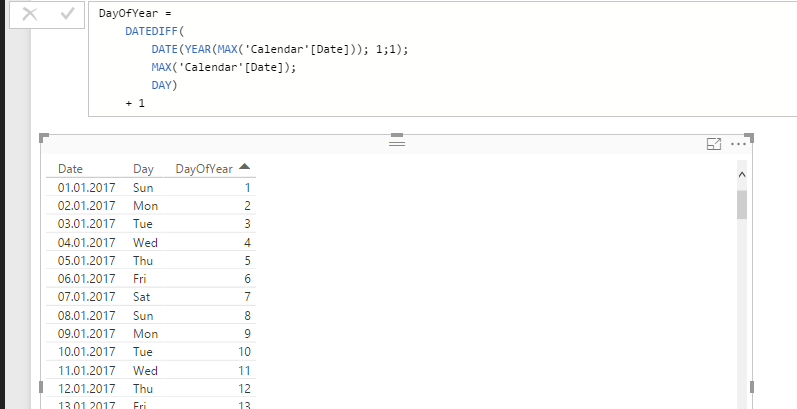
Hope this helps!
JJ
- Mark as New
- Bookmark
- Subscribe
- Mute
- Subscribe to RSS Feed
- Permalink
- Report Inappropriate Content
Hi JJ, thx for helping out.
I would like to be able to create the measure without any reference to any date in a table, ie what is the number of days in the current year.
brgds,
Peter
- Mark as New
- Bookmark
- Subscribe
- Mute
- Subscribe to RSS Feed
- Permalink
- Report Inappropriate Content
Here is what i use to calculate the day of year in a column, if that is any help.
(Date.DayOfYear(DateTime.LocalNow())
- Mark as New
- Bookmark
- Subscribe
- Mute
- Subscribe to RSS Feed
- Permalink
- Report Inappropriate Content
Can you post some sample data and also end result expected?
- Mark as New
- Bookmark
- Subscribe
- Mute
- Subscribe to RSS Feed
- Permalink
- Report Inappropriate Content
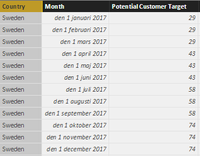
A table would look like this with monthly targets. What is the YTD target on April 5. that measure would return the TotalYTD for the first 3 months + 5 days worth of April target = 94 (29+29+29+43*(5/30)
A simple way to get close is to do (TotalYTD for the targetcolumn*12 (no of months)*daynumberofyear)/monthno), but it will not be exact in any way
- Mark as New
- Bookmark
- Subscribe
- Mute
- Subscribe to RSS Feed
- Permalink
- Report Inappropriate Content
Hi @Peterwis,
If you want to calculate YTD target, you can refer to below formula:
YTD= SUMX(FILTER(ALL(Table),[Date]<=Max([Date])&&Year([Date])=Year(Max([Date]))),[Target])
Regards,
Xiaoxin Sheng
- Mark as New
- Bookmark
- Subscribe
- Mute
- Subscribe to RSS Feed
- Permalink
- Report Inappropriate Content
Hi Xiaoxin,
Thx for your help. Not totally sure I understand your syntax. I have tried applying it to my data but I cannot get it to return anything meaningful so maybe it just does not fit with my data per above.
thx anyway
Peter
- Mark as New
- Bookmark
- Subscribe
- Mute
- Subscribe to RSS Feed
- Permalink
- Report Inappropriate Content
Hi @Peterwis,
I think your month column is not the date type, right?
If this is a case, you can add a calculated column to transform it to date type, then write a measure calculated on it.
Calculate column to analysis date:
Analysis Date = DATEVALUE(RIGHT([Month],LEN([Month])-FIND(" ",[Month])))
Measure to calculate YTD:
YTD = SUMX(FILTER(ALL(Record),[Analysis Date]<=Max([Analysis Date])&&Year([Analysis Date])=Year(Max([Analysis Date]))),[Target])
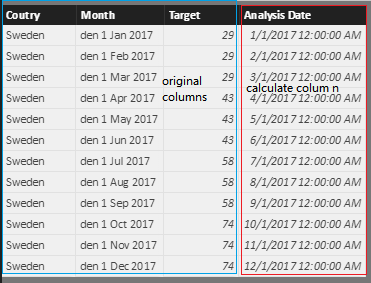
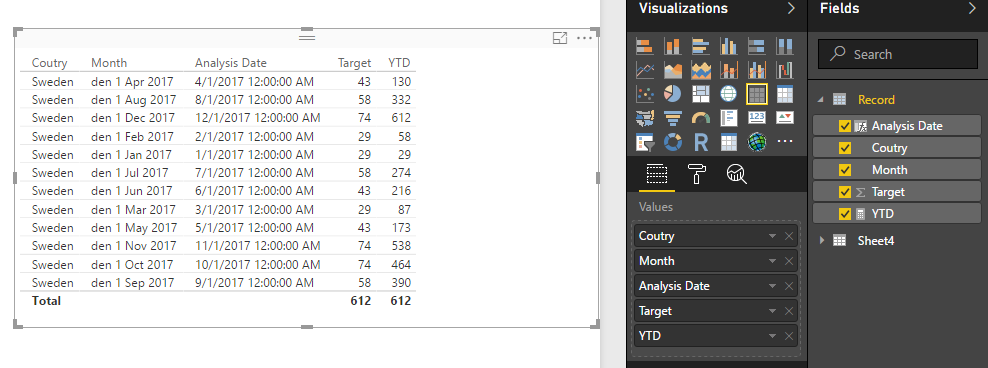
Regards,
Xiaxin Sheng
- Mark as New
- Bookmark
- Subscribe
- Mute
- Subscribe to RSS Feed
- Permalink
- Report Inappropriate Content
Hi Xiaxin,
My current month is already date typ so no need to create an additional column. Will investigate your proposal and see if it solves my problem.
kind regards,
Peter

- Mark as New
- Bookmark
- Subscribe
- Mute
- Subscribe to RSS Feed
- Permalink
- Report Inappropriate Content
Looking at this topic, I get confused whether we are looking for a DAX or M solution.
In case of the latter, this works for me:
Query MonthlyTargets:
let
    Source = Table.FromColumns({{1..4},{20,25,20,50}},type table[Month = Int64.Type, Target = Int64.Type])
in
    Source
Query YTDTargets (returning dates 1/1/2017 thru 30/4/2017, each with the YTD Target):
let
    Source = Table.FromColumns({List.Dates(#date(2017,1,1),120,#duration(1,0,0,0))},type table[Date = date]),
    YTDTarget = Table.AddColumn(
                    Source,
                    "YTD Target",
                    (YTD) => List.Sum({0}&Table.SelectRows(MonthlyTargets, each [Month] < Date.Month(YTD[Date]))[Target]) +
                             Date.Day(YTD[Date])/Date.Day(Date.EndOfMonth(YTD[Date])) *
                             Table.SelectRows(MonthlyTargets, each [Month] = Date.Month(YTD[Date]))[Target]{0},
                    type number)
in
    YTDTarget

Helpful resources

Power BI Dataviz World Championships
The Power BI Data Visualization World Championships is back! Get ahead of the game and start preparing now!

Power BI Monthly Update - December 2025
Check out the December 2025 Power BI Holiday Recap!

FabCon Atlanta 2026
Join us at FabCon Atlanta, March 16-20, for the ultimate Fabric, Power BI, AI and SQL community-led event. Save $200 with code FABCOMM.

| User | Count |
|---|---|
| 39 | |
| 38 | |
| 38 | |
| 28 | |
| 27 |


| User | Count |
|---|---|
| 124 | |
| 88 | |
| 73 | |
| 66 | |
| 65 |


