Join us at FabCon Atlanta from March 16 - 20, 2026, for the ultimate Fabric, Power BI, AI and SQL community-led event. Save $200 with code FABCOMM.
Register now!The Power BI Data Visualization World Championships is back! Get ahead of the game and start preparing now! Learn more
Hello,
I feel like this particular issue is likely really simple but I can't find any good examples.
I have a really simple report with a date slicer and two visuals. I need one visual to display the data from the selected slicer date and the other visual to display +1 day from the selected slicer date. This would be easy if the date selection was constant to use relative dates but the user may want to select a date from last week and then the relative dates stops working as intended.
Any ideas?
Solved! Go to Solution.
Hi jarnolky,
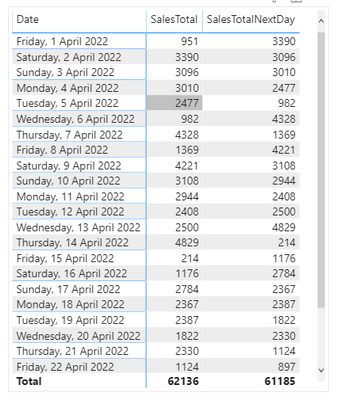
You could also use DATEADD function
Example
SalesTotal = SUM('SalesData'[Sales])
SalesTotalNextDay = CALCULATE([SalesTotal],DATEADD(_Calendar[Date],1,DAY))
Hope that helps.
Thank you
@amitchandak @jsaunders_zero9 Thank you so much! I knew I was over thinking this one, I really appreciate it!
Hi jarnolky,
You could also use DATEADD function
Example
SalesTotal = SUM('SalesData'[Sales])
SalesTotalNextDay = CALCULATE([SalesTotal],DATEADD(_Calendar[Date],1,DAY))
Hope that helps.
Thank you
@Anonymous , if you need next day
example with date table and time intelligence
Next Day = CALCULATE(sum('Table'[Qty]), FILTER(ALL('Date'),'Date'[Date]=max('Date'[Date])+1))
Next Day = CALCULATE(sum('Table'[Qty]), nextday('Date'[Date]))
The Power BI Data Visualization World Championships is back! Get ahead of the game and start preparing now!
| User | Count |
|---|---|
| 38 | |
| 38 | |
| 36 | |
| 28 | |
| 28 |
| User | Count |
|---|---|
| 124 | |
| 88 | |
| 74 | |
| 66 | |
| 65 |