Join us at FabCon Atlanta from March 16 - 20, 2026, for the ultimate Fabric, Power BI, AI and SQL community-led event. Save $200 with code FABCOMM.
Register now!Get Fabric Certified for FREE during Fabric Data Days. Don't miss your chance! Request now
Hi Community,
I need a DAX to find count of a related product based on selection of product selected in the filter.
Example: Consider A as Product , if I select Product A, I want to know the count of Product A and Count of Other Products which are purchased with Product A.
Person 1 buy a Pen with Pencil
Person 2 buy a Pen with Eraser
Person 3 buy a Pencil with Eraser
If I filter Pen then I need count of Pen Purchased and Related Product Count
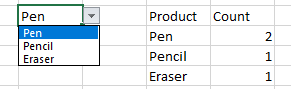
Such as Product Filter:Pen Count :2 Related Product:Pencil Count:1
Eraser Count:1
Somewhat similar to this
Thanks In Advance
Amz
Solved! Go to Solution.
Hi @Amz_123
You may create measures like below.Attached sample file for your reference.
count of product =
IF (
ISFILTERED ( Slicer[Product] ),
CALCULATE (
COUNT ( Table1[Product] ),
FILTER ( Table1, Table1[Product] IN VALUES ( Slicer[Product] ) )
)
)
Count of Other Products =
VAR a =
CALCULATETABLE (
VALUES ( Table1[Person] ),
FILTER ( ALL ( Table1 ), Table1[Product] IN VALUES ( Slicer[Product] ) )
)
RETURN
CALCULATE (
COUNT ( Table1[Product] ),
FILTER (
Table1,
Table1[Person] IN a
&& Table1[Product] <> SELECTEDVALUE ( Slicer[Product] )
)
)
Regards,
Hi @Amz_123
You may create measures like below.Attached sample file for your reference.
count of product =
IF (
ISFILTERED ( Slicer[Product] ),
CALCULATE (
COUNT ( Table1[Product] ),
FILTER ( Table1, Table1[Product] IN VALUES ( Slicer[Product] ) )
)
)
Count of Other Products =
VAR a =
CALCULATETABLE (
VALUES ( Table1[Person] ),
FILTER ( ALL ( Table1 ), Table1[Product] IN VALUES ( Slicer[Product] ) )
)
RETURN
CALCULATE (
COUNT ( Table1[Product] ),
FILTER (
Table1,
Table1[Person] IN a
&& Table1[Product] <> SELECTEDVALUE ( Slicer[Product] )
)
)
Regards,
Hi,
just import data in Power bi.
Use slicer dropdown option for product and add product and count into the table.
you will get the desired result.
let me know if you need help and share some data
Hi @adityavighne ,
This is not what I asked,
I need DAX, If I select Pen I what Pen count with the count of product which I purchased with Pen. Based on above example which I said in above message says Person 1 and Person 2 brought Pen along with 1 Pencil and 1 Eraser.
Here you have shown only the total count of Pen I need the count of Pencil and Eraser Since its purchased by Person 1 and Person 2.
So, while filtering Pen I want to get,
Pen=2
Pencil=1
Eraser=1
while filtering Pencil,
Pencil=2
Pen=1
Eraser=1
while filtering Eraser,
Eraser=2
Pen=1
Pencil=1
Thanks
Check out the November 2025 Power BI update to learn about new features.
Advance your Data & AI career with 50 days of live learning, contests, hands-on challenges, study groups & certifications and more!