Join us at FabCon Atlanta from March 16 - 20, 2026, for the ultimate Fabric, Power BI, AI and SQL community-led event. Save $200 with code FABCOMM.
Register now!The Power BI Data Visualization World Championships is back! Get ahead of the game and start preparing now! Learn more
Hi,
I am new to DAX language. I am using powerpivot in Excel 2016.
I have the following spreadsheet that uses DAX time function.
Date Futures Settlement Daily Adjustment
1/1/2017 10.22
1/2/2017 10.46 -0.24
1/3/2017 10.87 -0.41
1/4/2017 11.02 -0.15
1/5/2017 10.67 0.35
1/6/2017 0 0
1/7/2017 0 0
1/8/2017 10.42 0.25
1/9/2017 10.21 0.21
1/10/2017 10.1 0.11
This was done in plain excel just as an example of what I have in real life. What I need to do using powerpivot/DAX is to create the difference (Daily Adjustment column) but “skipping” the zeroes. See above that the 1/8/2017 it is the difference of 10.42 minus previous cell that has a value, in this case 10.67.
I have seen lots of posts referring to row differences by using INDEX. This is not the case here. I would like to do this by using the column [DATE]. Is there a way to do this? Like, “get current value and subtract from last date where there is a value on column “Futures Settlement”.
Thank you,
Marcos
Solved! Go to Solution.
Hi,
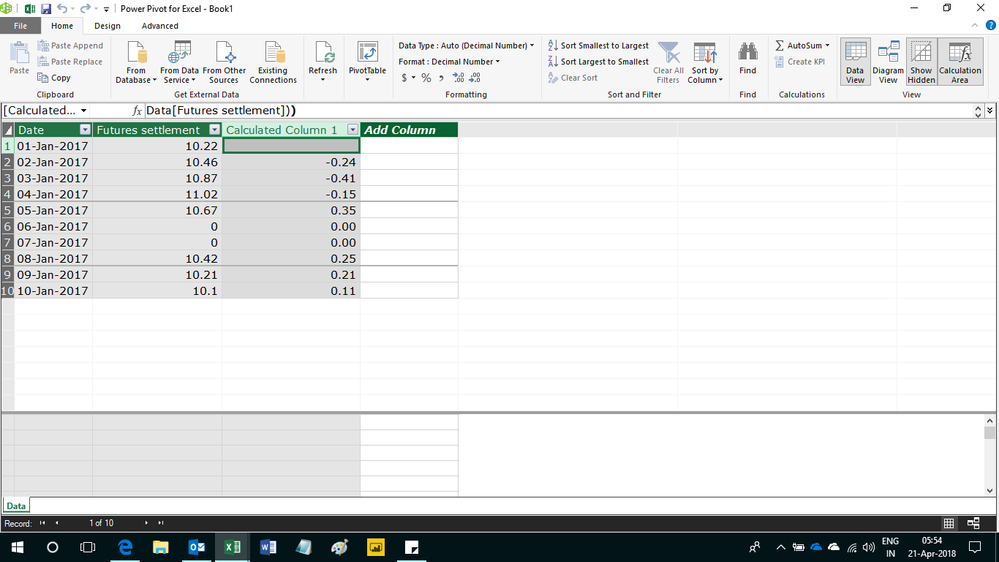
Enter this calculated column formula
=if(ISBLANK(CALCULATE(LASTNONBLANK(Data[Date],1),FILTER(Data,Data[Date]<EARLIER(Data[Date])),Data[Futures settlement]>0)),BLANK(),if(Data[Futures settlement]=0,0,LOOKUPVALUE(Data[Futures settlement],Data[Date],CALCULATE(LASTNONBLANK(Data[Date],1),FILTER(Data,Data[Date]<EARLIER(Data[Date])),Data[Futures settlement]>0))-Data[Futures settlement]))
Hope this helps.
Hi,
Enter this calculated column formula
=if(ISBLANK(CALCULATE(LASTNONBLANK(Data[Date],1),FILTER(Data,Data[Date]<EARLIER(Data[Date])),Data[Futures settlement]>0)),BLANK(),if(Data[Futures settlement]=0,0,LOOKUPVALUE(Data[Futures settlement],Data[Date],CALCULATE(LASTNONBLANK(Data[Date],1),FILTER(Data,Data[Date]<EARLIER(Data[Date])),Data[Futures settlement]>0))-Data[Futures settlement]))
Hope this helps.
Hello Ashish,
Thank you so much for your help. This is exactly what I was looking for. By reading your solution/formula I am starting to understand a bit more about the logic behind dax language. Fantastic.
Cheers!
Marcos
You are welcome.
The Power BI Data Visualization World Championships is back! Get ahead of the game and start preparing now!
| User | Count |
|---|---|
| 38 | |
| 36 | |
| 33 | |
| 33 | |
| 29 |
| User | Count |
|---|---|
| 134 | |
| 96 | |
| 78 | |
| 67 | |
| 65 |