cancel
Showing results for 
Search instead for 
Did you mean: 

The Power BI Data Visualization World Championships is back! It's time to submit your entry. Live now!

Reply
marcosmoraes
New Member

Dax time function difference between rows ignoring zero

Hi,

I am new to DAX language. I am using powerpivot in Excel 2016.

I have the following spreadsheet that uses DAX time function.

Date      Futures Settlement         Daily Adjustment

1/1/2017            10.22   

1/2/2017            10.46    -0.24

1/3/2017            10.87    -0.41

1/4/2017            11.02    -0.15

1/5/2017            10.67    0.35

1/6/2017            0            0

1/7/2017            0            0

1/8/2017            10.42    0.25

1/9/2017            10.21    0.21

1/10/2017          10.1       0.11


This was done in plain excel just as an example of what I have in real life. What I need to do using powerpivot/DAX is to create the difference (Daily Adjustment column) but “skipping” the zeroes. See above that the 1/8/2017 it is the difference of 10.42 minus previous cell that has a value, in this case 10.67.

I have seen lots of posts referring to row differences by using INDEX. This is not the case here. I would like to do this by using the column [DATE]. Is there a way to do this? Like, “get current value and subtract from last date where there is a value on column “Futures Settlement”.

Thank you,

Marcos

1 ACCEPTED SOLUTION
Ashish_Mathur
Super User
Super User

Hi,


Enter this calculated column formula


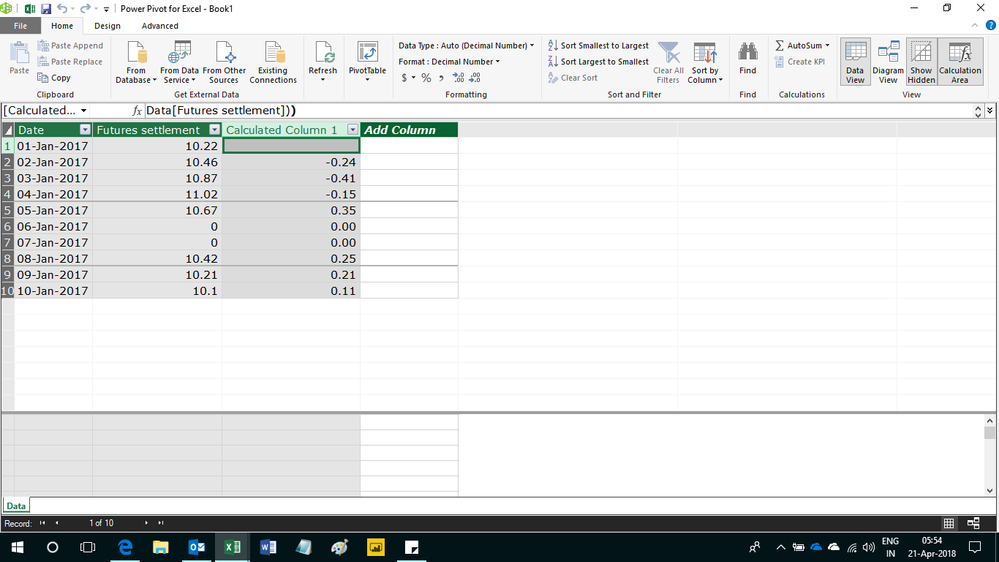
=if(ISBLANK(CALCULATE(LASTNONBLANK(Data[Date],1),FILTER(Data,Data[Date]<EARLIER(Data[Date])),Data[Futures settlement]>0)),BLANK(),if(Data[Futures settlement]=0,0,LOOKUPVALUE(Data[Futures settlement],Data[Date],CALCULATE(LASTNONBLANK(Data[Date],1),FILTER(Data,Data[Date]<EARLIER(Data[Date])),Data[Futures settlement]>0))-Data[Futures settlement]))


Hope this helps.


Untitled.png


Regards,
Ashish Mathur
http://www.ashishmathur.com
https://www.linkedin.com/in/excelenthusiasts/

View solution in original post

3 REPLIES 3
Ashish_Mathur
Super User
Super User

Hi,


Enter this calculated column formula


=if(ISBLANK(CALCULATE(LASTNONBLANK(Data[Date],1),FILTER(Data,Data[Date]<EARLIER(Data[Date])),Data[Futures settlement]>0)),BLANK(),if(Data[Futures settlement]=0,0,LOOKUPVALUE(Data[Futures settlement],Data[Date],CALCULATE(LASTNONBLANK(Data[Date],1),FILTER(Data,Data[Date]<EARLIER(Data[Date])),Data[Futures settlement]>0))-Data[Futures settlement]))


Hope this helps.


Untitled.png


Regards,
Ashish Mathur
http://www.ashishmathur.com
https://www.linkedin.com/in/excelenthusiasts/

Hello Ashish,


Thank you so much for your help. This is exactly what I was looking for. By reading your solution/formula I am starting to understand a bit more about the logic behind dax language. Fantastic.


Cheers!


Marcos

You are welcome.


Regards,
Ashish Mathur
http://www.ashishmathur.com
https://www.linkedin.com/in/excelenthusiasts/

Helpful resources

Announcements
Power BI DataViz World Championships

Power BI Dataviz World Championships

The Power BI Data Visualization World Championships is back! It's time to submit your entry.

Sticker Challenge 2026 Carousel

Join our Community Sticker Challenge 2026

If you love stickers, then you will definitely want to check out our Community Sticker Challenge!

January Power BI Update Carousel

Power BI Monthly Update - January 2026

Check out the January 2026 Power BI update to learn about new features.

FabCon Atlanta 2026 carousel

FabCon Atlanta 2026

Join us at FabCon Atlanta, March 16-20, for the ultimate Fabric, Power BI, AI and SQL community-led event. Save $200 with code FABCOMM.