cancel
Showing results for 
Search instead for 
Did you mean: 

Learn from the best! Meet the four finalists headed to the FINALS of the Power BI Dataviz World Championships! Register now

Reply
Benx
Helper I
Helper I

Dax performance issues

Hello all,


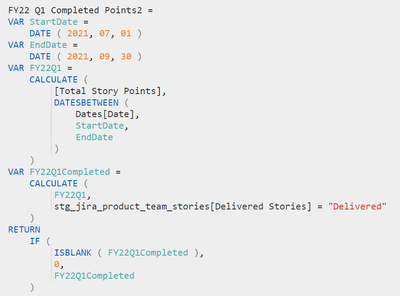
I've run into a confounding performance issue in one of my reports.  Through the use of Perfomance Anylizer in Desktop, and DAX Studio, I have been able to narrow the primary cause for the issues down to one (apparently) poorly written DAX measure.  I've made several attempts to improve this, but haven't had success.  Can anyone suggest a better way to approach this measure?

Benx_1-1632760571605.png


1 ACCEPTED SOLUTION
parry2k
Super User
Super User

@Benx you cannot have a filter on var , you should merge FY22Q1 and FY22Q1Completed in one measure. Also if you want to return zero in case of BLANK(), add +0 to the var and then return the var without if coniditon


Also, it is better to paste the code instead of the image so that it is easy to change.


VAR FYQ1 = CALCUALTE ( [Yourmeasure], DATESBETWEEEN ( <your dates>> ), YourTable[YourColumn] = "Completed" ) + 0
RETURN
FYQ1


Follow us on LinkedIn


Check my latest blog post The Power of Using Calculation Groups with Inactive Relationships (Part 1) (perytus.com) I would  Kudos if my solution helped. 👉 If you can spend time posting the question, you can also make efforts to give Kudos to whoever helped to solve your problem. It is a token of appreciation!


Visit us at https://perytus.com, your one-stop-shop for Power BI-related projects/training/consultancy.


Subscribe to the @PowerBIHowTo YT channel for an upcoming video on List and Record functions in Power Query!!

Learn Power BI and Fabric - subscribe to our YT channel - Click here: @PowerBIHowTo

If my solution proved useful, I'd be delighted to receive Kudos. When you put effort into asking a question, it's equally thoughtful to acknowledge and give Kudos to the individual who helped you solve the problem. It's a small gesture that shows appreciation and encouragement! ❤


Did I answer your question? Mark my post as a solution. Proud to be a Super User! Appreciate your Kudos 🙂
Feel free to email me with any of your BI needs.

View solution in original post

2 REPLIES 2
parry2k
Super User
Super User

@Benx you cannot have a filter on var , you should merge FY22Q1 and FY22Q1Completed in one measure. Also if you want to return zero in case of BLANK(), add +0 to the var and then return the var without if coniditon


Also, it is better to paste the code instead of the image so that it is easy to change.


VAR FYQ1 = CALCUALTE ( [Yourmeasure], DATESBETWEEEN ( <your dates>> ), YourTable[YourColumn] = "Completed" ) + 0
RETURN
FYQ1


Follow us on LinkedIn


Check my latest blog post The Power of Using Calculation Groups with Inactive Relationships (Part 1) (perytus.com) I would  Kudos if my solution helped. 👉 If you can spend time posting the question, you can also make efforts to give Kudos to whoever helped to solve your problem. It is a token of appreciation!


Visit us at https://perytus.com, your one-stop-shop for Power BI-related projects/training/consultancy.


Subscribe to the @PowerBIHowTo YT channel for an upcoming video on List and Record functions in Power Query!!

Learn Power BI and Fabric - subscribe to our YT channel - Click here: @PowerBIHowTo

If my solution proved useful, I'd be delighted to receive Kudos. When you put effort into asking a question, it's equally thoughtful to acknowledge and give Kudos to the individual who helped you solve the problem. It's a small gesture that shows appreciation and encouragement! ❤


Did I answer your question? Mark my post as a solution. Proud to be a Super User! Appreciate your Kudos 🙂
Feel free to email me with any of your BI needs.

Thank you parry2k!  This is so much cleaner!

Helpful resources

Announcements
Power BI DataViz World Championships carousel

Power BI DataViz World Championships - June 2026

A new Power BI DataViz World Championship is coming this June! Don't miss out on submitting your entry.

Join our Fabric User Panel

Join our Fabric User Panel

Share feedback directly with Fabric product managers, participate in targeted research studies and influence the Fabric roadmap.

March Power BI Update Carousel

Power BI Community Update - March 2026

Check out the March 2026 Power BI update to learn about new features.