Don't miss your chance to take exam DP-600 or DP-700 on us!
Request nowLearn from the best! Meet the four finalists headed to the FINALS of the Power BI Dataviz World Championships! Register now
Hi everyone,
I would like to do this measure :
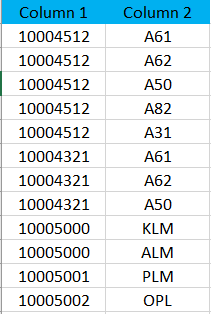
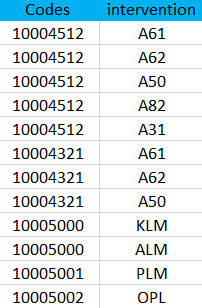
calculate the number of interventions using the distinctcount function for which there is neither the "A61" nor the "A62" intervention, but also does not take into account other interventions including the co-response codes A61 AND A62 Here is the table. Table name: Table.
Another information: there are a lot of data like this.
Thank you, My best regards.
Solved! Go to Solution.
I'm sorry, but I don't understand your question.
What do you mean by "calculate the number of interventions"?
Can you tell us what result you would expect the measure to return from the sample data you posted?
@Anonymous wrote:the result will be = 3
Ah ok, So you are counting distinct values from the Codes column provided that none of the interventions for that code are A61 or A62.
One was of doing this is a measure like the following:
DCount Codes =
var _excludedCol1 = CALCULATETABLE(ALLSELECTED('Table'[Codes]), FILTER(ALL('Table'),'Table'[Intervention] IN {"A61","A62"}))
var _result = CALCULATE(DISTINCTCOUNT('Table'[Codes]), not 'Table'[Codes] in _excludedCol1)
return _result I basically create the first variable as a list of Codes that do have one of A61 or A62, then I exclude these codes from the distinct count.
I'm sorry, but I don't understand your question.
What do you mean by "calculate the number of interventions"?
Can you tell us what result you would expect the measure to return from the sample data you posted?
Hi,
to be more precise
the result will be = 3
@Anonymous wrote:the result will be = 3
Ah ok, So you are counting distinct values from the Codes column provided that none of the interventions for that code are A61 or A62.
One was of doing this is a measure like the following:
DCount Codes =
var _excludedCol1 = CALCULATETABLE(ALLSELECTED('Table'[Codes]), FILTER(ALL('Table'),'Table'[Intervention] IN {"A61","A62"}))
var _result = CALCULATE(DISTINCTCOUNT('Table'[Codes]), not 'Table'[Codes] in _excludedCol1)
return _result I basically create the first variable as a list of Codes that do have one of A61 or A62, then I exclude these codes from the distinct count.
Share feedback directly with Fabric product managers, participate in targeted research studies and influence the Fabric roadmap.
Check out the February 2026 Power BI update to learn about new features.
| User | Count |
|---|---|
| 49 | |
| 40 | |
| 37 | |
| 14 | |
| 14 |
| User | Count |
|---|---|
| 86 | |
| 69 | |
| 37 | |
| 29 | |
| 26 |