FabCon is coming to Atlanta
Join us at FabCon Atlanta from March 16 - 20, 2026, for the ultimate Fabric, Power BI, AI and SQL community-led event. Save $200 with code FABCOMM.
Register now!- Power BI forums
- Get Help with Power BI
- Desktop
- Service
- Report Server
- Power Query
- Mobile Apps
- Developer
- DAX Commands and Tips
- Custom Visuals Development Discussion
- Health and Life Sciences
- Power BI Spanish forums
- Translated Spanish Desktop
- Training and Consulting
- Instructor Led Training
- Dashboard in a Day for Women, by Women
- Galleries
- Data Stories Gallery
- Themes Gallery
- Contests Gallery
- QuickViz Gallery
- Quick Measures Gallery
- Visual Calculations Gallery
- Notebook Gallery
- Translytical Task Flow Gallery
- TMDL Gallery
- R Script Showcase
- Webinars and Video Gallery
- Ideas
- Custom Visuals Ideas (read-only)
- Issues
- Issues
- Events
- Upcoming Events
The Power BI Data Visualization World Championships is back! Get ahead of the game and start preparing now! Learn more
- Power BI forums
- Forums
- Get Help with Power BI
- Desktop
- Re: Dax formula to calculate comission
- Subscribe to RSS Feed
- Mark Topic as New
- Mark Topic as Read
- Float this Topic for Current User
- Bookmark
- Subscribe
- Printer Friendly Page

- Mark as New
- Bookmark
- Subscribe
- Mute
- Subscribe to RSS Feed
- Permalink
- Report Inappropriate Content
Dax formula to calculate comission
Hi guys!
I need a little help about DAX formula to calculate comission for some items.
2 tables:
Commission Table
ID | FAMILY | PRODUCT | COMISSION |
1 | 100 | * | 10% |
2 | 100 | CAR | 5% |
3 | 200 | * | 6% |
4 | 300 | * | 7% |
FACT TABLE
ID | FAMILY | PRODUCT | Euros | COMISSION | Total Com |
1 | 100 | MOTO | 100 | 10% | 10 |
2 | 300 | APPLE | 200 | 7% | 14 |
3 | 200 | HOUSE | 300 | 6% | 18 |
4 | 100 | CAR | 400 | 5% | 20 |
Last two columns for FACT Table are calculated by DAX FORMULA
I need a formula with DAX that:
1.- Search if there's a comission (=FAMILY and =PRODUCT).
2.- If there's no comission, search for only one variable (=FAMILY and Product =*).
Do you know how to do it?

- Mark as New
- Bookmark
- Subscribe
- Mute
- Subscribe to RSS Feed
- Permalink
- Report Inappropriate Content
- Mark as New
- Bookmark
- Subscribe
- Mute
- Subscribe to RSS Feed
- Permalink
- Report Inappropriate Content
Hi Again!
Example:
FACT Table ID1 : Family 100 and Product MOTO --> Search default comission (100 and *) = 10%
FACT Table ID1 : Family 100 and Product CAR --> Search specific comission (100 and CAR) = 5%
- Mark as New
- Bookmark
- Subscribe
- Mute
- Subscribe to RSS Feed
- Permalink
- Report Inappropriate Content
So instead of having duplicates of one family, you want the aggregated, is that correctly understood?
- Mark as New
- Bookmark
- Subscribe
- Mute
- Subscribe to RSS Feed
- Permalink
- Report Inappropriate Content
Exactly! it's like switch formula:
1.- Find family and product
2.-Find family and product *


- Mark as New
- Bookmark
- Subscribe
- Mute
- Subscribe to RSS Feed
- Permalink
- Report Inappropriate Content
Hi @Osti2,
Please refer below steps to get the desired results:
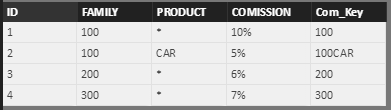
1. Create a custom Column in COMMISION table
Com_Key = IF(Commision[PRODUCT]="*",Commision[FAMILY],CONCATENATE(Commision[FAMILY],Commision[PRODUCT]))
2. Create a Custom Column in FACT table
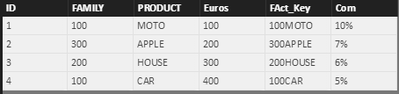
FAct_Key = CONCATENATE('Fact'[FAMILY],'Fact'[PRODUCT])
3. Create a Custom Column in FACT table
Com = IF(ISBLANK(LOOKUPVALUE(Commision[COMISSION],Commision[Com_Key],'Fact'[FAct_Key])),LOOKUPVALUE(Commision[COMISSION],Commision[Com_Key],'Fact'[FAMILY]),LOOKUPVALUE(Commision[COMISSION],Commision[Com_Key],'Fact'[FAct_Key]))
Hope this helps!
-Sumit
- Mark as New
- Bookmark
- Subscribe
- Mute
- Subscribe to RSS Feed
- Permalink
- Report Inappropriate Content
Thank you sumi4732!
Your solution works, but i'm looking more effective solution when comission is calculated by more than two variables.
I mean, imagine the same example but you are working with five variables:
-Family
-Product
-Item
-Campaing
-Store
With IF and LOOKUPVALUE is a bit difficult, don't you think?
- Mark as New
- Bookmark
- Subscribe
- Mute
- Subscribe to RSS Feed
- Permalink
- Report Inappropriate Content
I'm not sure what you want, which is different from what you already have. @sumit4732's solution gives you the same as you've already got. Maybe you should aggregate the families and their comissions? Or maybe I misunderstand what you want. Could you please elaborate?
- Mark as New
- Bookmark
- Subscribe
- Mute
- Subscribe to RSS Feed
- Permalink
- Report Inappropriate Content
Can you send me a picture of your desired end result?
Helpful resources

Power BI Dataviz World Championships
The Power BI Data Visualization World Championships is back! Get ahead of the game and start preparing now!

Power BI Monthly Update - November 2025
Check out the November 2025 Power BI update to learn about new features.

FabCon Atlanta 2026
Join us at FabCon Atlanta, March 16-20, for the ultimate Fabric, Power BI, AI and SQL community-led event. Save $200 with code FABCOMM.

| User | Count |
|---|---|
| 59 | |
| 43 | |
| 42 | |
| 23 | |
| 17 |


| User | Count |
|---|---|
| 190 | |
| 122 | |
| 96 | |
| 66 | |
| 47 |


