cancel
Showing results for 
Search instead for 
Did you mean: 

The Power BI Data Visualization World Championships is back! Get ahead of the game and start preparing now! Learn more

Reply
shyamily_123
Frequent Visitor

Dax formula for calculating no. of projects from past 30 days, past 30 - 60 days and < 60 days

Hi ,

I have a requirement where I need to calcuate "Number of projects created" for last 30 days, 30-60 days and above 60 days.

I have two date columns "actual start date" and "Expected delivery date".

 
no of days = DATEDIFF('Work in Progress'[Actual Start date],'Work in Progress'[Estimated Delivery/Close date],DAY)
 
Using above formula i am getting no of days between two dates but i need projects between 30,30-60 and above 60.
1 ACCEPTED SOLUTION
Anonymous
Not applicable

Hi @shyamily_123 ,


According to your description , you mean counting the number of projects with a project time of 30 days, 30-60 days, and more than 60 days, right? Here are my steps you can follow as a solution.

(1) This is my test data. 

vtangjiemsft_0-1671003444585.png


(2) We can create calculated columns.

Column = var a=DATEDIFF('Table'[Actual start date],'Table'[Expected delivery date],DAY)

return SWITCH(TRUE(),a<30,"<30",a>=30&&a<=60,"30~60",a>60,">60")
Column 2 = COUNTAx(FILTER('Table','Table'[Column]=EARLIER('Table'[Column])),[Column])

(3) Then the result is as follows.
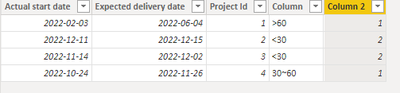
vtangjiemsft_3-1671003574065.png

If the above one can't help you get the desired result, please provide some sample data in your tables (exclude sensitive data) with Text format and your expected result with backend logic and special examples. It is better if you can share a simplified pbix file. Thank you.


Best Regards,

Neeko Tang

If this post  helps, then please consider Accept it as the solution to help the other members find it more quickly. 

View solution in original post

1 REPLY 1
Anonymous
Not applicable

Hi @shyamily_123 ,


According to your description , you mean counting the number of projects with a project time of 30 days, 30-60 days, and more than 60 days, right? Here are my steps you can follow as a solution.

(1) This is my test data. 

vtangjiemsft_0-1671003444585.png


(2) We can create calculated columns.

Column = var a=DATEDIFF('Table'[Actual start date],'Table'[Expected delivery date],DAY)

return SWITCH(TRUE(),a<30,"<30",a>=30&&a<=60,"30~60",a>60,">60")
Column 2 = COUNTAx(FILTER('Table','Table'[Column]=EARLIER('Table'[Column])),[Column])

(3) Then the result is as follows.

vtangjiemsft_3-1671003574065.png

If the above one can't help you get the desired result, please provide some sample data in your tables (exclude sensitive data) with Text format and your expected result with backend logic and special examples. It is better if you can share a simplified pbix file. Thank you.


Best Regards,

Neeko Tang

If this post  helps, then please consider Accept it as the solution to help the other members find it more quickly. 

Helpful resources

Announcements
Power BI DataViz World Championships

Power BI Dataviz World Championships

The Power BI Data Visualization World Championships is back! Get ahead of the game and start preparing now!

December 2025 Power BI Update Carousel

Power BI Monthly Update - December 2025

Check out the December 2025 Power BI Holiday Recap!

FabCon Atlanta 2026 carousel

FabCon Atlanta 2026

Join us at FabCon Atlanta, March 16-20, for the ultimate Fabric, Power BI, AI and SQL community-led event. Save $200 with code FABCOMM.