cancel
Showing results for 
Search instead for 
Did you mean: 

The Power BI Data Visualization World Championships is back! It's time to submit your entry. Live now!

Reply
martyska_sze
Frequent Visitor

Dax code optimization - any ideals?

Hi !

How you would optimise measure below? I tried to replace FILTER on KEEPFILTERS but performance stays the same.
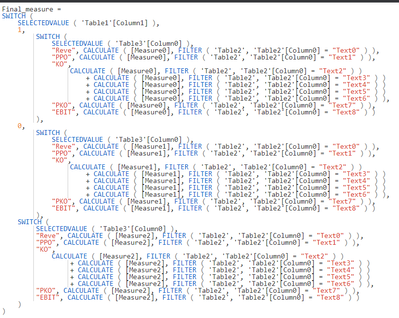


martyska_sze_0-1636465205139.png


Final_measure =
SWITCH (
    SELECTEDVALUE ( 'Table1'[Column1] ),
    1,
        SWITCH (
            SELECTEDVALUE ( 'Table3'[Column0] ),
            "Reve"CALCULATE ( [Measure0], FILTER ( 'Table2', 'Table2'[Column0] = "Text0" ) ),
            "PPO"CALCULATE ( [Measure0], FILTER ( 'Table2', 'Table2'[Column0] = "Text1" ) ),
            "KO",
                CALCULATE ( [Measure0], FILTER ( 'Table2', 'Table2'[Column0] = "Text2" ) )
                    CALCULATE ( [Measure0], FILTER ( 'Table2', 'Table2'[Column0] = "Text3" ) )
                    CALCULATE ( [Measure0], FILTER ( 'Table2', 'Table2'[Column0] = "Text4" ) )
                    CALCULATE ( [Measure0], FILTER ( 'Table2', 'Table2'[Column0] = "Text5" ) )
                    CALCULATE ( [Measure0], FILTER ( 'Table2', 'Table2'[Column0] = "Text6" ) ),
            "PKO"CALCULATE ( [Measure0], FILTER ( 'Table2', 'Table2'[Column0] = "Text7" ) ),
            "EBIT"CALCULATE ( [Measure0], FILTER ( 'Table2', 'Table2'[Column0] = "Text8" ) )
        ),
    0,
        SWITCH (
            SELECTEDVALUE ( 'Table3'[Column0] ),
            "Reve"CALCULATE ( [Measure1], FILTER ( 'Table2', 'Table2'[Column0] = "Text0" ) ),
            "PPO"CALCULATE ( [Measure1], FILTER ( 'Table2', 'Table2'[Column0] = "Text1" ) ),
            "KO",
                CALCULATE ( [Measure1], FILTER ( 'Table2', 'Table2'[Column0] = "Text2" ) )
                    CALCULATE ( [Measure1], FILTER ( 'Table2', 'Table2'[Column0] = "Text3" ) )
                    CALCULATE ( [Measure1], FILTER ( 'Table2', 'Table2'[Column0] = "Text4" ) )
                    CALCULATE ( [Measure1], FILTER ( 'Table2', 'Table2'[Column0] = "Text5" ) )
                    CALCULATE ( [Measure1], FILTER ( 'Table2', 'Table2'[Column0] = "Text6" ) ),
            "PKO"CALCULATE ( [Measure1], FILTER ( 'Table2', 'Table2'[Column0] = "Text7" ) ),
            "EBIT"CALCULATE ( [Measure1], FILTER ( 'Table2', 'Table2'[Column0] = "Text8" ) )
        ),
    SWITCH (
        SELECTEDVALUE ( 'Table3'[Column0] ),
        "Reve"CALCULATE ( [Measure2], FILTER ( 'Table2', 'Table2'[Column0] = "Text0" ) ),
        "PPO"CALCULATE ( [Measure2], FILTER ( 'Table2', 'Table2'[Column0] = "Text1" ) ),
        "KO",
            CALCULATE ( [Measure2], FILTER ( 'Table2', 'Table2'[Column0] = "Text2" ) )
                CALCULATE ( [Measure2], FILTER ( 'Table2', 'Table2'[Column0] = "Text3" ) )
                CALCULATE ( [Measure2], FILTER ( 'Table2', 'Table2'[Column0] = "Text4" ) )
                CALCULATE ( [Measure2], FILTER ( 'Table2', 'Table2'[Column0] = "Text5" ) )
                CALCULATE ( [Measure2], FILTER ( 'Table2', 'Table2'[Column0] = "Text6" ) ),
        "PKO"CALCULATE ( [Measure2], FILTER ( 'Table2', 'Table2'[Column0] = "Text7" ) ),
        "EBIT"CALCULATE ( [Measure2], FILTER ( 'Table2', 'Table2'[Column0] = "Text8" ) )
    )
)


2 REPLIES 2
V-lianl-msft
Community Support
Community Support

In my opinion, Final_measure =
SWITCH (
SELECTEDVALUE ( 'Table1'[Column1] ),
1,
xxxx,
0,
xxxx,
xxxx
) can be deleted, which seems to be invalid logic.

Then you can use nested if instead of switch:

IF(
            SELECTEDVALUE ( 'Table3'[Column0] )="Reve",
            , CALCULATE ( [Measure1], FILTER ( 'Table2', 'Table2'[Column0] = "Text0" ) ),
            	IF(
                    SELECTEDVALUE ( 'Table3'[Column0] )="PPO", 
		            CALCULATE ( [Measure1], FILTER ( 'Table2', 'Table2'[Column0] = "Text1" ) ),
                    IF(
                        SELECTEDVALUE ( 'Table3'[Column0] )="KO",
                        SUMX (FILTER ( 'Table2', 'Table2'[Column0] IN{ "Text2", "Text3","Text4","Text5","Text6"}),[Measure1]),
                            IF(
                                SELECTEDVALUE ( 'Table3'[Column0] )="PKO",
                                CALCULATE ( [Measure1], FILTER ( 'Table2', 'Table2'[Column0] = "Text7" ) ),
                                    IF(
                                        SELECTEDVALUE ( 'Table3'[Column0] )="EBIT",
                                         CALCULATE ( [Measure1], FILTER ( 'Table2', 'Table2'[Column0] = "Text8" ) )
        )
)
)
)
)

https://www.sqlservice.se/dax-quick-performance-tip-replace-switch-with-nested-ifs/ 

Greg_Deckler
Community Champion
Community Champion

@martyska_sze See if this series of 2 blog articles helps:

Performance Tuning DAX - Part 1 - Microsoft Power BI Community

Performance Tuning DAX - Part 2 - Microsoft Power BI Community


There is a recent comment on Part 2 that demonstrates the potential value of optimizing your data model.


Follow on LinkedIn
@ me in replies or I'll lose your thread!!!
Instead of a Kudo, please vote for this idea
Become an expert!: Enterprise DNA
External Tools: MSHGQM
YouTube Channel!: Microsoft Hates Greg
Latest book!:
DAX For Humans

DAX is easy, CALCULATE makes DAX hard...

Helpful resources

Announcements
Power BI DataViz World Championships

Power BI Dataviz World Championships

The Power BI Data Visualization World Championships is back! It's time to submit your entry.

January Power BI Update Carousel

Power BI Monthly Update - January 2026

Check out the January 2026 Power BI update to learn about new features.

FabCon Atlanta 2026 carousel

FabCon Atlanta 2026

Join us at FabCon Atlanta, March 16-20, for the ultimate Fabric, Power BI, AI and SQL community-led event. Save $200 with code FABCOMM.