cancel
Showing results for 
Search instead for 
Did you mean: 

The Power BI Data Visualization World Championships is back! Get ahead of the game and start preparing now! Learn more

Reply
Kennethtonglu
New Member

Dax Week calculation

Hello,PBI experts,

Thank you for reading my question.


i want to achieve a week calculation with last/current/duture week measure in power BI in below model by DAX,  the outcome by these measures can be refreshed with week number forward. 


Product volume for last weekvolume for last 4 weeksvolume for current weekvolume for current week +1
1    
2    
3    


hereI i have raw data table that covers information:  production week(but there's no product date ), product name, volume.  I went throuh previous post related to weekly calculation, while most of them are based on date level to calcuate with filter function, how ever currently how i can achieve this if I don't have related date information in raw data.


Thank you.


raw data example,

week number of 2019 ClientProduct volume(package)
201901A110
201901B120
201901C230
201902A210
201902A320
201902A110
201903A120
201904B220
201904B345
201935C220
201937B110
201938B320


1 ACCEPTED SOLUTION

Hi Kennethtonglu,

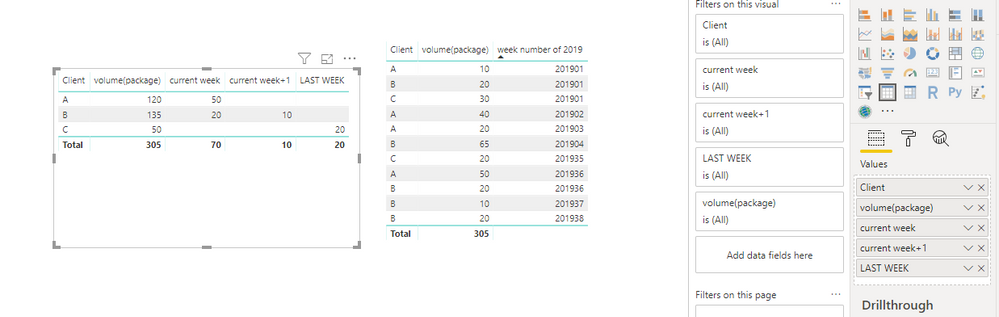
You also don't need to create calendar, below is my sample

week number of 2019  Client Product  volume(package)
201901 A 1 10
201901 B 1 20
201901 C 2 30
201902 A 2 10
201902 A 3 20
201902 A 1 10
201903 A 1 20
201904 B 2 20
201904 B 3 45
201935 C 2 20
201937 B 1 10
201938 B 3 20
201936 A 1 10
201936 A 2 20
201936 A 3 20
201936 B 3 20

Please make sure week number of 2019 is number type, then you could create measures like below

LAST WEEK = CALCULATE(SUM(weeksum[volume(package)]), FILTER(ALLEXCEPT(weeksum,weeksum[Client]), weeksum[week number of 2019 ]=YEAR(TODAY())*100+WEEKNUM(TODAY())-1))
current week = CALCULATE(SUM(weeksum[volume(package)]), FILTER(ALLEXCEPT(weeksum,weeksum[Client]), weeksum[week number of 2019 ]=YEAR(TODAY())*100+WEEKNUM(TODAY())))
current week+1 = CALCULATE(SUM(weeksum[volume(package)]), FILTER(ALLEXCEPT(weeksum,weeksum[Client]), weeksum[week number of 2019 ]=YEAR(TODAY())*100+WEEKNUM(TODAY())+1))

310.PNG

Best Regards,
Zoe Zhi

If this post helps, then please consider Accept it as the solution to help the other members find it more quickly.

View solution in original post

3 REPLIES 3
Kennethtonglu
New Member

Thanks Matt, and your recommendation.


i build up calendar table with unique week number and create some week volume measures for last week, current week by below calculation (just take last week calculation here) , it works to get output when i add week number to table ( I guess it gives context and measure is getting outcome by this context),but when i replace week number with product name, there is no any output.


the calcualtion I made now:

Volume Last WK:=CALCULATE([Volume],
FILTER(ALL('Calendar'),
'Calendar'[week]<=MAX('Calendar'[week])-1&&
'Calendar'[week]>=MAX('Calendar'[week])-1
)
)

the outcome when i added week number into table 

wk                volume last week   current wk    current wk+1 

201901              XX                           XX                 XX

201902              XX                           XX                 XX

201903              XX                           XX                 XX

...

201935               XX                         XX                 XX


well, what i want to get finally is to have volume output by product on differnet week basis as below, how can i get it to achieve this calculation and it can be refreshed automatically  with week number move foward.  may i have your further suggestions?  much appreciation in advance.


target layout:

product   volume last week   current wk    current wk+1 

A                XX                           XX                 XX

B               XX                           XX                 XX

C               XX                           XX                 XX


Hi Kennethtonglu,

You also don't need to create calendar, below is my sample

week number of 2019  Client Product  volume(package)
201901 A 1 10
201901 B 1 20
201901 C 2 30
201902 A 2 10
201902 A 3 20
201902 A 1 10
201903 A 1 20
201904 B 2 20
201904 B 3 45
201935 C 2 20
201937 B 1 10
201938 B 3 20
201936 A 1 10
201936 A 2 20
201936 A 3 20
201936 B 3 20

Please make sure week number of 2019 is number type, then you could create measures like below

LAST WEEK = CALCULATE(SUM(weeksum[volume(package)]), FILTER(ALLEXCEPT(weeksum,weeksum[Client]), weeksum[week number of 2019 ]=YEAR(TODAY())*100+WEEKNUM(TODAY())-1))
current week = CALCULATE(SUM(weeksum[volume(package)]), FILTER(ALLEXCEPT(weeksum,weeksum[Client]), weeksum[week number of 2019 ]=YEAR(TODAY())*100+WEEKNUM(TODAY())))
current week+1 = CALCULATE(SUM(weeksum[volume(package)]), FILTER(ALLEXCEPT(weeksum,weeksum[Client]), weeksum[week number of 2019 ]=YEAR(TODAY())*100+WEEKNUM(TODAY())+1))

310.PNG

Best Regards,
Zoe Zhi

If this post helps, then please consider Accept it as the solution to help the other members find it more quickly.

MattAllington
Community Champion
Community Champion

Your  week number column is a surrogate key.  You need to create a calendar table with the same key column -  One row for every week.  I then suggest you add a week ID column starting from one and continuing to increase by one for every week in your calendar.   You should also add a year column and a week number of year column.  You can then write time intelligence functions using all of these columns in your calendar table.  Here are a couple of my articles that you can take a look at.

https://exceleratorbi.com.au/power-pivot-calendar-tables/

https://exceleratorbi.com.au/dax-time-intelligence-beginners/


* Matt is an 8 times Microsoft MVP (Power BI) and author of the Power BI Book Supercharge Power BI.
I will not give you bad advice, even if you unknowingly ask for it.

Helpful resources

Announcements
Power BI DataViz World Championships

Power BI Dataviz World Championships

The Power BI Data Visualization World Championships is back! Get ahead of the game and start preparing now!

December 2025 Power BI Update Carousel

Power BI Monthly Update - December 2025

Check out the December 2025 Power BI Holiday Recap!

FabCon Atlanta 2026 carousel

FabCon Atlanta 2026

Join us at FabCon Atlanta, March 16-20, for the ultimate Fabric, Power BI, AI and SQL community-led event. Save $200 with code FABCOMM.