cancel
Showing results for 
Search instead for 
Did you mean: 

Learn from the best! Meet the four finalists headed to the FINALS of the Power BI Dataviz World Championships! Register now

Reply
lherbert501
Post Partisan
Post Partisan

Dax Logic Ranking

Hi,


I'm really stuck with some logic in dax. Could somebody please help? 

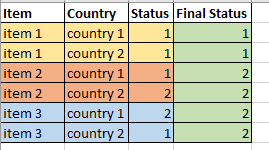
I need country 1 for an item to take priority unless country 1 is 1 and country 2 is not.


I have two rows for each item one for each of the two countries. I need it to say

If the items status in country 1 is 1 and country 2 is not 1 then take country 2's status for that item on both lines

else take the status on country 1 for both lines.

This happens on item 2 below as example.


lherbert501_1-1699107837765.png

Thanks


1 ACCEPTED SOLUTION
TomMartens
Super User
Super User

Hey @lherbert501 ,


I use DAX to create a calculated column, this is the DAX statement:

Column = 
var statusC1 = CALCULATE( MAX( 'Table'[Status] ) , ALLEXCEPT( 'Table' , 'Table'[item] ) , 'Table'[Country] = "Country 1" )
var statusC2 = CALCULATE( MAX( 'Table'[Status] ) , ALLEXCEPT( 'Table' , 'Table'[item] ) , 'Table'[Country] = "Country 2" )
return
IF( statusC1 = 1 && statusC2 <> 1 , statusC2 , statusC1 )

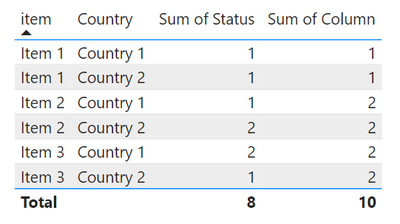
and this is how the table looks like:

image.png

Hopefully, this provides what you are looking for.


Regards,

Tom


Did I answer your question? Mark my post as a solution, this will help others!

Proud to be a Super User!
I accept Kudos 😉
Hamburg, Germany

View solution in original post

2 REPLIES 2
TomMartens
Super User
Super User

Hey @lherbert501 ,


I use DAX to create a calculated column, this is the DAX statement:

Column = 
var statusC1 = CALCULATE( MAX( 'Table'[Status] ) , ALLEXCEPT( 'Table' , 'Table'[item] ) , 'Table'[Country] = "Country 1" )
var statusC2 = CALCULATE( MAX( 'Table'[Status] ) , ALLEXCEPT( 'Table' , 'Table'[item] ) , 'Table'[Country] = "Country 2" )
return
IF( statusC1 = 1 && statusC2 <> 1 , statusC2 , statusC1 )

and this is how the table looks like:

image.png

Hopefully, this provides what you are looking for.


Regards,

Tom


Did I answer your question? Mark my post as a solution, this will help others!

Proud to be a Super User!
I accept Kudos 😉
Hamburg, Germany

Thankyou so much @TomMartens 

Helpful resources

Announcements
Join our Fabric User Panel

Join our Fabric User Panel

Share feedback directly with Fabric product managers, participate in targeted research studies and influence the Fabric roadmap.

March Power BI Update Carousel

Power BI Community Update - March 2026

Check out the March 2026 Power BI update to learn about new features.